
It starts with a tiny spiral: one Slack ping, one meeting change, one task that should have taken ten minutes.
By lunch, the day has scattered into half-finished tabs and a headache that feels way too familiar.
That is where time management remote work stops being a productivity trick and starts looking like stress reduction.
The World Health Organization links burnout to chronic workplace stress that has not been successfully managed, and remote work can make that stress feel invisible until it is already loud.
The fix is usually not more hustle. Time blocking, Pomodoro Technique sprints, and a short list of top priorities give the day some edges again, which matters when work can spill into every quiet moment at home.
Fewer decisions mean less friction, and fewer interruptions mean the brain gets a chance to settle.
Those same habits support real mental health strategies, not just better calendars.
When meetings are batched, notifications are checked on purpose, and recovery breaks are treated like part of the plan, remote work feels less like constant reaction and more like something you can actually steer.
Table of Contents
Why Remote Work Stress Happens When Time Is Poorly Managed
A remote day can go sideways before lunch. One unread message turns into three decisions, two meetings, and a work block that never really starts.
That pressure builds fast because the brain keeps switching gears. Unclear priorities, constant interruptions, and fuzzy boundaries create a steady drip of stress that feels small in the moment and exhausting by 4 p.m.
The World Health Organization treats burnout as an occupational phenomenon tied to chronic workplace stress that has not been successfully managed.
That matters here, because poor time management often turns a normal workload into a never-ending stream of pressure.
Time management remote work is not about squeezing more into the day.
It works better as a form of stress reduction, because it gives the day shape, reduces decision fatigue, and leaves room for recovery.
Tools such as Google Calendar can help make that structure visible, while focused methods like the Pomodoro Technique create small, manageable work windows.
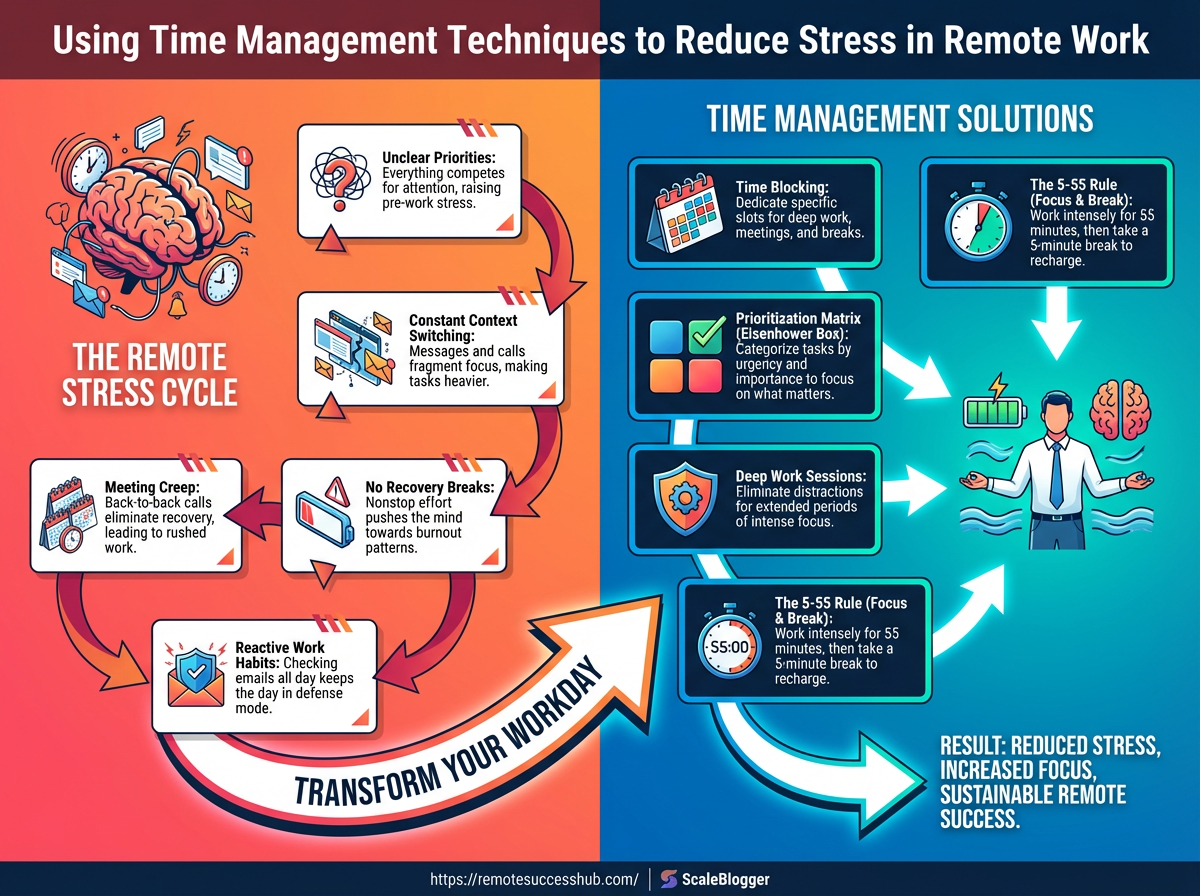
The diagram below shows how remote stress usually snowballs.
It starts with unclear priorities, moves into context switching, and ends with blurred boundaries that make work feel like it never fully stops.
The flow is simple, and a little brutal.
When the next task is unclear, people check messages more often.
When messages keep arriving, focus gets chopped into fragments.
Unclear priorities: Without a clear top three, every task feels urgent.
That makes even simple work feel heavier than it is.
Constant context switching: Jumping from email to chat to deep work burns mental energy.
Each switch adds friction, which is why progress feels slow.
Blurred boundaries: If work has no start or stop point, the day expands to fit everything. Remote workers often end up “almost working” all evening.
No recovery breaks: Back-to-back tasks sound efficient, but they wear people down.
Short breaks, like Pomodoro-style pauses, help reset attention before it frays.
Meeting overload: Too many calls break the day into tiny pieces.
Batching meetings into a few windows protects focus and lowers the stress of repeated transitions.
That is why structured planning works so well.
A clear schedule gives the brain fewer open loops to juggle, and that usually means calmer thinking, steadier output, and less end-of-day burnout.
Assess Your Current Time Use and Stress Patterns
A remote day can look busy and still leak hours.
A Slack ping, a rushed meeting, and a half-finished task often hide the real problem: the workday is getting chopped into pieces.
The best audit is simple.
Track where time disappears, and also notice where your body tenses up even when the task gets done.
That distinction matters.
A messy calendar is a productivity problem.
A day that leaves you wired, flat, or irritated is a stress problem, and burnout risk rises when that pattern keeps repeating, which matches the World Health Organization’s view of burnout as an occupational phenomenon tied to chronic workplace stress that has not been managed well.
Quick audit of the biggest leaks
A one-day review is enough to spot the usual troublemakers.
Google Calendar works fine for this, as does a plain notes app with timestamps.
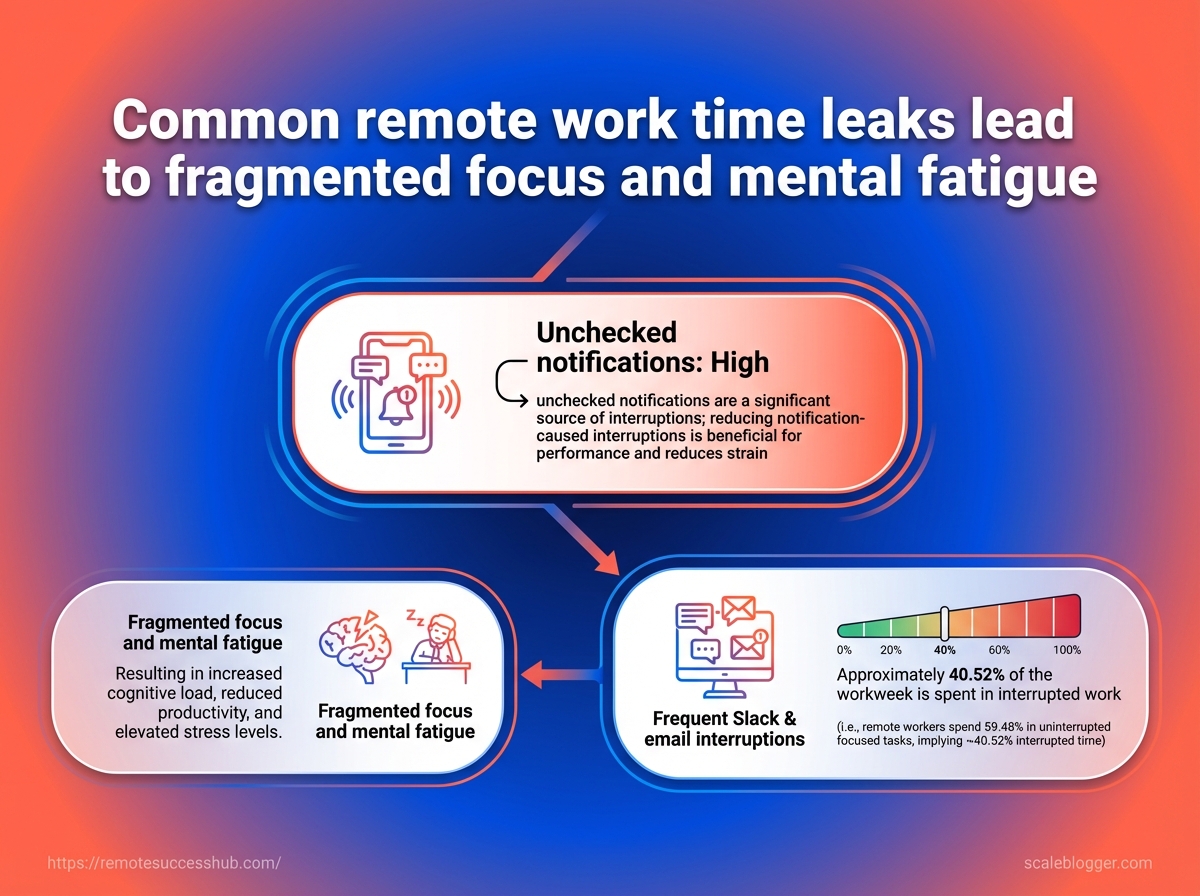
Time leak | How it shows up in remote work | Stress impact | Quick fix |
|---|---|---|---|
Unchecked notifications | You keep stopping to glance at pings | Fragmented focus and mental fatigue | Set message-check windows |
Frequent Slack and email interruptions | Work gets split into tiny bursts | More re-entry effort and irritability | Batch replies at set times |
Fragmented focus | Tasks take longer than expected | Mental fatigue builds fast | Protect one uninterrupted focus block |
Unclear task priorities | You start three things and finish none | Decision fatigue and anxiety | Use a daily top-3 priority list |
Starting without a ranked list | The day begins with whatever feels urgent | Slow ramp-up and second-guessing | Pick must-do items before opening chat |
Overextended meetings | Calls pile up with no breathing room | Low energy and reduced deep work | Block meeting-free focus periods |
Back-to-back calls | No time to reset between conversations | Your attention feels “stuck on” | Add 10-minute buffers before and after |
Poor boundary setting | Work spills past the intended stop time | Chronic stress and burnout risk | Create a hard stop time |
The pattern is easy to miss because not every leak feels dramatic.
Some are just tiny choices repeated all day.
The cleanest way to separate productivity problems from stress problems is to ask two questions.
First, did the task take too long because the day was disorganized? Second, did it leave you tense because the workload, pace, or boundaries were off?
A useful test is this: if the same task would feel fine in a calmer, better-structured day, it is probably a time-management issue.
If it still drains you after the task is done, treat it as a stress signal and adjust recovery, not just scheduling.
That split keeps the fix honest.
Time blocking, priority lists, and meeting hygiene help the calendar, while mental health strategies like recovery breaks and firmer stop times help the person doing the work.
Build a Stress-Reducing Daily Time Management System
A remote workday gets easier when it follows your energy, not just the clock.
A sharp morning brain can carry deep work, while your slower hours are better for email, admin, and small fixes.
That matters more than it sounds.
The World Health Organization treats burnout as an occupational phenomenon tied to chronic workplace stress that has not been successfully managed, and a messy schedule makes that harder.
Start with a top-3 priority list before you open chat or email.
That cuts decision fatigue fast, because the day already has a shape before other people start adding to it.
Then build your calendar around those priorities.
Tools like Google Calendar work well for time blocking because they turn intention into visible space, which makes it harder for low-value work to quietly eat the whole day.
Pick your energy-heavy work first. Put the hardest task in your best mental window, usually the part of the day when you think most clearly.
Use a simple priority filter. Choose one must-do, one should-do, and one could-do task.
If everything feels urgent, nothing is.
Block similar work together. Group calls, message replies, and admin into the same window.
That reduces context switching, which is one of the biggest stress leaks in time management remote work.
Work in short sprints. The Pomodoro Technique, credited to Francesco Cirillo, uses focused intervals and breaks.
A common version is 25 minutes on and 5 minutes off, which helps large tasks feel less heavy.
Protect a recovery window. Step away for lunch, stretch, or take a short walk without the screen.
APA guidance on stress and coping points in the same direction: recovery is part of managing stressors, not a reward after everything is done.
Close the day with a reset. Spend five minutes naming tomorrow’s top tasks and shifting unfinished work into a clear slot.
That keeps tomorrow from starting as a rescue mission.
A system like this does not make remote work magical.
It just makes the day feel less slippery, which is a very good trade.
Remote Work Techniques That Save Time and Lower Anxiety
A remote day gets calmer when every task stops competing for your attention.
The trick is not working harder; it is reducing the number of tiny decisions that pile up before noon.
That matters because burnout is not just about long hours.
The World Health Organization treats burnout as an occupational phenomenon tied to chronic workplace stress that has not been managed well, and remote work can make that stress feel endless when the day has no edges.
The fastest relief usually comes from three habits: controlled communication windows, protected focus blocks, and a fast rule for tiny tasks.
Together, they make time management remote work feel less like a scramble and more like a plan.
A calendar-based setup makes this easier to see.
Use the video as a visual guide for building focus blocks and recovery time inside a tool like Google Calendar, so the schedule is doing real work instead of just collecting meetings.
Set communication windows.
Check email and chat at fixed times, such as late morning and mid-afternoon.
That keeps you from living in reactive mode, and it also gives follow-ups a clear home instead of scattering them across the day.
Block deep work and recovery together.
Put focused work sessions on the calendar, then add short recovery breaks right after them.
Francesco Cirillo’s Pomodoro Technique uses timed work intervals with breaks, and that same idea helps remote workers stay sharp without turning the day into one long mental marathon.
Use the two-minute rule for tiny actions.
If something takes less than two minutes, handle it during a communication window instead of letting it linger.
A quick reply, a file rename, or a short confirmation can disappear from your mental stack before it grows teeth.
Batch the rest by type.
Handle admin, messaging, and planning in clusters.
That cuts down on context switching, which is one of the sneakiest stress drivers in remote work.
Leave a small recovery block at day’s end.
Close with an unscheduled buffer for review, cleanup, or a walk away from the screen.
A short reset makes tomorrow easier to start, especially when the day has run hot.
Used together, these techniques create more than efficiency.
They give your brain fewer surprises, which is often the real win in remote work.
Create Boundaries That Protect Mental Health
A remote day without edges can quietly eat the whole week.
When messages start before breakfast and keep coming after dinner, work stops feeling manageable and starts feeling endless.
That is exactly where time management remote work becomes stress reduction, not just scheduling.
The World Health Organization treats burnout as an occupational phenomenon tied to chronic workplace stress that has not been successfully managed, and that makes boundaries a mental health strategy, not a luxury.
Start by making the workday visible.
Put a real start time, a real stop time, and one first work action on the calendar, then use a shared calendar block in Google Calendar or a similar tool so the team sees the boundary instead of guessing.
Build a shutdown routine that closes the loop
A good shutdown routine gives your brain a clean exit.
It says, “Nothing is being forgotten,” which matters more than people think at the end of a long remote day.
Capture open loops: Write down unfinished tasks, stray ideas, and follow-ups in one place.
Set tomorrow’s first three priorities: Pick the next day’s top tasks before you log off.
Clear the workspace: Close tabs, silence notifications, and put work tools out of sight.
Leave one handoff note: Send a quick update if someone needs context before your next working window.
That routine takes less than ten minutes, but it changes the feel of the evening.
It also helps prevent the mental drag that comes from carrying half-finished work into personal time.
Say your availability out loud
Remote teams often struggle because silence gets interpreted as availability.
Clear language fixes that fast.
Messages that protect your time
Scenario | Recommended message | Purpose | Best time to use |
|---|---|---|---|
Need uninterrupted focus time | I’m offline for deep work until 2 PM and will respond afterward. | Sets expectations and reduces interruptions | Before focus blocks |
After-hours request | I can review this during my next working window tomorrow morning. | Protects personal time without sounding dismissive | When work arrives late |
Meeting overload | I need a lighter meeting load this week to complete priority work. | Preserves capacity for core tasks | During planning discussions |
These phrases work because they are specific.
They name the boundary, give a clear next step, and keep the tone calm.
APA guidance on stress and mental health also points toward practical coping skills, and this is one of the simplest ones.
When your start, stop, and response times stay consistent, the day feels smaller and more controllable.
Use Tools and Routines That Support Consistency
A cluttered stack of apps can make remote work harder, not easier.
For most people, time management remote work gets better when the setup is boring on purpose: one calendar, one timer, one place to write priorities.
That kind of simplicity cuts decision fatigue.
It also supports stress reduction because the day stops feeling like a puzzle you have to solve every hour.
A steady routine matters just as much. Francesco Cirillo’s Pomodoro Technique works because it turns huge tasks into short, finishable sprints, while Google Calendar helps turn good intentions into actual time on the page.
Keep the tool stack small
A clean setup usually beats a fancy one.
If a tool does not help you plan, focus, or review your day, it is probably just adding noise.
Use one calendar as the source of truth: Put focus blocks, meetings, and buffers in the same place.
Use one timer for focus sprints: A Pomodoro-style timer keeps work from drifting.
Use one note for priorities: A short top-3 list is enough for most days.
Use one check-in tool if your team needs it: Microsoft Viva Insights can help surface work patterns, but only if your team actually uses it.
Build a routine you can repeat
A useful remote routine should feel almost automatic.
Morning planning, focused work, batch communication, and a shutdown ritual create fewer open loops in your head.
This timeline shows a simple day from first login to final sign-off.
The point is not perfection; it is giving your brain the same rhythm often enough that it stops negotiating with you.
Track habits that actually matter
Tracking should support mental health strategies, not turn into another chore.
The best signals are simple and honest.
Focus blocks completed: Count how many timed work sessions you finished.
Meeting-free windows protected: Notice whether you kept deep-work time intact.
Recovery breaks taken: Track whether you stepped away from the screen on purpose.
Shutdown success: Check whether work ended when you said it would.
A weekly review helps here.
If your calendar is packed but your energy keeps collapsing, the problem is often too many context switches, not too little effort.
That is where a reset loop helps.
Tools like Google Calendar, paired with a short review habit, make consistency feel less fragile and more normal.
📥 Download: Download Template (PDF)
Troubleshoot Common Remote Work Challenges
A meeting at 10:30 can wreck the rest of the day fast.
One call runs long, another starts late, and suddenly the plan for focused work is gone.
The fix is rarely more effort.
It is usually a tighter reset after the disruption.
For time management in remote work, the goal is to stop treating every problem like the same problem.
Meetings need buffers.
Midweek slumps need smaller wins.
Long, stressful days need a hard stop and a recovery habit.
When meetings disrupt your schedule
A packed calendar is usually the main culprit.
If calls keep slicing the day into fragments, move from open-ended scheduling to protected blocks in Google Calendar.
Put focus time on the calendar first, then stack meetings into fewer windows.
Add buffers before and after calls. Five to ten minutes cuts the whiplash from context switching.
Group similar meetings together. Back-to-back calls are less draining than random interruptions all day.
Protect one no-meeting block. Even a 90-minute window can save a deep task from dying in inbox limbo.
When motivation drops midweek
Wednesday drag is real.
By then, the week’s novelty is gone, but the finish line still feels far away.
Shrink the target instead of waiting for inspiration.
A Pomodoro-style sprint, such as 25 minutes on, 5 minutes off, lowers the mental weight of a large task and makes it easier to start.
If the whole task feels heavy, pick one visible next step and finish that first.
Reset to a top three list. A small priority list reduces the noise of competing tasks.
Use a fresh environment. A different room, desk, or even a short walk can restart attention.
Batch the dull work. Admin tasks feel easier when they stop ambushing the day.
When stress keeps you working longer
Burnout is not just feeling tired.
The World Health Organization treats burnout as an occupational phenomenon linked to chronic workplace stress that has not been successfully managed.
That is why mental health strategies matter inside the workday, not only after it.
Set a stop time, then plan a real recovery window away from the screen.
Microsoft Viva Insights can also help spot work patterns that quietly stretch the day, which is useful when the problem is hidden in habits, not obvious deadlines.
Close the day with a shutdown ritual. Write tomorrow’s first task before logging off.
Take one longer break daily. A meal, walk, or stretch break beats endless low-grade strain.
Check whether the stress is task-based. If it is, renegotiate scope instead of just pushing harder.
These fixes are simple, but they work because they cut friction.
Once meetings, motivation dips, and overtime each get their own response, remote work feels a lot less chaotic.
Make Time Management a Career Advantage in Remote Work
Managers notice patterns long before they notice heroics.
In remote work, time management becomes part of your reputation when your work shows up on time, with fewer surprises, and without a lot of hand-holding.
That matters because reliability is visible.
A clean calendar, a steady rhythm of completed work, and realistic updates make progress easy to trust.
It also lowers stress, since burnout is linked by the World Health Organization to chronic workplace stress that has not been successfully managed.
Visibility comes from predictable work
A packed day does not look impressive for long.
What usually earns confidence is a repeatable pattern: focused blocks for real work, clear windows for communication, and small check-ins that show movement before deadlines get shaky.
This is where time blocking earns its keep. A calendar filled with actual work blocks tells a better story than one filled with vague intentions.
Tools like Google Calendar make that easy, and patterns from Microsoft Viva Insights can help spot whether your day is turning into nonstop collaboration.
Progress looks better when it is smaller and clearer
Big projects get easier to discuss when they are broken into visible chunks.
A finished outline, a reviewed draft, or a closed support task gives people something concrete to react to, instead of waiting for a giant final reveal.
That also helps with mental health strategies.
Progress feels less slippery when you can see it, and that reduces the urge to overwork just to prove you are doing enough.
Pick one visible outcome each morning.
Choose the one result that would make the day feel successful.
Block time for it on the calendar.
Treat the block like a meeting with your future self.
Use short work sprints.
A Pomodoro-style cycle keeps the task moving without turning the day into a marathon.
Send progress before people ask.
A brief update beats a late apology every time.
Close the day with a reset.
Write tomorrow’s first move while the work is still fresh.
A simple system like this makes you easier to trust and easier to work with.
If you want a practical remote-work framework to build from, resources like Remote Success Hub fit neatly into that kind of routine.
The real advantage is quiet but powerful: people see steady progress, and you stop having to prove it the hard way.
📥 Download: Download Template (PDF)
Conclusion
Build a Workday That Protects Your Energy
The biggest shift is simple: time management remote work is not about squeezing more into the day.
It is about stopping the small leaks that turn into stress, then shaping the day around focus, recovery, and clear boundaries.
When the calendar controls you, anxiety usually follows; when you control the calendar, mental health strategies start to work in real life instead of sitting in a note app.
That example about batching Slack checks and protecting a real focus block matters because it shows how calm is built, not found.
One well-placed boundary can do more for stress reduction than a dozen productivity hacks that never survive a busy Tuesday.
The people who seem effortlessly steady are usually the ones who have made a few boring decisions in advance.
Start today with one move you can actually keep: choose your most draining distraction, block one protected work window, and set one hard stop for the day.
If you want extra structure, tools and community through Remote Success Hub can support that shift, but the first win comes from a cleaner schedule and a clearer line between work and everything else.