
What if the hardest part of remote work is not the workload, but the silence around it? When people are scattered across time zones and chat windows, small signs of strain disappear fast.
That matters because mental health in remote work often changes quietly.
There are fewer casual check-ins, fewer chances to notice a colleague pulling back, and more room for stress to build before anyone says a word.
The work-from-home setup also blurs the line between work and personal time.
A laptop on the kitchen table can make every hour feel available, and that is a fast track to exhaustion when expectations stay fuzzy.
Good support for remote employees is not just about crisis response.
It also depends on everyday habits that make it safe to ask for help, clear norms that protect downtime, and managers who notice when someone’s energy, tone, or output starts to shift.
That is where wellness in a remote workforce gets real.
It is not about yoga links or cheerful messages that vanish after one week.
It is about creating conditions where people can stay well enough to do their best work without burning out quietly.
Table of Contents
What if remote work flexibility is hiding a mental health problem?
What effective support for remote employees actually looks like
How to turn support into a competitive advantage for remote careers
What if remote work flexibility is hiding a mental health problem?
What if the flexibility that makes remote work feel so healthy is also hiding the first signs of strain? That happens more often than people admit.
When there are no hallway chats, no shared lunch tables, and no quick visual check-ins, it gets easier for stress to stay invisible.
That is why mental health and remote work are now tied together in every serious conversation about performance.
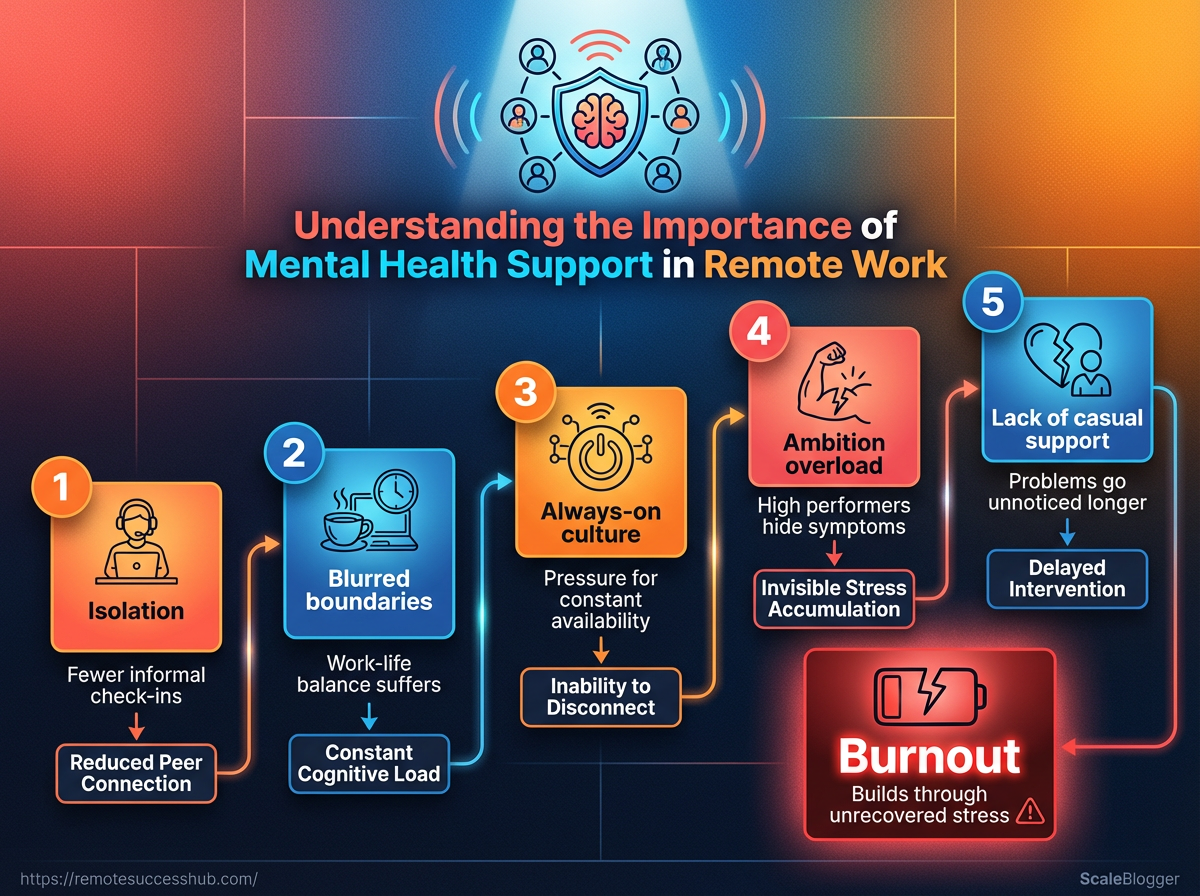
Isolation removes the casual support that usually catches problems early.
At the same time, blurred boundaries make the workday leak into dinner, weekends, and sleep. Ambitious remote professionals are especially exposed.
They often keep delivering, keep smiling on calls, and keep saying yes long after their energy has dropped.
By the time a manager notices slower replies or missed details, the pattern has usually been building for weeks.
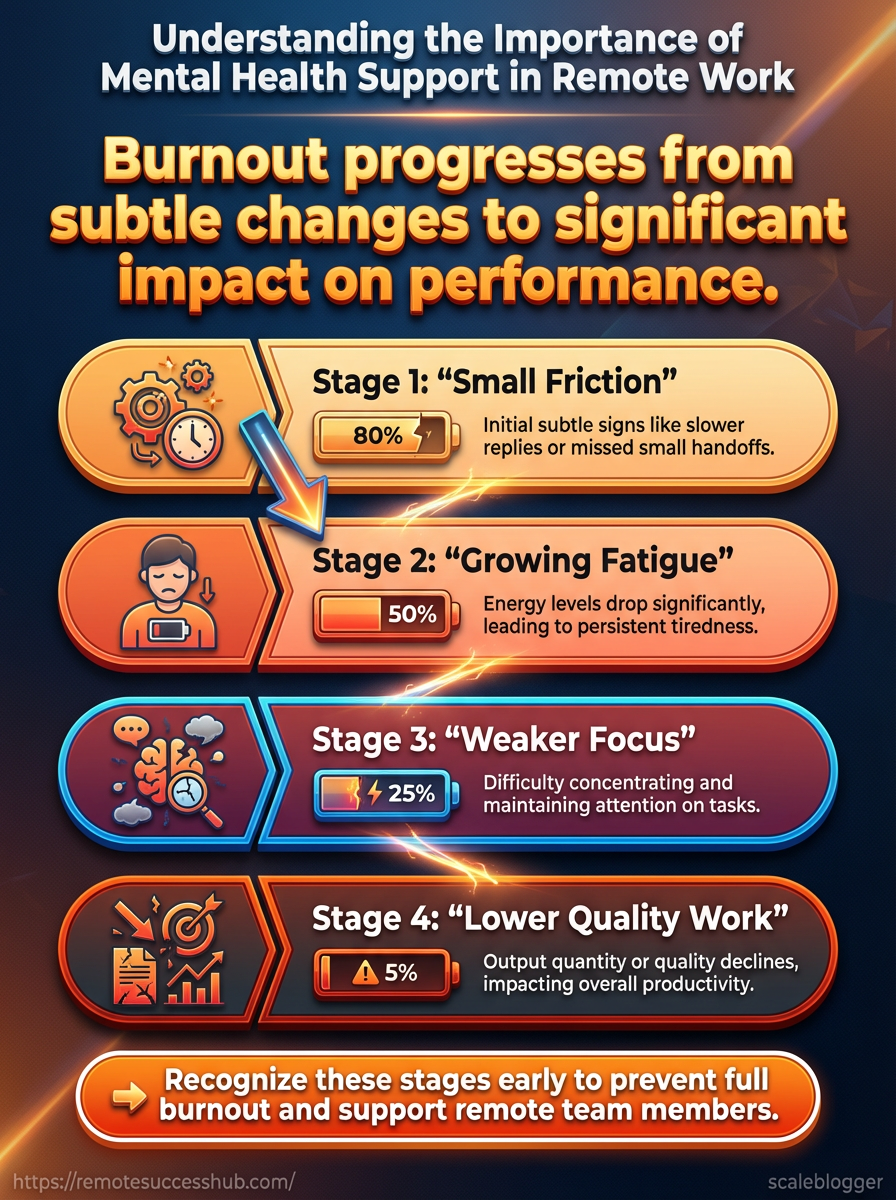
The diagram makes one thing obvious: remote stress rarely turns into a crisis all at once.
It usually starts with small friction, then grows into fatigue, then shows up as weaker focus and lower-quality work.
That is the part teams miss when they try to solve everything with productivity hacks.
A better response is to support remote employees with clear norms, confidential care paths, and manager training that spots changes in behavior early.
Isolation: fewer informal check-ins mean fewer chances to notice someone pulling back.
Blurred boundaries: without clear stop times, recovery shrinks and burnout risk climbs.
Always-on culture: fast replies become the default, even when deep work or rest is needed.
Ambition overload: high performers often hide symptoms because they do not want to look behind.
This is where employer benefits matter.
An Employee Assistance Program (EAP) can give remote workers confidential short-term counseling and referrals, while platforms such as Lyra Health or Spring Health connect people to therapy and care navigation.
Tools like Headspace for Work and Calm for Business can help with stress management, but they do not replace clinical care when symptoms are serious.
The healthiest remote teams treat wellbeing as part of the operating system, not a perk.
That mindset protects people and keeps the work itself from quietly falling apart.
Recognizing the warning signs before productivity drops
What if the first warning sign is not a dramatic breakdown, but a tiny shift in rhythm? In remote work, that is usually how trouble starts.
A person who once replied quickly goes quiet.
A reliable teammate starts missing small handoffs.
The pattern looks harmless right up until it is not.
Burnout rarely shows up as one giant event.
It usually builds through temporary stress that never gets a real recovery window, then starts changing behavior, focus, and follow-through.
A tight deadline can cause a rough week.
Emerging burnout keeps showing up after the deadline is gone.
Managers miss these signals for a simple reason: distributed teams remove the little moments where people usually notice each other.
No hallway chat.
No lunch table updates.
That makes mental health remote work conversations harder to spot, and it puts more pressure on deliberate check-ins, clear norms, and the right support channels for remote employees.
Common mental health signals in remote employees
Warning sign | What it may look like remotely | Possible support response |
|---|---|---|
Withdrawal from team communication | Slower replies, fewer messages in shared channels, camera-off avoidance, or disappearing from informal chats | Check in privately, ask about workload, and make space for a short conversation instead of a status update |
Missed deadlines or inconsistent output | Work arrives late, quality swings from one task to the next, or simple follow-through becomes unreliable | Reconfirm priorities, reduce ambiguity, and look for overload before assuming motivation is the issue |
Increased anxiety, fatigue, or irritability | Short temper in messages, visible exhaustion on calls, or frequent signs of being overwhelmed | Encourage a break, review workload and hours, and point to confidential support such as an EAP or employer mental health platform |
Reduced participation in meetings | Silence where there used to be ideas, minimal eye contact, or waiting for others to lead every discussion | Invite input in smaller settings, use written follow-ups, and avoid putting the person on the spot |
Long hours without visible progress | Constant online presence, late-night activity, and a feeling that nothing is getting finished | Check whether they are stuck, clarify scope, and look for perfectionism, distraction, or too many open tasks |
Remote burnout and ordinary stress can look similar at first, but the pace tells a different story.
Stress usually eases when the pressure eases.
Burnout keeps leaking into sleep, mood, and basic decision-making, even on quieter days.
That is why support has to be practical, not vague.
Teams that want to support remote employees well often combine manager training, clear workload norms, and access to confidential care through programs like Employee Assistance Programs, Lyra Health, or Spring Health, with lighter-touch wellness tools such as Headspace for Work or Calm for Business.
The best signal to watch is not one bad day.
It is a pattern that keeps repeating.
Catch that early, and the wellness of the remote workforce has a much better chance of staying intact.
What effective support for remote employees actually looks like
Real support for remote teams is less about grand gestures and more about making help easy to find, easy to use, and hard to miss.
The strongest setups combine manager habits, clear routines, and benefits that do not require an employee to “prove” they are struggling before getting support.
That matters because mental health remote work issues often stay hidden until they hit performance.
Remote employees can lose the casual check-ins that normally reveal stress early, so support remote employees means building safety into the way work actually runs.
A good setup usually starts with accessible care pathways like an Employee Assistance Program, along with employer mental health platforms such as Lyra Health, Spring Health, or lighter wellness tools like Headspace for Work and Calm for Business.
Those tools help, but they work best when managers reinforce them with calm, predictable behavior.
Policies and routines that reduce hidden stress
Support practice | How it helps | Ease of implementation | Best fit for |
|---|---|---|---|
Flexible work hours | Gives people room for appointments, caregiving, and energy management. | Medium | Teams across time zones |
Shared availability windows | Makes collaboration predictable without forcing constant overlap. | Easy | Distributed teams |
Meeting-light days | Protects focus time and lowers video fatigue. | Medium | Knowledge workers |
Regular one-on-ones | Creates a private place to notice stress early. | Easy | Any remote team |
Clear response-time expectations | Reduces the pressure to stay “always on.” | Easy | Fast-moving teams |
These practices work because they remove guesswork.
When people know when to respond, when to disconnect, and when focus time is protected, stress drops fast.
They also make accountability cleaner, not weaker.
Deadlines still matter, but the team stops confusing urgency with constant interruption.
Manager behavior matters just as much as policy.
The best remote managers notice small changes, ask direct but respectful questions, and route people toward help instead of trying to become therapists.
Name the pattern early. A change in tone, speed, or participation is worth a private check-in.
Ask about workload, not just mood. Sometimes the real problem is overload, not motivation.
Use normal language. Calm, specific questions reduce stigma faster than polished HR scripts.
Follow up once. A single warm check-in beats a dramatic “door is always open” speech.
Support for remote employees works when it feels normal, repeatable, and fair.
The team gets steadier, the workload gets clearer, and people do not have to choose between honesty and appearing reliable.
Tools and systems that make wellness support scalable
A polished wellness program falls apart fast when every check-in depends on memory.
Remote teams need systems that work even when managers are busy, distracted, or in another time zone.
For mental health remote work, the best tools make contact routine, discreet, and easy to use.
Digital check-ins work best when they live where work already happens.
That might mean Slack, Teams, an HR portal, or a very short pulse survey that takes less than a minute.
A simple prompt like “What feels heavy this week?” can surface strain without turning the workplace into a therapy session.
The strongest setups keep the signal light and the response human.
A form can flag a pattern, but a real person still has to notice, follow up, and route support well.
This clip fits here because it shows how a remote employee wellness check-in can stay simple without feeling invasive.
It is a useful model for teams trying to support remote employees without adding one more exhausting system.
Tools that help without crowding people
EAP links in plain sight: Put confidential counseling and crisis guidance in onboarding, benefits pages, and a pinned team channel.
Care navigation platforms: Services like Lyra Health and Spring Health can route employees toward therapy and mental health support through employer benefits.
Low-pressure wellbeing content: Headspace for Work and Calm for Business are useful for stress management, especially when paired with clear guidance on when to seek clinical care.
Manager check-in templates: Keep them short.
One question on workload, one on energy, one on blockers is usually enough.
Choosing tools that build trust
A tool can either make people feel seen or make them feel watched.
The difference usually comes down to what you collect, who sees it, and how often it shows up.
Collect the minimum: Ask only for what helps someone get support.
Separate support from evaluation: Wellness notes should never blend into performance reviews.
Explain confidentiality early: People relax when they know what stays private and what triggers escalation.
Offer choice in format: Some employees answer a form.
Others prefer a chat, a call, or nothing until they are ready.
Keep the cadence predictable: Weekly or biweekly check-ins feel normal.
Random pings feel like surveillance.
A good wellness system for the remote workforce is quiet, consistent, and easy to trust.
When the tools reduce friction instead of adding noise, support feels like part of the culture rather than a special event.
How to turn support into a competitive advantage for remote careers
What if the strongest remote professionals are not the ones who “push through” everything, but the ones who work where support is normal? In remote work, that changes the game fast. When mental health support is easy to access, people stay longer, show up more consistently, and make fewer costly mistakes that come from burnout or isolation.
That matters because remote work can quietly strip away the little signals that usually help people recover early.
No hallway chat.
No casual “you seem off today.” A healthy setup replaces that missing layer with clear care paths, manager training, and benefits people can actually use, like an Employee Assistance Program, Lyra Health, Spring Health, Headspace for Work, or Calm for Business.
For ambitious professionals, that is not fluff.
It is a sign the workplace understands how to support remote employees without making them jump through hoops.
The best workplaces also make support visible without making it awkward.
A good test is simple: can you find the help in minutes, understand what is confidential, and get care remotely? If the answer is no, the company is probably asking people to absorb stress privately and hope for the best.
That usually shows up later as missed deadlines, disengagement, and turnover.
When resources are limited, the smartest move is to ask for practical changes that fit the team’s size.
Start with access: Ask for one clear page that explains EAP or mental health benefits, how to use them, and what stays private.
Push for manager basics: Request simple training on noticing burnout signals and routing people to the right help.
Protect the workday: Suggest focus-time blocks, realistic response-time norms, and fewer “always on” expectations.
Use one small pilot: Try a monthly wellbeing check-in or a short resource reminder before asking for a bigger program.
A lot of support for the wellness remote workforce is less about grand budgets and more about removing friction.
If a company cannot fund everything, it can still reduce confusion, normalize help-seeking, and make the next right step obvious.
That is where support becomes an advantage.
It keeps good people around, helps them do better work, and makes remote careers feel sustainable instead of fragile.
Mental Health Support Checklist for Remote Work
Conclusion
Making Space Before Strain Turns Silent
What if the real risk in remote work is not overwork, but unnoticed drift? Mental health remote work problems usually start in small ways: a camera stays off, replies slow down, and a once-chatty teammate goes quiet.
Those signals matter because they show strain before output falls off a cliff.
The best way to support remote employees is to build habits that make stress visible early.
That might look like shorter check-ins, realistic deadlines, and managers who ask better questions than “How’s it going?” when the answer is clearly not much.
A healthy wellness remote workforce does not happen by accident; it comes from systems that make care part of the workday, not a bonus after burnout.
So the real move today is simple: pick one person, one team ritual, and one workload habit to improve this week.
If you want practical ideas and tools to build that kind of remote support, resources like Remote Success Hub are a useful place to start.
The goal is not to make remote work feel perfect.
It is to make sure silence never gets mistaken for stability.