A remote team can lose half a day to one messy calendar thread.
Someone is in London, someone else is in Austin, and the only thing moving fast is the group chat.
That is why remote work scheduling has become a real skill, not just an admin task.
The best scheduling tools do more than book a meeting.
They cut down on time-zone mistakes, double bookings, and those awkward back-and-forth messages that drain everyone before the call even starts.
For freelancers, the pain looks a little different.
One client wants a quick sync, another sends a “free anytime” note, and your own focus blocks disappear before lunch.
Strong time management for remote teams depends on tools that respect deep work, clear availability, and sane boundaries.The tricky part is that not every calendar app solves the same problem.
Some are built for team coordination, while others are better for booking calls, shifting work hours, or protecting focus time.
Choosing well saves energy every single week.
Why Remote Work Scheduling Becomes Harder Without the Right Tool
Remote work makes scheduling look simple right up until three time zones, two calendars, and one missed handoff collide before lunch.
Without the right scheduling tools, even small teams start paying a tax in context switching, double-booked meetings, and delayed decisions.That hurts time management for remote teams fast, because the problem is rarely just one bad meeting; it is the chain reaction after it.
The hardest part is that remote scheduling is not only about finding an open slot.
It has to handle availability, focus time, async work, and different working hours without turning everyone’s day into calendar Tetris.
Some teams need a booking flow.
Others need team planning.
A few need both, plus a way to protect deep work.
Calendar clashes: People forget to account for overlap, so meetings land on top of focus blocks or personal commitments.
Time zone drift: A “quick call” can mean very different things in Manila, Berlin, and Chicago.
Too many tools: One calendar for meetings, one app for tasks, and one chat thread for changes create messy handoffs.
No shared priorities: If everyone schedules in isolation, the team loses sight of deadlines and dependency timing.
Weak visibility: Remote teams need to see who is available, busy, or offline without asking in chat every time.
A strong remote work scheduling setup should solve those problems in one place.
It should support booking rules, shared calendars, recurring meetings, buffer time, and simple ways to block focus hours.
It should also make changes obvious.
When a meeting moves, the right people should know immediately, not after they’ve already started the wrong task.
That is where good remote work scheduling software earns its keep.
It reduces back-and-forth, keeps plans visible, and gives remote teams a calmer rhythm to work in.
Quick Comparison of the Top 7 Remote Work Scheduling Tools
Not every scheduling tool solves the same headache.
Some are built for booking links, some for group coordination, and some for protecting focus time when the calendar gets messy.
For remote work scheduling, that difference matters fast.
A solo freelancer needs something very different from a 40-person team spread across time zones, and a manager running recurring handoffs needs different controls again.
The cleanest way to compare scheduling tools is to look at three things at once: what they do best, how they fit remote work, and how large a team they handle comfortably.
At-a-glance comparison of features, best use cases, and ideal team sizes
| Tool | Best For | Key Scheduling Features | Remote Team Fit | Pricing Model |
|---|---|---|---|---|
| Calendly | Solo professionals, recruiters, and small to mid-size teams | Booking links, round-robin routing, group meetings, calendar sync, reminders | Strong for client-facing scheduling and internal coordination across time zones | Free plan plus paid individual, team, and enterprise tiers |
| Clockwise | Teams that want more focus time | Smart calendar optimization, focus blocks, flexible holds, meeting reshuffling | Very strong for distributed teams using shared calendars | Free plan plus paid team plans |
| Motion | Busy individuals and small teams that want one calendar for tasks and meetings | AI scheduling, task auto-planning, calendar management, project visibility | Strong for people juggling deep work and meetings in remote setups | Paid subscription model, often with trial access |
| Google Calendar | Teams already living in Google Workspace | Shared calendars, appointment schedules, time zone support, booking pages | Excellent for Google-first teams of almost any size | Included with Google accounts, with more scheduling features in Workspace plans |
| Microsoft Outlook Calendar | Organizations built around Microsoft 365 | Scheduling Assistant, shared calendars, meeting coordination, Teams integration | Excellent for Microsoft-first remote teams and larger organizations | Included with Microsoft 365 and Outlook accounts |
| Reclaim.ai | Remote teams that need automatic time blocking | Smart scheduling, habits, focus time, buffers, task management | Strong for async teams that want better time management for remote teams | Free plan plus paid individual and team plans |
| Doodle | Group meetings and external scheduling | Meeting polls, booking pages, reminders, one-on-one booking | Good for cross-company scheduling and meetings with outside partners | Free plan plus paid personal and business plans |
Clockwise and Reclaim.ai are stronger when the real goal is better calendar shape, not just faster booking.
Motion stands apart because it mixes tasks and meetings in one place, which can help remote workers who live inside their calendars.
Google Calendar and Outlook Calendar stay relevant because they are already the default for many teams, so adoption is easy and the friction stays low.
The practical split is simple: choose booking tools for coordination, optimization tools for focus, and native calendar platforms when your team already works inside that ecosystem.
That keeps remote work scheduling from turning into another tool everyone tolerates but nobody actually uses.
The Top 7 Remote Work Scheduling Tools
A calendar that only books meetings is not enough once a team spreads across cities, countries, and working styles.
The best scheduling tools do something more useful than shuffle appointments around.
They help with remote work scheduling, protect deep work, and keep time management for remote teams from turning into guesswork.
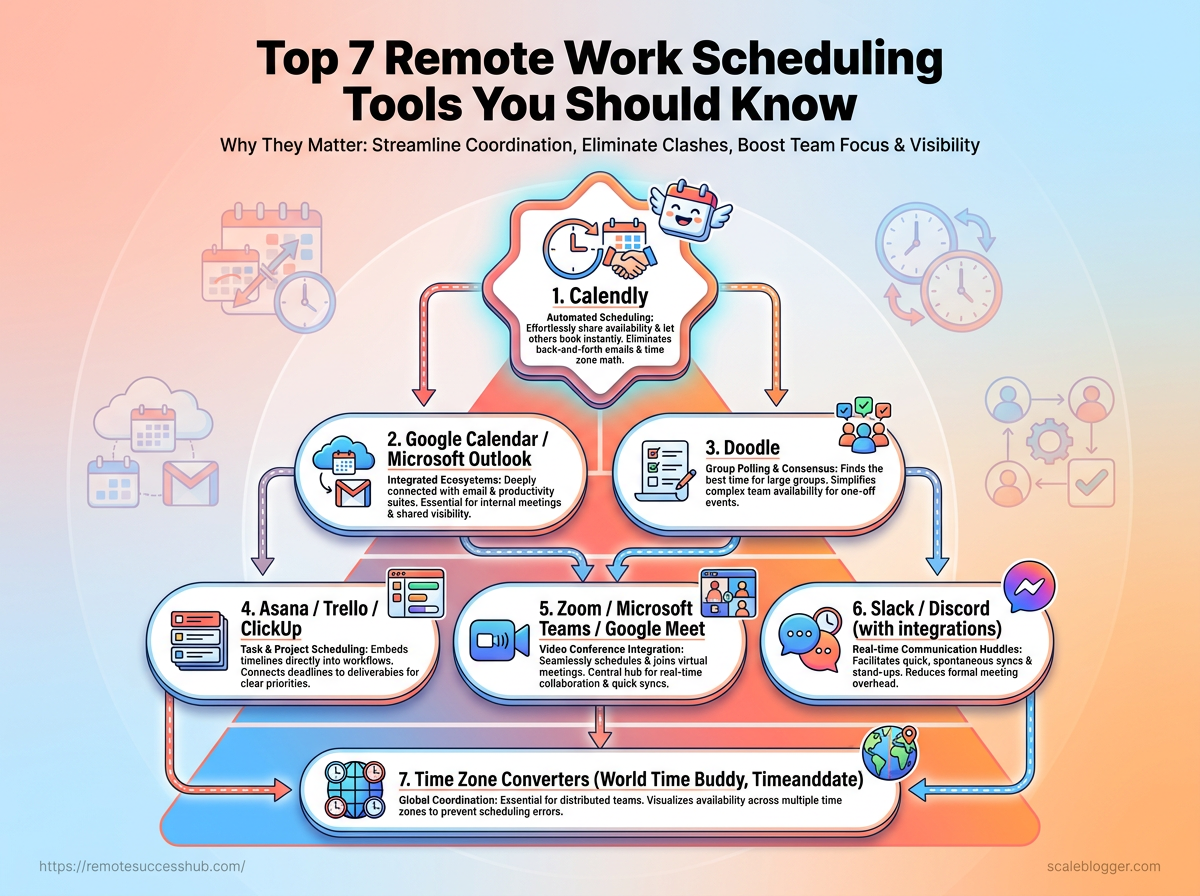
1. Calendly
Best when booking needs to stay frictionless: Calendly is the cleanest choice for simple meeting links, especially for client calls, interviews, and one-on-one check-ins.
It removes the back-and-forth that usually clogs remote inboxes.
2. Clockwise
Best when focus time keeps getting eaten alive: Clockwise is built for teams that need meeting space without losing whole afternoons to fragmentation.
It reshuffles calendars so concentrated work gets a real chance to happen.
3. Motion
Best when scheduling and task lists keep colliding: Motion combines calendar planning with task prioritization, which makes it useful for people juggling deadlines and meetings at the same time.
It works well when your day changes fast and your to-do list refuses to behave.
4. Google Calendar
Best when everyone already lives in the same ecosystem: Google Calendar stays popular because it is easy, familiar, and good enough for a lot of remote teams.
Shared calendars, event links, and color coding make it a reliable default.
5. Microsoft Outlook Calendar
Best when enterprise habits run the show: Outlook Calendar fits remote teams that already depend on Microsoft 365, Teams, and corporate account controls.
It is especially handy when compliance, permissions, and admin oversight matter as much as convenience.
6. Reclaim.ai
Best when routines need defending: Reclaim.ai automates time blocking for habits, recurring work, and personal routines, which helps remote workers stop treating their own priorities like optional extras.
It is useful for anyone who keeps promising to “fit it in later.”
7. Doodle
Best when a group just needs to agree on a time: Doodle makes availability polling fast, which is perfect for panels, team sessions, and cross-functional meetings with too many people involved.
It cuts through messy calendars and gets everyone to one slot faster.
A smart remote team often uses more than one of these tools.
One tool handles booking, another protects focus, and a third keeps group scheduling from dragging on for days.
How to Choose the Right Tool for Your Remote Workflow
A team can have the fanciest scheduling app on earth and still waste half a day on avoidable back-and-forth.
The problem is usually not the tool itself.
It is the mismatch between the tool and the actual remote work scheduling problem.
Some teams need fast booking links.
Others need stronger timezone support.
A few mainly need cleaner automation, so meetings stop colliding with focus time and deep work.
Start with the pain point, not the brand name
If the main headache is external meetings, pick scheduling tools that make booking simple and keep your calendar clean.
If the problem is team coordination, look for round-robin assignment, shared availability, and fewer manual handoffs.
If your team spans several regions, timezone handling should be non-negotiable.
That simple filter saves time.
It also keeps you from buying a feature-heavy app that solves the wrong problem.
Booking-heavy teams: Choose tools built for fast scheduling links and simple invite flows.
Cross-functional teams: Choose tools that handle shared calendars and group availability.
Global teams: Choose tools with strong timezone detection and clear local-time displays.
Process-heavy teams: Choose tools that automate reminders, buffers, and meeting routing.
Check the plumbing before the polish
Integrations matter more than shiny design.
A tool that works poorly with your calendar, chat app, or task system creates extra work every day.
For time management for remote teams, the best setup usually connects scheduling to the places where work already happens.
Automation is the same story.
Good automation reduces manual updates, sends reminders without nudging, and blocks time when priority work needs protection.
Timezone support matters too, especially when people travel or shift hours across seasons.
Buffer time, timezone clarity, and calendar sync are the three quiet features that prevent most scheduling mistakes.
Calendar sync: Prevents double-booking and stale availability.
Automation rules: Cuts repetitive admin work and missed follow-ups.
Timezone support: Keeps meetings readable across regions and travel days.
Team visibility: Helps people know when they can interrupt and when they should not.
The best remote workflow tool is the one your team actually uses without thinking about it.
That is the same filter we use at Remote Success Hub when we sort through practical options for real remote work problems.
How Remote Teams Can Adopt Scheduling Tools Without Friction
A scheduling tool can make a remote team calmer or messier, depending on how it is introduced.
The software matters less than the habits around it.
When teams agree on who updates availability, how far ahead meetings get booked, and which blocks stay protected, remote work scheduling starts feeling natural instead of forced.
The best rollouts keep time management for remote teams simple.
Fewer choices usually beat fancy settings, especially when people already juggle deep work, client calls, and cross-time-zone handoffs.
Start with one working rule set. Define core hours, meeting windows, and response expectations before anyone clicks around in the app.
Protect focus time by default. Make busy blocks the norm, not the exception, so people do not need to defend every quiet hour.
Use one owner for the rollout. Someone needs to answer setup questions and keep the process from drifting into chaos.
Keep customization limited at first. Too many personal tweaks turn scheduling tools into a patchwork of exceptions.
Make availability reflect reality. If someone is in a client session, school pickup, or offline block, the calendar should show it fast.
Review friction after the first week. Ask where meetings still collide, then adjust rules before bad habits harden.
A common mistake is launching the tool as if adoption happens by magic.
It does not.
People need to know what problem the tool solves, what it should never be used for, and what “good” looks like in daily use.
Another trap is treating calendar data like a performance scorecard.
That creates quiet resistance, especially in distributed teams where trust matters more than surveillance.
A better move is to frame the tool as a shared coordination layer, not a monitor.
When the rules are clear, scheduling tools disappear into the workflow, which is exactly the point.
The goal is not more calendar activity.
It is fewer interruptions, cleaner handoffs, and a team that can actually stay in rhythm.
When Scheduling Tools Deliver the Biggest Productivity Gains
A scheduling tool pays for itself fastest when the same coordination problem shows up every week.
That usually means repeated meeting requests, constant rescheduling, or too many people trying to protect the same hours.
Remote work scheduling gets especially messy when the work itself is already fragmented.
One calendar invite here, one timezone shift there, and suddenly the team is spending more time arranging work than doing it.
The biggest gains usually come from automation, not from prettier calendar links.
When the tool handles the repetitive stuff, people get back the mental energy they need for actual deep work.
Where automation saves the most time
Automation helps most when a task happens often and follows a pattern.
That is why scheduling tools shine in places like customer calls, team standups, interview loops, and project handoffs.
Repeated booking requests: A self-serve link removes the back-and-forth that eats into mornings.
Round-robin assignment: Teams can spread meetings evenly without someone manually triaging every request.
Buffer and focus rules: Built-in gaps stop meetings from stacking into one exhausting block.
Recurring coordination: Weekly reviews and standups stop consuming extra admin time.
Timezone handling: The tool does the mental math, which matters more than people admit.
The best payoff shows up when the same friction appears across multiple days.
Even small time savings compound quickly in time management for remote teams, especially when five people each avoid ten minutes of admin several times a week.
Why better scheduling helps remote career growth
Good remote work scheduling does more than clean up a calendar.
It creates space for the work that gets noticed: thoughtful prep, sharper follow-up, and consistent delivery.
People often underestimate how much career growth depends on being available at the right moments.
If meetings are planned badly, the day turns reactive.
If they are planned well, there is room for visibility, learning, and the kind of focus that improves output.
That matters when remote workers want to move from “reliable” to “trusted.” Reliable gets you included.
Trusted gets you invited earlier, looped into bigger projects, and remembered when opportunities open.
Here at Remote Success Hub, we think that practical scheduling habits deserve the same attention as any productivity hack.
The real win is not a packed calendar.
It is a cleaner week, better decisions, and more room to do work that actually moves a remote career forward.
Conclusion
The Calendar Thread That Costs More Than You Think
The real win with scheduling tools is not fancy automation.
It’s the disappearance of small, daily friction: timezone confusion, duplicate invites, unclear ownership, and the endless back-and-forth that turns one meeting into a five-message thread.
In remote work, time doesn’t usually vanish in one dramatic disaster—it leaks away in missed overlaps and unclear next steps, right where time management for remote teams starts to break down.
The strongest tools from the list solve that leakage by making availability, handoffs, and recurring work visible before anyone has to ask.
Pick one recurring scheduling problem today and fix only that.
If meeting coordination is the pain point, start there; if shift handoffs are the mess, focus on handoff visibility and buffer rules instead.
A one-week pilot with a single workflow will tell you more than a month of debate, and if your team wants practical remote work guides along the way, our resources are built for that kind of decision.