
The hardest part of remote work is not logging on.
It is watching a full day disappear into Slack pings, back-to-back calls, and half-finished tasks that never seem to close out.
That is why remote work productivity is rarely about discipline alone.
It usually comes down to focus, boundaries, and a setup that protects real work from constant interruption.
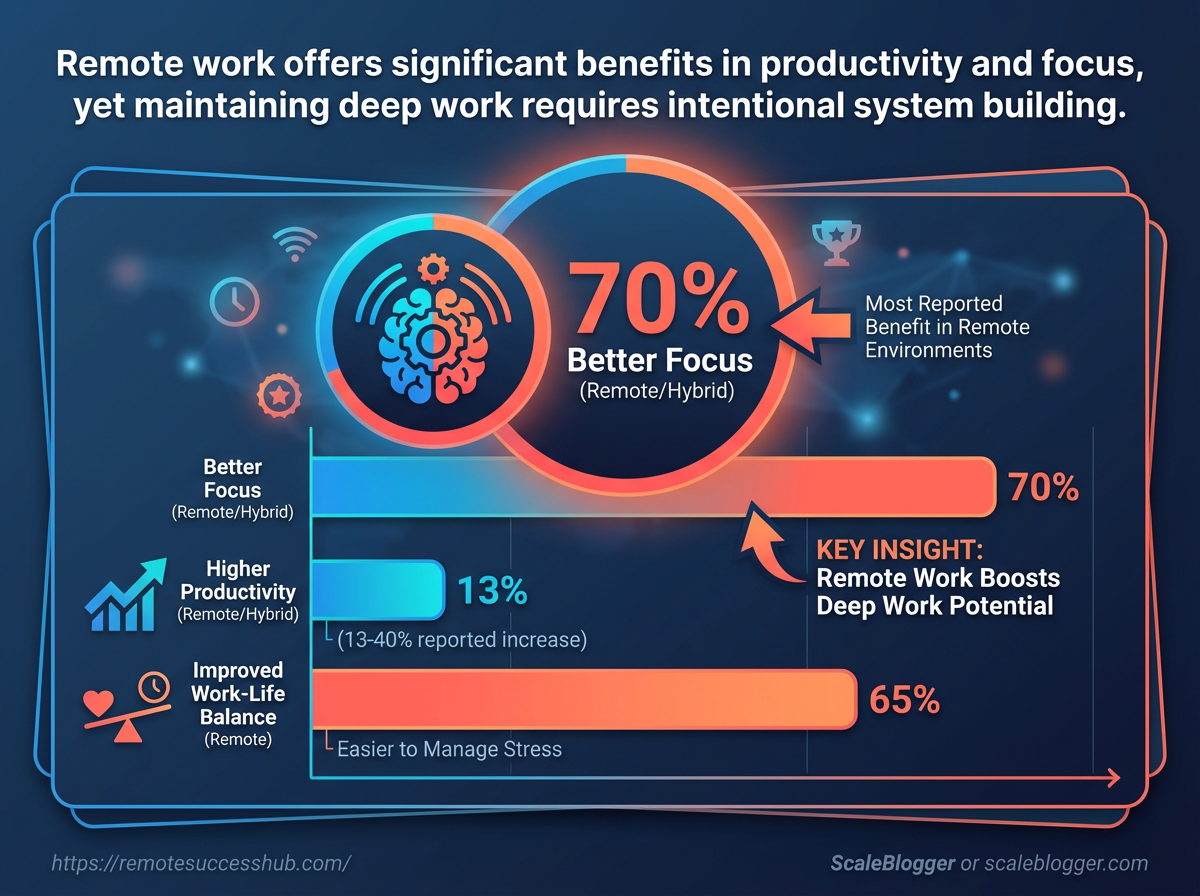
According to SurveyMonkey’s 2026 remote and hybrid work research, 44% of workers report higher productivity and 42% say they focus better when working this way.
Still, better output does not happen by accident.
A laptop on a kitchen table can work for a day; it rarely supports sustained deep work for a month.
Remote workers feel that tension every week.
The 2026 Remote Work Well-Being Survey found that 69% say their work-life balance improved in the past year, which is encouraging, but balance and productivity are not the same thing.
The real challenge is building a work rhythm that keeps momentum high without turning the whole house into an office.
Quick Answer: Remote work productivity improves when you build a system that protects deep focus with low-friction boundaries—not when you rely on willpower—because Slack pings, meetings, and blurred work-life limits break momentum. Optimize your day by scheduling distraction-resistant deep-work blocks, using asynchronous communication by default, and setting clear availability expectations so interruptions don’t turn into constant context switching.
Why Remote Work Productivity Breaks Down
Remote work usually fails for boring reasons, not dramatic ones.
A missed message, a noisy Slack channel, and a lunch break that never really ends can drain a whole afternoon.
That pattern shows up in the latest numbers too.
In 2026, SurveyMonkey found that 44% of remote and hybrid workers reported higher productivity, but 42% also said they focused better when working remotely, which tells you something important: the setup can help, but only when the friction stays low.
The latest remote and hybrid work trends and CoworkingCafe’s 2026 remote work well-being survey both point to the same tension between flexibility and distraction.
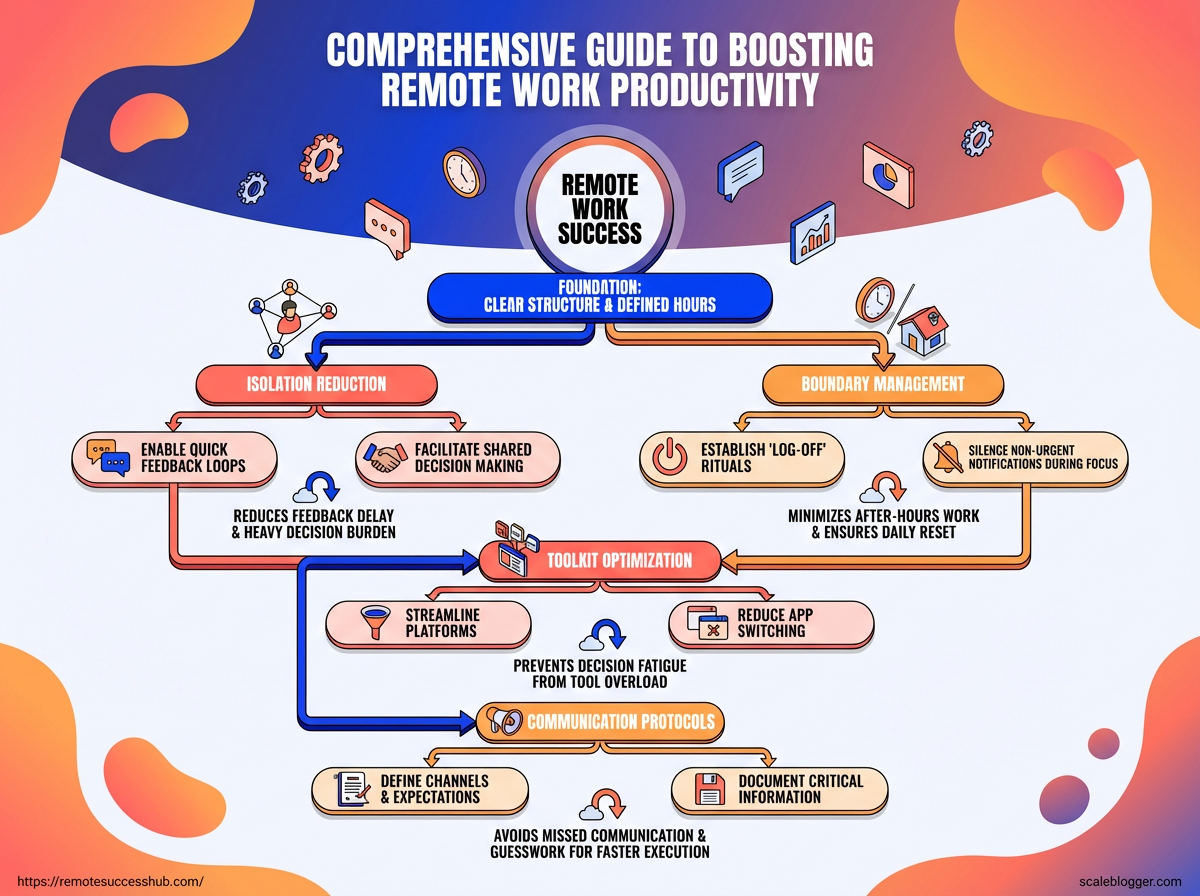
Isolation is one of the fastest hidden costs.
When people work alone too long, they lose quick feedback, which slows decisions and makes simple work feel heavier.
Add blurred boundaries, and the day turns into fragments: notifications during focus time, work after hours, and no real reset in between.
> In 2026, 69% of remote workers said their work-life balance had improved, according to CoworkingCafe’s 2026 remote work well-being survey. That upside still coexists with a real risk of overextension.
Tool overload makes things worse.
Every app promises speed, but too many tabs, inboxes, and status updates create decision fatigue, and decision fatigue kills momentum.
Even a simple task can stall when a person has to remember where the file lives, which channel gets the answer, and which platform holds the latest version.
High performers handle remote work differently.
They protect focus blocks, reduce app switching, and set clear rules for availability.
- They batch communication: Messages get answered in windows, not all day long.
- They define work hours early: Boundaries are visible, not implied.
- They keep one home base: One task system, one calendar, one source of truth.
- They create feedback loops: Short check-ins replace long delays and guesswork.
- They protect recovery time: Real breaks keep attention from collapsing by midafternoon.
That discipline matters because remote work tends to reward structure more than effort.
The people who stay productive are usually not the busiest ones; they are the ones who remove friction before it snowballs.
Build a Remote Work System That Supports Deep Focus
Deep focus in remote work rarely fails because people lack discipline.
It usually fails because the day is built around the clock, not around energy.
That matters more than it sounds.
When your most cognitively demanding work lands at the wrong time—or gets repeatedly interrupted—productivity doesn’t just dip. The whole system starts to rely on motivation instead of structure.
A better remote work system protects your best thinking hours, gives every task a home, and repeats often enough that it stops depending on willpower.
Picking the right prioritization method
| Method | Best For | Strengths | Limitations | Remote Work Fit |
|---|---|---|---|---|
| Eisenhower Matrix | Mixed inbox work, urgent requests, boundary setting | Separates urgent from important fast | Can oversimplify complex project work | Strong for triaging async messages and protecting focus |
| Time Blocking | People with controllable calendars and fixed deep-work windows | Creates structure and guards attention | Breaks down when meetings run long | Excellent when you can defend focus blocks |
| Kanban | Ongoing work with many parallel tasks | Makes work visible and easy to move | Can become cluttered without limits | Great for distributed, async-friendly teams |
| Pomodoro | Tasks that feel heavy or hard to start | Lowers friction and encourages momentum | Can interrupt long creative flow | Good for admin, writing, and review work |
| MITs | Anyone who needs a simple daily anchor | Forces the day to start with real priorities | Not enough on its own for complex projects | Very strong for remote work because it stays simple |
Time blocking works best when your calendar still has room to breathe.
Kanban and MITs tend to fit remote life especially well.
They stay visible, light, and easy to reset when priorities shift—something that happens constantly in async work.
A simple cadence keeps the system alive.
Pick one weekly outcome on Monday, choose three MITs each morning, and close the week by clearing loose ends.
- Monday planning: choose one outcome that would make the week a win.
- Daily setup: block one deep-focus session before messages take over.
- Friday reset: review what moved, what stalled, and what needs a fresh start.
A repeatable system should feel almost unremarkable—because that’s what makes it sustainable. When structure is solid, deep focus becomes a habit instead of a lucky streak.
Optimize Your Work Environment, Tools, and Tech Stack
A desk that asks for almost no decisions is worth more than an expensive setup in the wrong place.
The best remote setups shrink the number of tiny choices you make all day.
One fixed spot for your laptop, charger, notebook, water, and headphones keeps the morning from turning into a scavenger hunt.
Software should do the same thing.
One lane for communication, one for task tracking, and one for files is usually enough—whether that means Slack or Teams, Asana or Trello or ClickUp, and Google Drive or OneDrive or Dropbox.
A clean physical setup also protects energy.
When your workspace and backups are already sorted, you don’t burn focus reacting to problems (lighting, noise, or connectivity) that a good setup prevents.
### Remote work equipment checklist
| Category | Recommended Item | Why It Matters | Priority |
|---|---|---|---|
| Desk and chair | Adjustable chair with lumbar support and a desk at elbow height | Keeps posture steady and reduces end-of-day fatigue | High |
| Monitor setup | 24–27 inch external monitor, or a laptop stand with keyboard and mouse | Lowers neck strain and makes multitasking easier | High |
| Headset and webcam | USB headset with noise cancellation and a 1080p webcam | Improves call quality and cuts background distractions | High |
| Lighting | Soft front light or a desk lamp with neutral color temperature | Makes you look clearer on camera and reduces eye strain | Medium |
| Internet backup | Mobile hotspot, tethering plan, or secondary ISP | Keeps work moving when the main connection fails | High |
| Noise control | Noise-canceling headphones, door sweep, or white-noise machine | Helps preserve focus in shared or noisy spaces | Medium |
Keep the setup boring in the best way possible: stable chair, readable screen, reliable call gear, and a backup connection that never gets used until it absolutely has to.
Then keep the app stack equally boring.
When communication, tasks, and files each have one home, the whole day gets lighter.
Strengthen Communication Without Losing Focus
Remote work gets noisy fast when every message feels urgent.
In practice, the “panic” usually comes from uncertainty: people don’t know when they’ll be answered, what’s urgent, or where decisions are recorded.
That is exactly why communication has to be designed with care.
The trick is not talking less.
It is removing the constant pressure to react.
When people know when to expect a reply, what counts as urgent, and which updates belong in writing, they stop checking messages like it is a slot machine.
Async communication is the cleanest way to protect deep work.
A good rule is simple: use written updates for anything that does not need a live decision, and reserve calls for conflict, nuance, or time-sensitive approvals.
A useful boundary set usually looks like this:
- Availability windows: State the hours when replies are likely, not instant.
- Response times: Define what gets answered in a few hours, same day, or next day.
- Urgency rules: Reserve direct calls or tagged messages for genuine blockers.
- Async defaults: Post status updates, handoffs, and routine questions in writing.
- Meeting filters: Decline meetings that could be a comment thread or short memo.
Meeting hygiene matters just as much.
A meeting with no agenda is usually just calendar clutter wearing a blazer.
The better habits are boring, which is why they work.
Send agendas early, cap meetings at 25 or 50 minutes, and end with explicit owners and deadlines.
If a meeting only exists to share information, that information belongs in a message or doc instead.
There is also a human side to this.
If everyone is always reachable, balance gets fragile and focus becomes harder to defend—especially on heavy workload days.
For teams that want communication to support focus instead of wreck it, the standard should be clear:
- No instant-answer culture: Fast replies are not the same as good work.
- One source of truth: Put decisions where everyone can find them later.
- Fewer meetings, better meetings: Each one should earn its place.
That balance keeps work moving without turning the day into fragments.
Good communication should make focused work easier, not harder.
Create Accountability and Community Support
Remote work gets slippery when nobody notices small delays, missed targets, or drifting routines.
Accountability puts a frame around the week, and that frame usually improves consistency more than sheer willpower ever does.
That matters because the social side of remote work still shapes performance.
Support helps even more when the distance starts to feel personal.
Peer check-ins are the easiest place to start.
Keep them short, specific, and tied to one visible goal for the week.
- Weekly commitments: Share three outcomes you will finish by Friday, not vague intentions.
- Midweek check-ins: Send a quick update on blockers, decisions, and what changed.
- Mentorship touchpoints: Use a mentor for judgment calls, not just encouragement.
- Coworking sessions: Work silently alongside someone for 60 to 90 minutes to stay on track.
- Shared scoreboards: Track progress in a simple note, sheet, or project board.
A good check-in sounds ordinary. “I’ll finish the client draft, clear the research notes, and send the revision list by Thursday” works better than “I need to be more productive.”
Mentorship adds a different kind of support.
A peer keeps you honest about deadlines, while a mentor helps you spot patterns—like overcommitting or waiting too long to ask for help.
Coworking sessions fill the gap between solitude and full meetings, which is useful on days when motivation feels thin.
For a practical rhythm, many remote workers do well with this sequence:
- Set one weekly focus with a peer.
- Review progress in the middle of the week.
- Use one coworking block for deep work.
- End the week with a brief reset and next-step plan.
Support does not need to be formal to work.
It just needs to be regular enough that your work stays visible—even when you are working alone.
Measure Productivity in a Way That Supports Career Growth
A manager is unlikely to remember your hours, but they will remember the report you shipped on time for six weeks straight.
That is why screen time makes such a weak career metric.
It rewards looking busy, not building trust.
Remote workers often improve outcomes when measurement shifts toward results.
The most useful system tracks three things: output, quality, and consistency.
Weekly reviews make the patterns obvious fast.
A missed deadline once is noise; a rising rework rate is a signal.
- Output: Count finished deliverables, closed tickets, or shipped features.
- Quality: Track error rates, edits requested, customer complaints, or review scores.
- Consistency: Note on-time completion streaks and whether results stay steady week after week.
Add one more layer if you want to improve—not just report:
- Bottlenecks: Record where work stalls, then fix the most frequent one first.
And finally, keep visibility intentional:
- Visibility: Maintain a short wins log with dates, outcomes, and business impact.
Promotion conversations get easier when the story is simple.
“I worked hard” gets ignored faster than people like to admit.
“ I improved turnaround time, reduced revisions, and kept delivery consistent for twelve weeks ” lands much better.
That kind of measurement also protects trust.
It gives your manager proof that your work is dependable, and it gives you a cleaner case for bigger scope, better visibility, and the next title.
Build the Day Around Focus, Not Friction
Remote work gets messy when attention is treated like an endless resource.
The real edge comes from reducing the small leaks that quietly drain it: constant pings, vague priorities, and meetings that swallow the best hours of the day.
Once those leaks are sealed, productivity stops feeling like a scramble and starts looking like momentum.
That was the pattern running through the whole article.
A day that disappears into Slack, calls, and half-finished tasks usually does not need more hustle; it needs clearer rules for communication, a calmer work setup, and a way to measure output that matches real career growth.
The people who do this well are not superhuman.
They are deliberate.
Protect one uninterrupted work block today. Turn off nonessential notifications, choose one meaningful task, and define what “done” looks like before you start.
Then review the result at the end of the day and notice what helped, what interrupted, and what needs adjusting tomorrow.
If you want more structure around that process, our remote work resources can help turn these ideas into a routine that actually sticks.