
A 9 AM video where half the team joins with poor lighting, noisy backgrounds, and stilted chat feels familiar.
That friction usually comes from missing rules around remote work etiquette, not bad intentions.
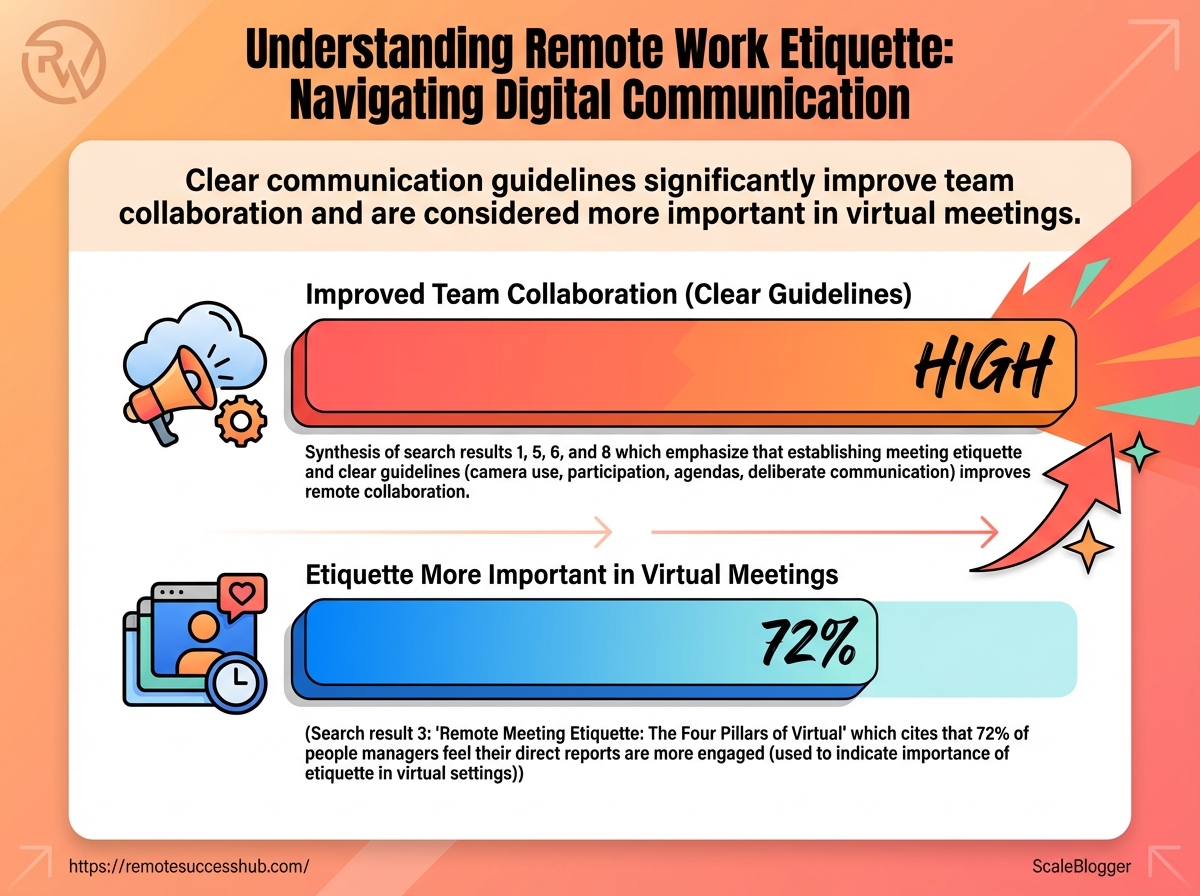
Clear guidelines matter: 74% of remote workers report that clear communication guidelines improve team collaboration (2025).
Sixty percent of professionals say etiquette matters more in virtual meetings than in-person, raising the stakes for every camera-on moment (2025).
Platforms such as Zoom and Slack reward small habits — tidy backgrounds, dressing for camera, clear camera framing, and using threads for focused conversations.
Video calls are preferred over voice-only to preserve nonverbal cues (2026), and timely replies within 24 hours keep workflows steady (2025).
A few practical digital communication tips stop most awkward moments before they start.
They sharpen professionalism in remote settings and rebuild the trust sloppy communication erodes.
When etiquette fails, meetings lengthen, decisions stall, and micro-frictions accumulate into missed deadlines and strained relationships.
Tightening digital habits saves time and reduces friction across teams.
Table of Contents
Choosing the Right Channel: Email, Chat, Calls, and Project Tools
Written Communication: Templates, Structure, and Accessibility
Boundaries, Availability, and Managing Professional Presence
Why Remote Work Etiquette Matters
Good etiquette in remote work isn’t polite window dressing — it’s the scaffolding that keeps distributed teams functioning.
Clear norms cut down on confusion, help ideas get credit, and make collaboration feel less like guesswork and more like a reliable workflow.
Strong digital manners show up as predictable response times, readable messages, and intentional meeting behavior.
Those habits reduce friction and make high-impact work more visible to the people who matter for promotions and opportunities.
The numbers back this up: 74% of remote workers said clear communication guidelines improve team collaboration (2025), and 60% of professionals in 2025 believed etiquette matters more in virtual meetings than in-person ones.
Using video to preserve nonverbal cues (2026) and responding within 24 hours (2025) are simple, measurable behaviors that raise professional standing.
What etiquette means in a distributed workplace
Remote etiquette is a bundle of shared expectations about how people communicate, show up, and document work.
It covers everything from message tone to meeting setup and handoffs. Etiquette: A set of agreed behaviors that reduce ambiguity and make collaboration predictable. Availability norms: Expectations around response windows, calendar visibility, and asynchronous updates. Meeting standards: Rules for video use, backgrounds, and agenda-driven timekeeping — the practical norms Zoom and others encourage for effective calls.
How strong digital communication habits accelerate career progress
Clear, consistent communication builds reputation over time.
When messages are concise, well-threaded, and documented, managers can see contributions without chasing status updates.
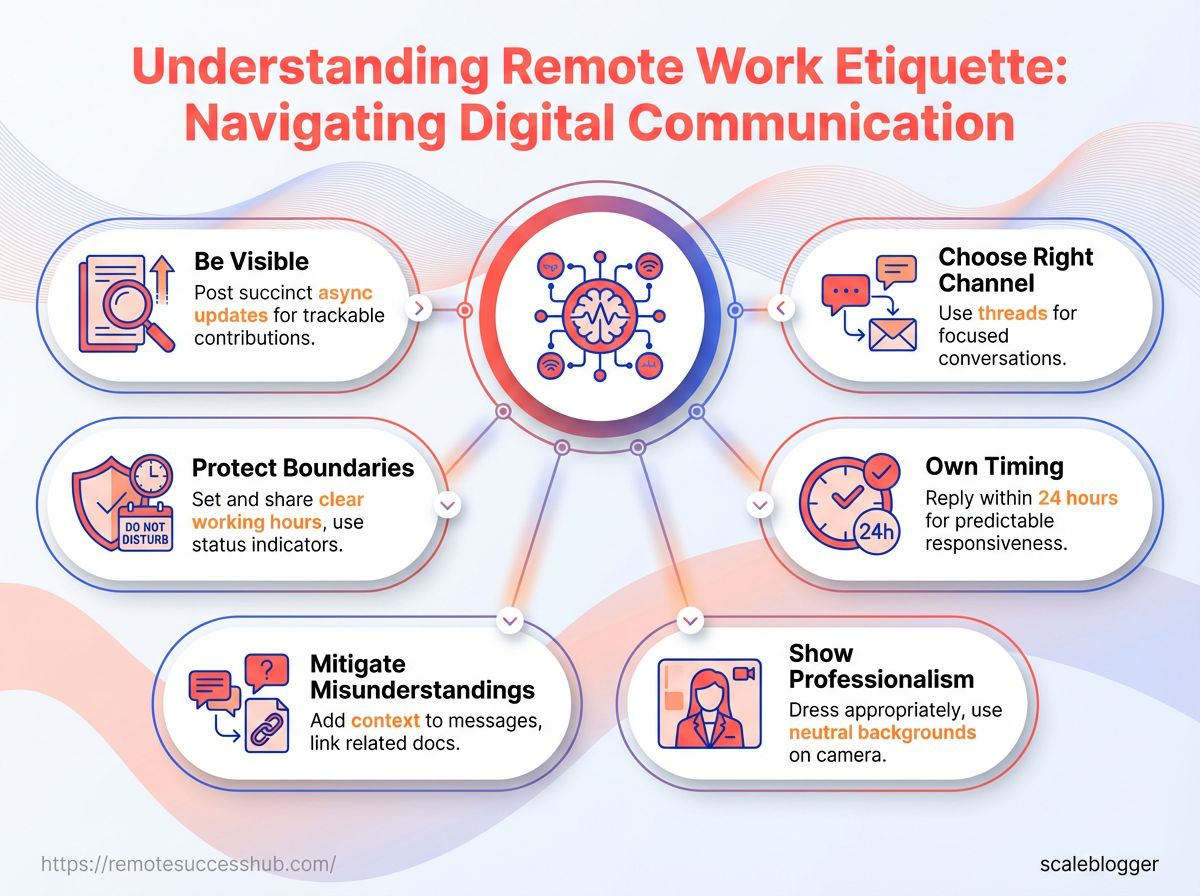
Be visible: Post succinct async updates so work is trackable and creditable.
Choose the right channel: Use
threadsfor focused conversations and avoid cluttering team channels.Own timing: Reply within 24 hours when possible; predictable responsiveness signals reliability.
Show professionalism on camera: Dress appropriately and use a neutral background to minimize distractions during meetings.
Those behaviors align with what Slack and other remote-first tools recommend for professional messaging.
Over months, they compound into clearer performance signals and faster career movement.
Common failure modes and how to avoid them
Misunderstandings happen when context is missing.
Short messages without intent lead to rework and strained trust.
Invisible contributions occur when work isn’t documented or shared; asynchronous teams can’t praise what they can’t see.
Boundary creep sets in when availability norms aren’t respected; people burn out and productivity drops.
Mitigate misunderstandings: Add one-line context to messages and link related docs.
Prevent invisibility: Summarize wins in weekly updates or shared dashboards.
Protect boundaries: Set and share clear working hours; use status indicators.
Good etiquette turns everyday interactions into reliable career infrastructure.
Keep expectations explicit and consistent, and remote work stops being chaotic and starts being predictable.
Core Principles of Professional Digital Communication
Clear, concise, and audience-focused messages are the backbone of effective remote collaboration.
Communicate with intention: say what matters first, remove filler, and match tone to the reader’s role and situation.
When done well, messages save time, reduce follow-ups, and keep projects moving.
Responsiveness and predictable timing create trust across time zones.
Aim for timely replies—ideally within 24 hours for routine items—and set clear expectations when longer delays are unavoidable.
Teams that set these norms reduce friction and avoid status-check overload.
Respectful tone and inclusive language prevent misunderstandings in text-first channels.
Small choices in messaging impact team dynamics significantly.
Choosing the Right Channel: Email, Chat, Calls, and Project Tools
Which conversation will move a project forward fastest: a quick Slack thread, a scheduled Zoom, or a well-written email? Picking the wrong medium wastes time and attention.
The right channel matches urgency, the need for context, and whether the exchange should live in a searchable record.
Remote teams that set clear channel expectations see better coordination.
For example, 74% of remote workers reported that clear communication guidelines improve team collaboration (2025).
Video also matters: by 2026 most professionals prefer video over voice-only when non-verbal cues matter.
Those patterns guide how to choose between synchronous and asynchronous work without adding meetings.
When to use synchronous vs. asynchronous communication Synchronous conversations work when immediate alignment, tone, or negotiation matters.
Use them for decisions that require real-time brainstorming, conflict resolution, or demos where visual context speeds understanding. Synchronous: Live meetings or calls for decisions, demos, and sensitive topics that benefit from instant feedback. Asynchronous: Messages and documents for updates, work handoffs, and requests that need a searchable trail and time for thought.
Urgency: Use synchronous when blockers prevent progress; otherwise prefer async.
Complexity: Use synchronous for ambiguous problems; async for routine or documented tasks.
Scope: Use async for one-to-many updates; synchronous for small-team alignment.
Channel comparison: speed, formality, audit trail, and best-use cases
Channel | Formality | Best for | Response expectation | Record/auditability | Tips for etiquette |
|---|---|---|---|---|---|
Medium–High | Formal announcements, external comms, legal or billing threads | 24–48 hours | High — threaded, archived | Be specific: clear subject lines and action items | |
Slack / Instant Messaging | Low–Medium | Quick questions, team banter, short clarifications | Seconds–24 hours | Medium — searchable, use threads | Use threads: keep channels focused and reduce noise |
Video Call (Zoom) | Medium | Schedule in advance | Low–Medium — recordings possible | Prepare a brief agenda: share before the call | |
Phone / Voice Call | Low–Medium | Quick sensitive conversations, poor bandwidth situations | Immediate during scheduled windows | Low — no automatic transcript | Respect timezones: confirm availability first |
Project Management Tool (Asana, Jira, Trello) | Medium | Task assignment, sprint planning, backlog management | Update-driven; check daily | High — task history and audit trail | Keep tasks atomic: clear owner and due date |
Shared Docs (Google Docs, Notion) | Low–Medium | Drafts, specs, collaborative editing | Review within agreed window (24–72h) | High — version history | Comment clearly: @mention for action items |
Ticketing System (Zendesk, Help Scout) | Medium–High | Customer issues, support SLAs | SLA-driven (hours–days) | High — audit trails and timestamps | Triage promptly: set expectations in first reply |
Collaborative Whiteboard (Miro) | Low | Visual ideation, mapping, workshops | Synchronous or asynchronous review | Medium — snapshots and exports | Save versions: capture final outputs to docs |
Company Forum / Discussion Board | Low–Medium | Knowledge sharing, FAQs, long-lived threads | 24–72 hours | High — searchable, indexed | Tag posts: make content discoverable |
The table shows trade-offs: fast channels often sacrifice auditability, while documented channels slow response but preserve context.
Slack and Zoom are powerful when used with rules; project tools and shared docs keep work traceable.
How to set and communicate channel norms for your team Start by agreeing on three simple rules: where to post updates, expected response times, and when synchronous check-ins happen.
Get buy-in in a short team meeting and capture the rules in a shared file.
Draft a concise channel matrix that maps common scenarios to a preferred channel and response window.
Publish the matrix in a shared doc and pin it in your main team space.
Run a 15-minute onboarding slot for new hires to explain norms and show examples.
Revisit norms quarterly and adjust based on friction points or new tools.
Encourage public feedback so the rules stay practical and not punitive.
Choosing channels deliberately reduces friction and keeps people focused.
Small, documented norms scale better than good intentions.
Written Communication: Templates, Structure, and Accessibility
Good written routines remove friction faster than extra meetings.
Clear subject lines, a concise TL;DR, and explicit action items turn ambiguous notes into predictable work that others can act on.
That predictability keeps projects moving and reduces the cognitive load of every recipient.
Daily rhythms matter: aim for predictable formats so teammates know what to expect when they open a message.
Research shows 74% of remote workers said clear communication guidelines improved collaboration (2025), and timely responses—ideally within 24 hours—are still the sweet spot for remote workflows (2025).
Put those realities into templates and structure.
Structure also supports inclusion.
Video is preferred for richer cues (2026), but much of remote work happens in writing.
Well-structured, accessible messages make sure voice and context travel across time zones and language differences.
Structure for clarity: subject lines, TL;DR, action items
Start messages with a one-line subject that includes context and the desired outcome.
A single-line TL;DR under the subject clarifies purpose for skimmers.
Use a brief context sentence or two, then a clear list of next steps with owners and deadlines.
When a message contains multiple actions, separate them into numbered items to avoid missed responsibilities.
Subject format: Include project tag and outcome (e.g.,
PROJ-UX: Feedback needed — final review).TL;DR: One sentence stating the ask and deadline.
Context: Two-sentence background max.
Action items: Numbered list with Owner — Due date.
Ready-to-use templates: status update, request, escalation, and handoff
Use templates to reduce back-and-forth and make expectations explicit.
Below are compact, copyable messages that fit inboxes and chat windows.
Ready-to-use templates: status update, request, escalation, and handoff
Template name | When to use | Key fields / structure | Tone guidance |
|---|---|---|---|
Daily/weekly status update | Regular team syncs or async reports | Subject: Project — Status (Daily/Weekly) TL;DR: 1 sentence. Progress: 3 bullets. Blockers: 1-2 bullets with owners. Next: Actions with owners/dates. | Concise, factual: keep emotion neutral and focused on outcomes |
Quick request (info/action) | When you need a small decision or asset | Subject: Request — [what] — [by date] TL;DR: Ask + deadline. Context: 1 sentence. Ask: Bullet with owner/format expected. | Polite, direct: assume positive intent; include deadline |
Escalation with context | When timelines or risks require higher visibility | Subject: Escalation — [Issue] — Impact TL;DR: Critical ask (what decision needed). What happened: 2-3 lines. Attempts made: bullets. Request: specific help and timeframe. | Urgent, factual: avoid blame; show steps already taken |
Handoff / project transition | When transferring ownership between people or teams | Subject: Handoff — [Project] — New owner TL;DR: Who owns what now. Status: current and outstanding tasks. Risks: items needing attention. Assets: links and credentials. Next meeting: suggested check-in. | Collaborative, clear: assume continuity and provide warm handover notes |
The table makes the templates copy-ready and shows when each belongs in your cadence.
Reuse the structure rather than the exact wording; personalization reduces friction and prevents robotic tone.
Accessibility and internationalization: simple language, time zones, and reader-first formatting
Write for the least-privileged reader: plain language, short sentences, and explicit times with time zones.
Avoid idioms and culturally specific references that confuse non-native speakers.
When scheduling or noting deadlines, include the timezone and convert for key teammates.
For long threads, add a one-line recap at the top so late readers catch up quickly.
Use
UTCor include two time zones: Owner — 2026-03-01 09:00 GMT / 04:00 PT.Prefer active voice and common verbs to reduce translation errors.
Use headings, bolded actions, and short paragraphs to help screen-reader users.
thought: consistent structure and accessible language make written work act like a reliable teammate.
Small upfront discipline saves hours of clarification later.
📥 Download: Download Template (PDF)
Meetings and Video Etiquette
Efficient remote meetings start by treating every invite like a mini-project: state the purpose, list outcomes, and limit time.
Meetings without a clear outcome waste attention—build the agenda for decisions, not just updates.
Remote teams prefer video over voice for the nonverbal cues it restores, so plan meetings that deserve face time and keep them tightly timeboxed.
The latest trends show video calls are increasingly favored for connection (2026), and clear meeting rules boost collaboration—74% of remote workers said guidelines improved teamwork (2025).
A short, intentional meeting rhythm saves hours and reduces follow-up chaos.
Apply simple structure up front and enforce it gently during the call.
Designing efficient video meetings: agendas, timeboxing, and purpose
Start every invite with a one-line meeting purpose and two to four bullet outcomes.
That orients attendees before they join and filters unnecessary invites.
Timebox ruthlessly.
For routine syncs, try 25 minutes; for decision-heavy sessions, 50 minutes with a five-minute buffer.
Shorter blocks force sharper agendas and reduce context switching.
Prepare: Share pre-reads 24 hours ahead.
Roles: Assign a facilitator and note-taker.
Decision signal: Use a clear phrase (e.g., “Decision:”) to mark outcomes.
Example: a 25-minute daily standup where each person states blockers (30s each), followed by a single sprint decision, keeps focus and cuts overruns.
On-camera behavior, backgrounds, and microphone etiquette
Dress one step above casual for important meetings; appearance affects perceived professionalism and focus.
Research shows 60% of professionals see etiquette as more important online than in person (2025).
Keep backgrounds neutral or use a simple virtual backdrop if your real background distracts.
Position lighting so your face is visible and use a stable camera angle at eye level.
Camera: Turn on when presence improves the outcome.
Audio: Use headphones and mute when not speaking.
Signals: Raise a hand or use chat to avoid interruptions.
Zoom emphasizes background and dress norms, and Slack recommends threaded follow-ups when decisions need documentation—both help keep meetings efficient.
Handling recordings, transcripts, and follow-up actions
Record selectively and always get consent at the meeting start.
Store recordings with searchable transcript files to save everyone time and avoid redundant recaps.
This short walkthrough models scheduling, running, recording, and closing a meeting.
Watch it to see how agenda discipline, clear roles, and a defined follow-up process look in practice.
Record with consent, then auto-generate a
transcript.Highlight action items in the transcript and tag owners.
Distribute a 1–3 sentence meeting summary within 24 hours.
Link the recording and transcript in the task or thread for future reference.
Platforms like https://remotesuccesshub.com/ offer templates for agendas and follow-up formats that fit this flow.
Good video etiquette preserves time and trust; run fewer, clearer meetings and the team will notice.
Boundaries, Availability, and Managing Professional Presence
Ever had your calendar ping during deep work and felt your whole rhythm collapse? That jolt is how boundary breakdown looks in remote teams. Clear, explicit availability rules keep those interruptions predictable and repairable.
Set availability deliberately: use status messages, calendar blocks, and Do Not Disturb to communicate when you’re reachable and when you’re not.
Teams that follow written availability norms report better collaboration — 74% of remote workers said clear communication guidelines improved teamwork (2025).
Timely responses matter too: aim for reply windows (SLAs) that match task urgency — for most async work, a 24-hour response target is reasonable (2025).
Managers and teammates need negotiation, not assumptions.
Propose overlap windows, document SLAs, and run a short trial.
Slack encourages organized threads and respectful response times; Zoom underlines professional appearance and backgrounds to reduce friction during moments when video is necessary.
Platforms like https://remotesuccesshub.com/ can be useful for templates and status examples when formalizing team norms.
Setting and communicating availability (status, calendar, and Do Not Disturb)
Start by making availability visible and standardized across tools.
Use consistent status language so everyone reads the same signals.
Status templates: Use clear, repeatable messages like Available — 9–11am UTC (email only after 5pm).
Calendar transparency: Block focus and meeting* times with descriptive titles, e.g., Deep Work: No Meetings.
Do Not Disturbrules: Share whenDNDwill be active and which channels can override it for true emergencies.
Status: Use short, time-bounded messages that include time zone context. Calendar blocks: Label them with purpose and visibility so teammates respect them. DND: Define escalation channels for urgent items.
Work hours, response SLAs, and negotiating flexibility with managers
Treat hours and SLAs as negotiable work design, not personality traits.
Come prepared with data and a pilot plan.
Document your typical available overlap with core teammates.
Propose SLAs: Urgent: 2 hours; Operational: 24 hours; Strategic: 48–72 hours.
Offer a two-week trial and capture metrics (response times, deliverable dates, missed handoffs).
Manager pitch: Show how flexible hours increase output without blocking collaboration.
Evidence: Use recent timelines or ticket stats to prove overlap suffices.
Negotiation works when both parties can see measurable impact.
Protecting focus time and avoiding burnout with asynchronous-first habits
Asynchronous-first workflows reduce context switching and emotional labor.
Design meeting-free focus blocks and limit real-time check-ins to predictable windows.
The mockup shows a balanced day: morning deep work, a midday async check-in window, a short overlap for meetings, and an evening wrap-up slot.
It models how to protect two uninterrupted deep-work blocks per day while keeping collaboration smooth.
Block deep work: Reserve at least two 60–90 minute blocks daily labeled
Deep Work.Batch communication: Check async channels in set windows (e.g., 10:30am and 3:30pm).
Rotate meeting-free days: One day per week without standing meetings improves focus and recovery.
Protecting boundaries prevents burnout and keeps professional presence intentional.
Keeping availability explicit, negotiating reasonable SLAs, and leaning into async-first habits makes remote professionalism sustainable.
Tools, Security, and Professionalism Signals
Ever opened a folder and spent ten minutes guessing which file is the latest? That disorganization is loud in a remote setting and it warps trust and momentum.
Good tools should quietly reduce friction while protecting privacy.
The right combination keeps conversations searchable, access controlled, and outcomes visible without extra meetings.
Security and professionalism are two sides of the same coin: lock down who can edit while making sure the team can see progress.
That balance is what moves work from “someone’s to-do” to measurable impact.
74% of remote workers said clear communication guidelines improve collaboration (2025).
60% of professionals believe etiquette matters more in virtual meetings than in person (2025).
Video calls are preferred over voice-only calls to boost non-verbal cues (2026).
Choosing tools that respect privacy and streamline communication
Select tools that offer granular permissions, searchable history, and simple audit logs.
Slack-style threaded conversations and Zoom-style recordings both help preserve context; prefer platforms that let you set retention and access rules.
Platform choice: Pick tools with enterprise controls and two-factor authentication.
Data minimization: Use links to cloud files instead of attachments to avoid duplication.
Privacy defaults: Choose tools where private messages and archives are not publicly indexed.
Platforms like https://remotesuccesshub.com/ can be useful resources for tool lists tailored to remote professionals.
Security basics: sharing, access controls, and safe file naming
Adopt the principle of least privilege: grant the minimum permissions needed and revoke them after handoffs.
Use view/comment/edit roles rather than broad folder access.
Access reviews: Schedule quarterly audits of sharing settings.
Safe file names: Start with
YYYYMMDD_projectname_versionto avoid ambiguity.Link hygiene: Use expiring links for sensitive files and require sign-in for access.
Signals of professionalism: documentation, attribution, and visibility of impact
Professionalism shows up as visible work trails: clear docs, named authorship, and regular public updates.
Those cues make contributions discoverable during performance reviews.
Attribution: Add author and date to decision notes.
Visibility: Post measurable outcomes, not just status.
Handoffs: Use a short checklist so the next owner can act without back-and-forth.
Signals of professionalism: checklist
Checklist — Signals of professionalism: documentation, attribution, and visibility of impact
Action | Why it matters | How to implement quickly | Frequency |
|---|---|---|---|
Post a weekly public status update | Keeps stakeholders informed and creates a record of progress | Publish a short update in the team channel with KPIs and blockers | Weekly |
Document decisions in a shared doc | Prevents repeated debates and preserves rationale | Create a “Decisions” page and log decision, owner, date, and alternatives | As-needed |
Tag stakeholders in follow-ups | Ensures responsible parties see and acknowledge next steps | Add @mentions in threads and summarize actions in the first message | After meetings |
Keep meeting notes and action items visible | Turns meeting minutes into execution artifacts | Save notes to a shared doc and link in calendar invites | After every meeting |
Use clear subject lines for threads | Makes historical lookup fast and reliable | Start subjects with | Every thread |
Share agendas before meetings | Focuses the meeting and lets people prepare | Post agenda with timeboxes and desired outcomes in the invite | 24–48 hours before |
Record meetings with timestamps | Creates retrievable sources for absent teammates | Enable recording and add timestamps to the recording notes | When decisions are expected |
Maintain a personal project dashboard | Shows ownership and progress at a glance | Keep a simple Kanban or list with current status and next actions | Daily/Weekly |
Apply least-privilege access controls | Reduces accidental leaks and misuse | Set role-based permissions and review membership lists | Quarterly |
Use consistent, timestamped file names | Eliminates version confusion | Rename files to | Every upload |
This checklist turns invisible good habits into repeatable practices.
Use it as a living template that the team can adapt.
Professional signals and strong security practices compound over time: small, visible habits build reputation and reduce friction.
Keep the defaults secure and the outcomes visible; trust follows.
Conclusion
Make remote professionalism simple and repeatable
Most friction in distributed teams isn’t technical — it’s social.
A shared set of small, predictable signals removes more meeting chaos than the fanciest software, which is why that 9 AM call with dim lighting and noisy backgrounds feels so painful.
Treating remote work etiquette and practical digital communication tips as everyday habits makes everyone’s time more respectful and productive.
Pick one principle and apply it everywhere: choose the right channel, use a short written template for async updates, and signal availability clearly before meetings.
Those steps improve professionalism in remote settings because they create stable expectations, not extra rules.
Security and professional signals — like consistent naming in tools or a quick agenda in the invite — reinforce that trust.
Make this actionable now: create a three‑item meeting preflight checklist (camera/lighting, mic/mute check, one‑line agenda) and share it with your next invitees. If you want ready-made templates, tools like Remote Success Hub can speed that setup.
Will you try the checklist at your next meeting and see how much less friction there is?