
Too many remote meetings feel like calendar busywork: agendas blur, tech fails, and decisions stall.
Picking the right virtual meeting platforms fixes that problem, but the choice now blends video quality, integrations, and security.
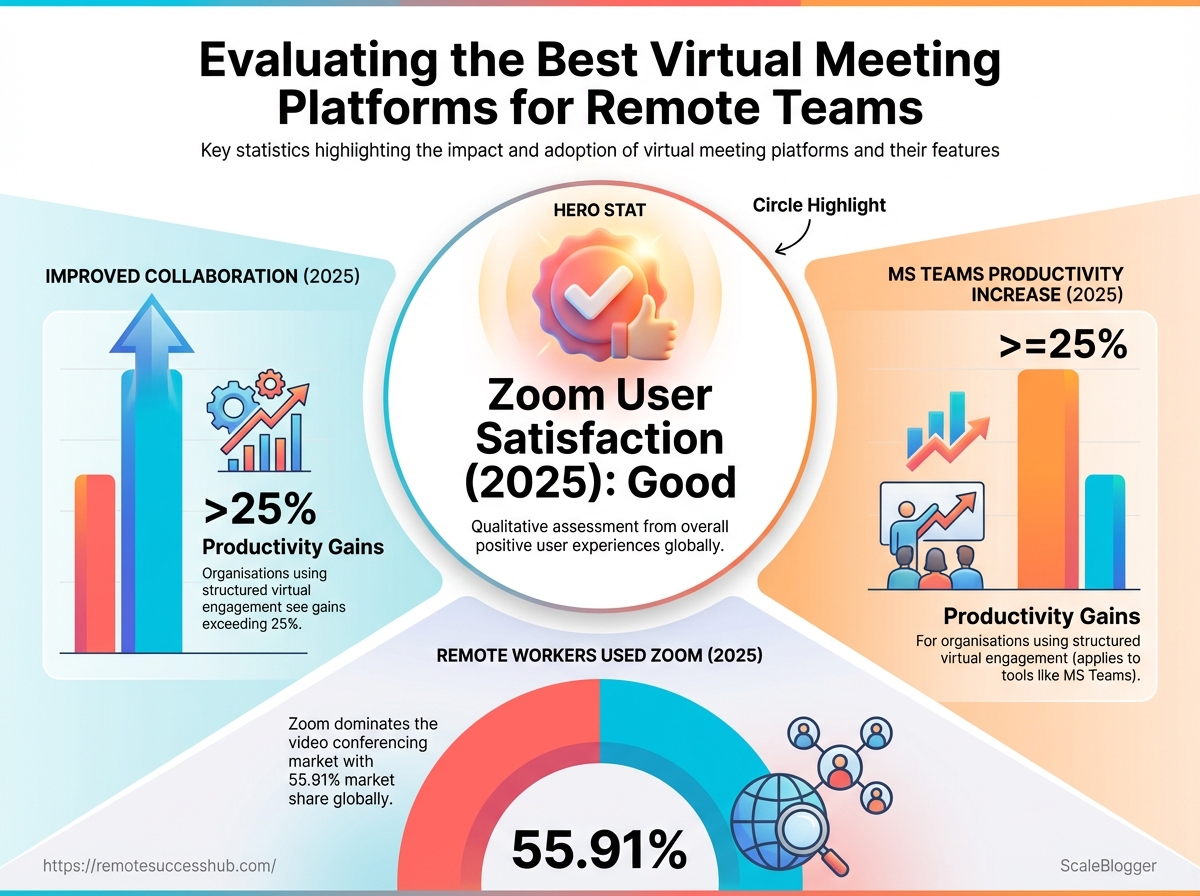
By 2025, 67% of organizations reported improved collaboration after adopting virtual meeting tools.
Meanwhile, 61% of remote workers used Zoom as their primary meeting tool in 2025.
Users rated Zoom 4.7 out of 5 for ease of use in 2025.
If your team runs on Microsoft 365, Microsoft Teams‘ integrations drove a 25% productivity increase in 2025.
For meetings that demand stricter privacy, Google Meet implemented end-to-end encryption and became a safer business choice in 2026.
Decision fatigue over tools burns hours that teams could spend shipping work.
Define meeting cadence, integration needs, and privacy priorities before switching platforms so the tool reduces friction instead of adding it.
Table of Contents
Opening hook and what this guide delivers
Which platform actually advances your remote career? That question matters more than whether a call starts on time.
The platform you choose shapes visibility,async workflows, and the tools you use to show impact.
Pick the wrong meeting tool and you lose time.
Pick one that aligns with your work style and company stack and you get noticed.
This guide weighs the real-world tradeoffs between the major options—Zoom, Microsoft Teams, and Google Meet—so you can choose with confidence.
Remote meetings are no longer just video calls.
They are the hub for collaboration, hiring signals, and cross-team influence.
In 2025, 67% of organizations reported improved collaboration through virtual meeting platforms, and 61% of remote workers named Zoom as their primary meeting tool during that year.
Zoom scores highest for ease of use (an average 4.7 out of 5 in 2025), while Microsoft Teams boosts productivity through tight Microsoft 365 integration—studies show about a 25% productivity lift for users leveraging those integrations.
Google Meet has strengthened security, including end-to-end encryption improvements by 2026.
Zoom also addressed earlier security concerns from 2020 and earned a reputation for reliability by 2025.
This guide delivers three practical outputs you can apply today.
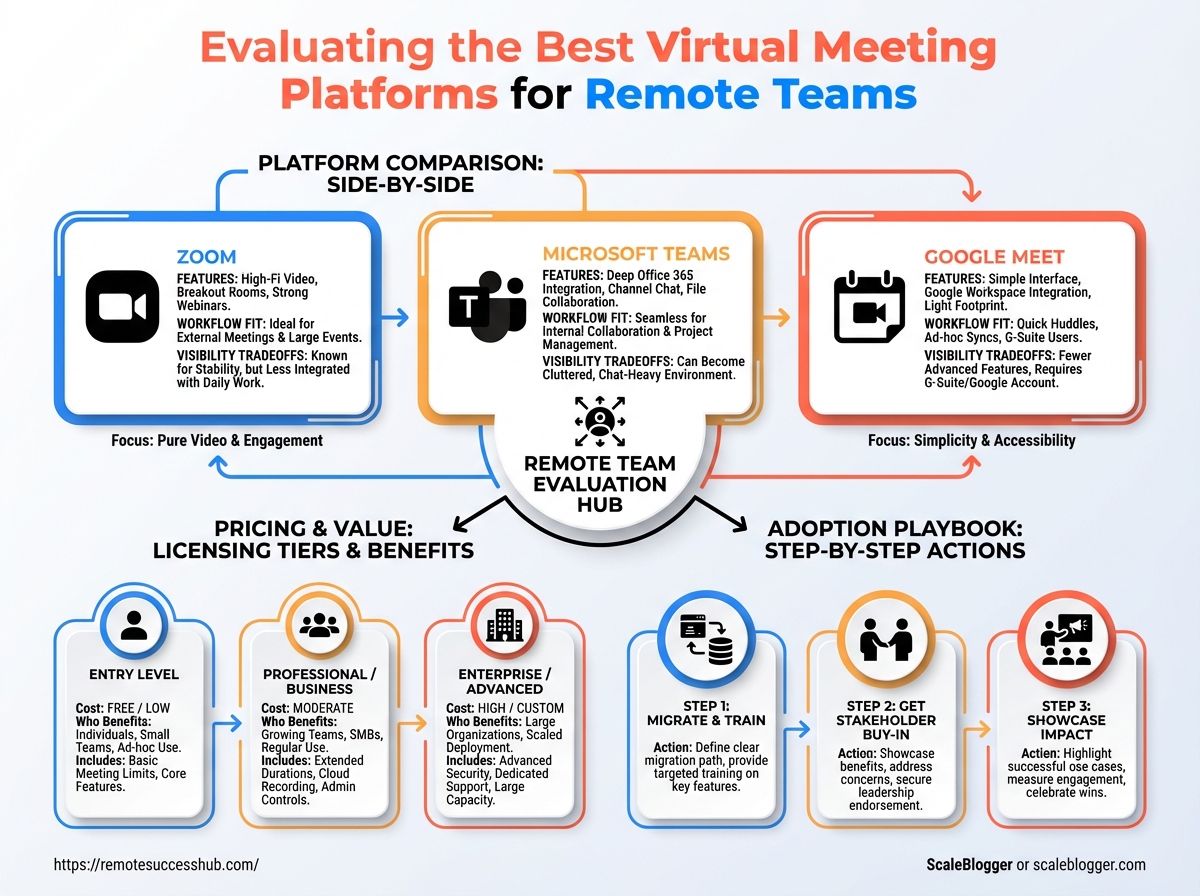
Side-by-side comparison: Feature, workflow fit, and visibility tradeoffs for Zoom, Microsoft Teams, and Google Meet.
Pricing breakdown: Typical licensing tiers and who benefits from each cost level.
Adoption playbook: Step-by-step actions to migrate, get stakeholder buy-in, and showcase your impact in meetings.
Who this guide is for and how to use it Remote job hunters: Practical moves to highlight leadership and presence in interviews and portfolio demos. Individual contributors: How to pick tools that reduce context switching and make your output visible. Team leads and managers: Steps for selecting a platform that increases team productivity and lowers friction.
Use the comparison when choosing a primary tool.
Follow the pricing notes when budgeting or negotiating with finance.
Apply the adoption playbook to roll out changes with minimal disruption.
This will save hours and make your contributions easier to find.
Choose the right platform, and your remote career gets a nudge forward.
Key evaluation criteria for remote teams
Which platform actually helps teams get work done and careers moving forward? Start by separating product fit into three practical buckets: day-to-day reliability and media quality, career-building features that increase visibility and growth, and the technical backbone that keeps operations secure and scalable.
Choose a platform that nails the basics first.
Solid uptime, consistent audio/video, and low-latency screen share are non-negotiable for meetings to feel professional.
Recent market feedback shows 67% of organizations reported improved collaboration through virtual meeting platforms in 2025, and 61% of remote workers used Zoom as their primary meeting tool that year — evidence that adoption follows usability.
Beyond media quality, look at how a platform surfaces people and work.
Features for discoverability, public Q&A, mentorship pairing, and community channels turn a meeting tool into a career platform.
Microsoft Teams’ tight Microsoft 365 integrations have driven measurable productivity gains for many users, while Google Meet’s enhanced end-to-end encryption positioned it as a safer choice in 2026.
Zoom’s user satisfaction for ease of use averaged 4.7/5 in 2025, after security improvements since 2020 made it more reliable.
Operational reliability & audio/video performance
Reliable media prevents meetings from becoming wasted time.
Measure real-world uptime, average call quality, and behavior under poor bandwidth.
Connection stability: Look for low dropped-call rates and reconnection behavior.
AV fidelity: Expect clear audio at low bitrates and adaptive resolution for video.
Latency & screen share: Test interactive apps (design, remote control) for responsiveness.
Career-focused visibility, networking, mentorship, community
Visibility features change careers more than nicer backgrounds.
Prioritize platforms that make contributors discoverable across teams and support ongoing relationships. Visibility: tools for public show-and-tell and searchable meeting recordings. Networking: structured breakout rooms, topic channels, and event directories. Mentorship: built-in pairing, scheduled office hours, and progress tracking.
The matrix above maps specific product features to career outcomes like discoverability and leadership opportunities.
Use it to prioritize which features matter most for your team’s growth stage.
Technical, security, and integrations
Security and integrations determine whether a platform fits into enterprise workflows and scales.
Security posture: End-to-end encryption and admin controls (note: Google Meet implemented enhanced E2EE by 2026).
Integrations: First-class hooks with calendars, file storage, and identity providers; Microsoft Teams excels here.
Scalability & accessibility: Supports hundreds to thousands of participants, plus captions and low-bandwidth modes.
Choosing the right platform is a mix of operational performance and strategic career features.
Focus first on reliability, then pick the set of career and technical capabilities that move your team forward.
Top virtual meeting platforms — quick comparative snapshot
This snapshot highlights the essential features to consider when selecting the right virtual meeting platform.
It focuses particularly on how these features align with team collaboration needs and workflows.
Factors such as scale, breakout room capabilities, recording and transcripts, and integration with existing tools are critical for productivity.
Below is a comparative table that summarizes the capabilities and positioning of leading platforms in the market.
Deep dives: strengths, weaknesses, and ideal users
Which platform actually fits the shape of your team’s work? Start by matching tool characteristics to the routine problems you solve every day — not to marketing claims. A reliable match keeps meetings short, decisions clear, and handoffs simple.
A few headline numbers are useful here.
In 2025, 67% of organizations reported better collaboration after adopting virtual meeting platforms, and 61% of remote workers named Zoom as their primary meeting tool that year.
Users rated Zoom highest for ease of use in 2025 (4.7/5), while Microsoft Teams drove measurable productivity gains where deep Microsoft 365 integration matters.
Pick the wrong tool and meetings become busywork.
Pick the right one and your team spends time on outcomes, not on learning new workflows.
Zoom
Zoom scales well and feels familiar to most people. Strengths: Easy onboarding, broad third-party integrations, and support for up to 1,000 video participants make it versatile for both small meetings and large town halls. Weaknesses: Less value when you need deep app-level workflow automation; advanced admin controls require paid tiers. When to choose it: Use Zoom for day-to-day standups, client calls, webinar-style events, or any situation where low friction and attendee familiarity matter. Ideal users: Small-to-medium teams that prioritize usability, event hosts who need large-capacity meetings, and distributed teams focused on synchronous communication.
Quick setup: One-click join and simple attendee controls.
Broad integrations: Many calendar and productivity apps supported.
Good defaults: Low friction for external guests.
Microsoft Teams
Microsoft Teams excels when collaboration lives inside Microsoft 365. Strengths: Deep integration with Outlook, SharePoint, and OneDrive creates a single place for chat, files, and meetings. Weaknesses: Can feel heavy for teams that don’t use Microsoft apps; initial admin setup and governance take work. When to choose it: Pick Teams when your organization relies on Microsoft 365 for documents, permissions, and long-term records. Ideal users: Enterprise customers, departments that need tight identity and file controls, and hybrid teams who work across persistent channels.
Integrated workflows: Meetings, files, and chat in one tenant.
Enterprise controls: Admin policies and compliance options.
Collaboration boost: Proven productivity lift for Microsoft-centric teams.
Google Meet
Google Meet keeps things simple and secure for Google Workspace users. Strengths: Straightforward UI, fast meeting creation from calendar events, and enhanced end-to-end encryption rolled out in 2026. Weaknesses: Lacks some advanced webinar and event tooling found elsewhere. When to choose it: Best for teams that live in Google Workspace and want low-friction calls without extra setup. Ideal users: Small teams, schools, and teams already using Google Docs and Calendar.
Tight Workspace integration: Meetings start from Calendar or Docs.
Security-first: Modern encryption and credentials.
Minimal admin overhead: Easy for IT-lite organizations.
Cisco Webex
Webex is designed for regulated and security-conscious environments. Strengths: Strong compliance features, enterprise-grade security, and controls tuned for regulated industries. Weaknesses: Interface and feature set can be more complex than consumer-first platforms. When to choose it: Opt for Webex when audits, compliance, or strict security policies are non-negotiable. Ideal users: Healthcare, finance, legal teams, and large enterprises with strict governance.
Compliance tooling: Audit logs and policy controls.
Security posture: Built for regulated workflows.
Scalable management: Enterprise admin features.
Event-oriented platforms (Hopin, Gather, etc.)
Use event platforms when participant experience needs to be curated. Strengths: Designed for multi-stage events, networking flows, expo halls, and persistent event spaces. Weaknesses: Overkill for everyday team meetings and adds setup overhead. When to choose them: Pick Hopin, Gather, or similar tools for conferences, onboarding summits, and public-facing events. Ideal users: Event teams, community managers, and organizations running large or recurring public gatherings.
Experience-rich features: Breakout venues, booths, and networking maps.
Audience scale: Built for one-to-many and many-to-many interactions.
Customization trade-off: Greater setup for a richer attendee experience.
Differentiate by matching platform strengths to the workflows you actually run.
Pick usability for everyday syncs, integrations for document-driven work, and security-focused tools when compliance demands it.
Pricing and plan comparison
Which plan actually matches your team’s calendar, storage needs, and budget? Most teams focus on headline price and miss recurring add-ons: cloud recording, participant caps, live transcription, and admin seats drive costs quickly.
Paid tiers usually move you from time or participant limits to features that matter day-to-day: full meeting recordings, searchable transcripts, admin controls, and integrations with file systems. Keep in mind that platform choice also ties you to an ecosystem — Microsoft Teams often reduces friction for Microsoft 365 shops, while Google Meet works best when your org already uses Google Workspace.
Practical reality: a low per-seat price can still cost more than a feature-rich mid-tier once you add transcription, extra cloud storage, and specialty integrations.
Use the table below to compare typical price tiers and what they actually include.
Prices are approximate and reflect common public plans as of early 2026; regional and volume discounts apply.
Pricing comparison table: what you actually get at each price tier
Platform | Free tier limits | Entry paid tier ($/mo) | Mid-tier ($/mo) | Enterprise or custom | Notable inclusions (recording, transcription, admin tools) |
|---|---|---|---|---|---|
Zoom | Up to 100 participants, 40‑minute cap on group meetings | $14.99 per host | $19.99 per host | Enterprise pricing by quote | Local/cloud recording, automated transcription (paid), admin dashboard |
Microsoft Teams (Microsoft 365 Business Basic) | Free Teams account; limited storage and features | $6.00 per user | $12.50 per user (Business Standard) | Microsoft 365 E3/E5 custom pricing | Full app integration, file sharing, admin controls, meeting recordings |
Google Meet (Google Workspace Business Starter) | Free for Google accounts; participant caps vary | $6.00 per user | $12.00 per user (Business Standard) | Enterprise plans by quote | Recording at mid-tier, now offers end-to-end encryption (2026), admin controls |
Cisco Webex | Free tier up to 100 participants, limited features | $14.95 per host | $29.95 per host | Enterprise contracts | Cloud recording, transcription, advanced security and admin tools |
Hopin (events) | Limited free trials for small events | $99.00 per organizer | $799.00 per month (Growth) | Enterprise events custom | Event-level registration, multi-stage streaming, attendee analytics |
GoToMeeting | Free trial with small limits | $12.00 per organizer | $16.00 per organizer | Enterprise plans by quote | Cloud recording, transcription add-on, admin management |
RingCentral Video | Free tier with basic meetings | $19.99 per user | $27.99 per user | Enterprise bundles available | Built-in calling, recording, enterprise admin and compliance |
BlueJeans (Verizon) | Limited free meetings | $9.99 per host | $13.99 per host | Enterprise pricing available | Dolby audio, cloud recording, meeting analytics |
Whereby | Free tier (small meetings) | $9.99 per pro room | $14.99 per business | Custom enterprise | Browser-based meetings, recording, simple admin controls |
Prices are representative of standard plans commonly shown on vendor pages; actual cost depends on billing cadence, country, and negotiated volume discounts.
Choose the column that matches what your team actually uses every day — not the cheapest line on the marketing page.
How to calculate total cost: seats, add‑ons, and integrations Start with headcount and meeting hosts.
Per-seat pricing multiplies quickly for large teams. Then add the cost of essential extras: cloud recordings, AI transcriptions, webinar/event modules, and SSO or compliance packs. Seats: Multiply the per-user monthly rate by billed headcount (monthly_rate users).
Hosts vs. attendees: Host licenses often cost more; count people who need scheduling and admin features.
Add-ons: Recording/transcription frequently appear as separate fees — include monthly or per-hour charges.
Integrations: SSO, CRM, or webinar modules may be one-time or monthly; treat them as recurring when budgeting.
Taxes and support: VAT, sales tax, and premium support can add 10–20% depending on vendor and region.
Example: budget for a 25-person team using Zoom Pro at $14.99 per host, 3 hosts, plus cloud transcription at $3/host/mo (example addon).
Compute 3 14.99 + 3 3 = $53.97/mo.
Then add shared recording storage charges or webinar seats as needed.
Account for future growth by modeling costs for 12–24 months, not just month one.
That prevents surprises when a pilot scales into a company-wide standard.
Decide on features before price.
The cheapest plan that lacks recording or admin tools often becomes the most expensive over time.
📥 Download: Download Template (PDF)
Security, compliance, and privacy considerations
How confident are you that meetings, files, and chat stay private when your team uses a given platform? Security failures aren’t just technical; they erode trust, expose customers, and create compliance headaches for regulated teams. Treat vendor conversations as risk assessments, not demos.
Ask crisp, document-backed questions about encryption, where data lives, authentication, and logging.
Use the answers to map controls against your regulatory needs and incident response plan before a rollout.
Platforms vary.
Google Meet announced enhanced end-to-end encryption in 2026, Zoom’s security posture improved significantly after early issues and was broadly regarded as reliable by 2025, and many organizations continued to prefer Zoom for ease of use — 61% of remote workers named it their primary meeting tool in 2025.
67% of organizations reported improved collaboration through virtual meeting platforms (2025).
Definitions to keep handy
End-to-end encryption: Encryption that prevents provider servers from decrypting meeting audio, video, and chat; confirm whether it’s always-on or opt-in. Data residency: Where customer data is stored and which national laws govern it; critical for regulated data. SSO / SAML / OIDC: Single sign-on mechanisms that centralize authentication and simplify lifecycle management.
Key security questions to ask vendors
Encryption specifics: What level of encryption is used in transit and at rest, and is
end-to-endavailable for meetings?Key management: Who controls the encryption keys and can customers use BYOK (
bring your own key)?Data residency: Where are meeting recordings and logs stored, and can you choose regions?
Authentication & SSO: Does the product support SAML, OIDC, and multi-factor authentication for all user types?
Auditability: Can the vendor provide access logs, retention settings, and an API for audit exports?
Compliance documentation to request
SOC 2 Type II report: Demonstrates operational controls over time.
ISO 27001 certificate: Shows an information security management system is in place.
DPA / GDPR controls: For European data processing; request a Data Processing Agreement.
HIPAA BAA (if applicable): Required for handling protected health information.
Penetration test summary: Recent third-party test results and remediation notes.
Practical checklist for assessing vendor security posture
Verify freshest audit reports (SOC 2 Type II, ISO) and date of issuance.
Confirm encryption model, key custody, and whether
E2EEis usable for your plan.Test SSO integration in a staging tenant and enforce MFA by policy.
Review data export, retention, and deletion controls aligned to your retention policy.
Check incident response SLAs and request recent breach exercises or tabletop reports.
Require contractual clauses for breach notification timing, escrow, and right to audit.
Treat security and compliance as gating criteria, not optional features.
Choosing the right controls up front saves time, risk, and credibility when your remote team scales.
Adoption, facilitation, and measuring success
How do you make a new virtual meeting platform stick with a distributed team? Successful rollouts treat the tool as a change in how people work, not just new software to install.
That means a short pilot, hands-on training, clear governance, and simple, measurable goals.
Adoption succeeds when leaders create predictable rituals and a feedback loop that shows value fast.
Start small, prove gains in weeks, then broaden access with governance and templates that remove guesswork.
Measure continuously so the team sees improvement rather than extra overhead.
Concrete signals matter: when collaboration actually improves, people keep using the platform.
In 2025, 67% of organizations reported improved collaboration through virtual meeting platforms, and many of those gains came from structured rollouts and measurement.
Adoption and rollout playbook: pilot, training, and governance
Run a 30–60 day pilot with a small cross-functional group before company-wide rollout.
Use the pilot to test admin settings, integrations, and common meeting templates.
Define scope and success criteria (30 days): choose teams, objectives, and 3 KPIs to track.
Configure admin settings (week 1): set defaults for recordings, permissions, and
single-sign-on.Run hands-on training (weeks 2–4): 45–60 minute sessions plus recorded how-tos.
Collect feedback and iterate (weeks 4–6): tweak templates, integrations, and governance.
Scale gradually (days 45–60): onboard more teams with trained champions.
Lock governance (post-pilot): formalize meeting templates, retention rules, and approval flows.
Two-minute walkthrough video showing a practical 30–60 day plan and admin setup follows.
Facilitating engagement: meeting formats, participation incentives, and community rituals
Engagement fails when meetings feel optional or chaotic.
Start by standardizing formats so people know what to expect and how to prepare.
Structured standups: 15-minute focused updates with an explicit agenda.
Working sprints: 45–90 minute co-working sessions with shared doc and camera optional.
Show-and-tell demos: 20 minutes of demos followed by 10 minutes of Q&A.
Office hours: Drop-in time with a leader for quick alignment and mentoring.
Recognition rituals: Publicly celebrate wins in a weekly digest or short segment.
67% of organizations reported improved collaboration through virtual meeting platforms in 2025.
KPIs and success metrics: meeting efficiency, participation, and career outcomes
Pick a small set of metrics that connect to business and people outcomes.
Measure weekly for operational metrics and quarterly for career outcomes. Meeting duration: Average minutes per meeting and total weekly meeting time. Participation rate: Percent of required attendees actively contributing. Action closure rate: Percent of meeting actions completed on time. Career mobility indicators: Internal role changes, promotion rates, and mentoring matches.
Track operational KPIs weekly (
meeting_time_per_week,action_closure).Review participation and sentiment monthly.
Assess career outcomes quarterly and link to platform-enabled opportunities.
Troubleshooting adoption challenges and common pitfalls
Low adoption usually traces to friction, unclear value, or poor governance.
Fix the smallest pain first.
Friction: Heavy sign-in or blocked integrations → simplify
SSOand approvals.
* Unclear value: People can’t see benefit → publish quick wins and time-savings.
Over-customization: Too many templates → standardize three core meeting types.
Security fear: Admins lock everything down → balance controls with clear exception paths.
Measurement overload: Tracking too many KPIs → focus on three leading indicators.
Start with a focused pilot, measure what moves behavior, and keep rituals simple.
When teams see less busywork and clearer outcomes, the platform becomes part of how they work.
Decision frameworks and next-step worksheets
Pick a single, measurable priority before comparing platforms. Decide whether ease of use, integration depth, or security matters most for your team and give it a weight from 1–5.
Score each platform against that weighted priority and a couple of secondary criteria.
That quick math collapses debate into an objective, repeatable choice.
Run the matrix as a short experiment: pick the winner, run a 30-day pilot, and measure two objective signals — adoption rate and impact on a real workflow.
If adoption is low or the workflow improvement is missing, iterate the weightings and re-run the matrix.
This keeps decisions tied to outcomes, not preferences.
A simple framework like this prevents endless feature shopping.
It lets you convert vague needs into a narrow test plan that any team member can follow.
Decision matrix: weight your priorities
Use the table below to score platforms on a 1–5 scale, then multiply by your weight.
Replace example weights with your priorities.
Platform | Ease of use (weight 4) | Integrations (weight 3) | Security (weight 2) | Weighted total |
|---|---|---|---|---|
Zoom | 5 | 3 | 3 | (5×4)+(3×3)+(3×2)=35 |
Microsoft Teams | 4 | 5 | 4 | (4×4)+(5×3)+(4×2)=38 |
Google Meet | 3 | 3 | 5 | (3×4)+(3×3)+(5×2)=32 |
Use weight and score as integers to keep calculations simple.
Swap attributes to match your team’s primary needs.
30-day trial — printable checklist
Define the workflow: Document one recurring meeting or handoff the platform must improve.
Set success metrics: Adoption target (e.g., 80% attendance using new tool) and one productivity metric (e.g., meeting time reduced by 20%).
Run a pilot group: Choose 5–8 representative users and a facilitator.
Test integrations: Confirm calendar, file access, and at least one automation (e.g., transcript to task) work.
Collect feedback weekly: Use a short 5-question survey and one 15-minute interview.
Decide by day 30: Keep, tweak, or roll back based on metrics and qualitative feedback.
Add a printable copy to your onboarding binder or to platforms like https://remotesuccesshub.com/ for team visibility.
Career-oriented evaluation: visibility and leadership
Choosing a platform affects who gets seen and who leads.
Running meetings with polished recordings, guest panels, or structured Q&A creates leadership moments for organizers.
Platforms matter here: in 2025, 61% of remote workers used Zoom as their primary meeting tool, and users rated Zoom highest for ease of use (4.7/5).
Microsoft Teams’ deep integrations were associated with a 25% productivity lift for users in 2025.
Google Meet’s improved end-to-end encryption (noted in 2026) is a differentiator for confidential leadership sessions. Actionable moves:
Host a recurring “show-and-tell”: One monthly slot where a contributor presents a project update.
Own the meeting design: Use agendas, recorded highlights, and threaded follow-ups to make contributors visible.
Leverage integrations: Link meeting outputs to tasks so presenters get credited in workflows.
Start the matrix and the 30-day checklist this week.
The right test will reveal which platform helps people lead, not just show up.
Conclusion
Choose the platform that actually fixes your meeting problems
Deciding which of the many virtual meeting platforms to use should hinge on how well a tool fits your meeting types and team habits, not on the glossy feature list.
The most valuable insight from this guide is simple: match capabilities to outcomes — for example, use platforms with robust breakout rooms and collaborative whiteboards for workshops, and pick solutions with strict recording and access controls for client-facing calls.
Measure success the same way you choose: agenda adherence, action-item completion, and participant engagement tell you whether a platform improves work instead of just occupying calendars.
Turn that theory into practice this week by running a brief, structured pilot using the decision framework and worksheets from the guide. Today: shortlist three platforms, schedule one pilot meeting on each, and track those three metrics across the trials. Tools like Remote Success Hub can speed that process with templates for adoption and facilitation, and testing a few options will reveal which of the best tools for online meetings and remote team collaboration tools actually move your work forward.