
Unread Slack threads, a calendar filled with back-to-back calls, and late responses feel familiar.
But the issue isn’t just volume; it’s how teams use communication tools.
A 2025 survey found 74% of remote workers said they need better communication tools.
That level of frustration signals a structural problem, not a temporary hiccup.
Gallup’s 2025 data links insufficient communication to a 40% decline in employee engagement.
That loss shows up as missed deadlines, weaker ownership, and vanishing initiative.
Most teams now mix real-time platforms with asynchronous work systems to handle time zones.
Tools like Slack, Zoom, and Trello enable those patterns, yet tools alone won’t fix habits.
Remote work layers in cultural differences and flexible schedules that magnify small missteps.
Addressing this requires clearer norms, role clarity, and smarter meeting design to make collaboration reliable.
Table of Contents
The core communication problem for remote professionals
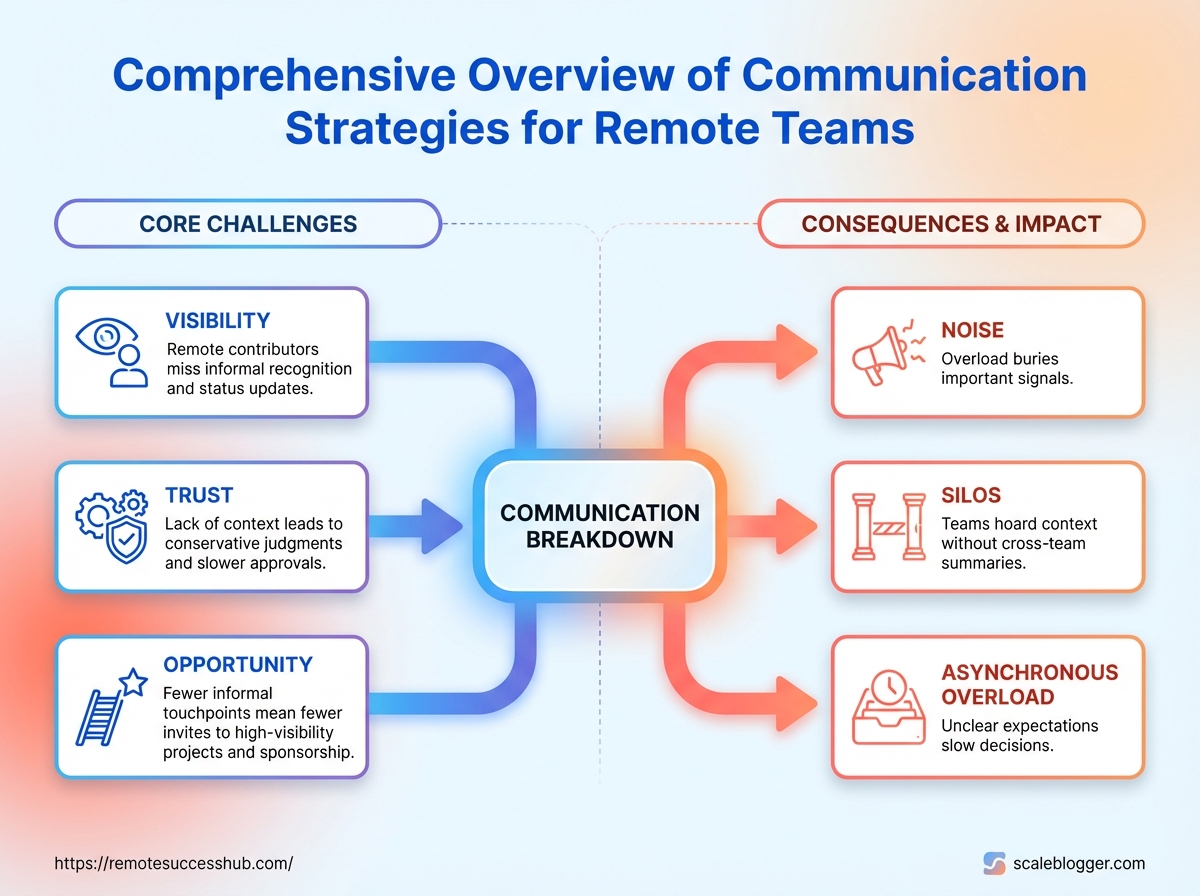
Remote work collapses the hallway into a chat thread, leading to the loss of informal visibility. Good work becomes invisible and relationships weaken, which isn’t just a minor annoyance — it erodes trust, stalls promotions, and shrinks opportunity over time.
While technology can help, it can also hide issues: teams rely on platforms like Slack for quick messaging and Zoom for face-to-face interaction. Surveys reveal that a significant portion of remote workers express a need for improved communication tools, a concern echoed by Gallup’s findings that link insufficient communication to declines in engagement. Establishing effective communication practices is crucial for maintaining team dynamics and ensuring everyone’s contributions are visible.
Foundational principles for effective remote communication
Clear communication shapes who gets noticed and who doesn’t in a remote team.
When messages are tidy, decisions are visible, and work is findable, people collaborate faster and reputations grow.
These three principles—Clarity, Intentionality, and Redundancy & Discoverability—are practical rules, not ideals.
Apply them to meetings, messages, and project artifacts to reduce rework and keep career-impacting contributions visible.
74% of remote workers reported a need for better communication tools in 2025, and 40% of employee engagement decline was tied to insufficient communication in remote teams (2025).
Sync vs. async: Real-time meetings vs. time-shifted work; choose based on urgency and decision type. Decision record: A dated, searchable note that explains what was decided, why, and who owns next steps. Discoverability: How easy it is for a future reader to find context, decisions, and outcomes in your tools.
Principle 1 — Clarity: expected outcomes, decision records, and headers
Clear expectations remove guesswork and email ping-pong.
Start messages and tickets with the expected outcome, timeline, and owner so recipients know what success looks like.
Bold outcome first: Begin messages with a one-line expected result and due date.
Decision record: Capture the who/what/why in a single line and link it to the related task or meeting notes.
Header conventions: Use standardized headers like
Decision:,Action:,Info:in subject lines or card titles.Use threads and cards: Keep discussion inside a Slack thread or Trello card so context stays attached to the work.
Decision logs make promotions easier because leaders can point to documented impact rather than memories.
Principle 2 — Intentionality: choosing sync vs. async based on cost and urgency
Not every question needs a meeting.
Match the communication channel to the cost of delay and the need for co-creation.
Urgent & collaborative → schedule a short Zoom call (video conferencing saw a 30% rise in daily users in 2025).
Complex but low-immediacy → async document plus comments on Trello or Slack thread.
Informational updates → single-line status updates in the project board.
Decisions that affect many → propose in async, then book a focused sync to resolve outstanding points.
A clear decision rule prevents overuse of meetings and respects time zones and deep work windows.
Principle 3 — Redundancy and discoverability: making work findable for career visibility
Visibility is not bragging; it’s record-keeping.
Duplicate final outputs in the place people search for work and keep a short summary for readers.
Searchable titles: Use consistent prefixes and dates in Trello cards and doc titles.
Cross-post final artifacts: Link a summary message in Slack to the Trello card and store attachments in the project folder.
Weekly visibility note: Send a brief thread summarizing wins and decisions so managers can spot impact.
Tag decisions: Add tags like
decision,blocked, orshipto make filtering easier.
When work is easy to find, managers and peers can attribute outcomes to the right people.
These three habits make remote communication reliable and promotable.
For templates, checklists, and decision-log examples, platforms like https://remotesuccesshub.com/ provide ready-to-use resources.
Tools and channel selection
Which channels you choose should make your work discoverable, not just audible.
Pick tools that map to the outcome you need: quick syncs, decision records, or visible progress.
The right mix reduces context switching and makes accomplishments easy to find.
Remote teams report persistent tool gaps: 74% of remote workers said they needed better communication tools in 2025, and inadequate tools contributed to a 40% decline in engagement that same year.
Video use also rose, with a roughly 30% increase in daily active users of video conferencing platforms in 2025.
Those trends mean tool choice isn’t optional — it shapes visibility, culture, and career momentum.
Start by matching channel to objective.
Use messaging for clarifying questions, project systems for task-level work, documentation for decisions and handoffs, and video for relationship-building and complex alignment.
Make every channel earn its place by asking what it stores, who can find it, and how it surfaces contributions during reviews.
Selecting the right mix: messaging, video, project systems, and documentation
Choose a primary channel for each workflow and limit redundancy.
Messaging for clarifications: fast replies, presence cues, and
searchable threadsfor transient conversations.Project systems for work status: task owners, due dates, and progress history live here.
Documentation for decisions: use editable pages that link to tickets and include version history.
Video for nuance and connection: reserve for kickoffs, deep problem solving, and onboarding.
Practical rule: if you need an audit trail or to show impact in a review, favor project systems or docs over ephemeral chat.
Choosing channels for career impact: amplifying achievements without over-sharing
Visibility matters, but noise dilutes it.
Post outcomes where your manager and peers already look, and summarize results rather than forwarding every message.
Post results where work lives: publish a 1–2 sentence outcome to the project board or wiki page.
Tag sparingly: mention stakeholders when action is required; avoid blanket pings.
Create a “Wins” doc: weekly entries that link to PRs, tickets, or demos — concise and evidence-based.
Use recorded video selectively:
Loomclips for demos save meeting time and create an artifact for reviews.
For examples and templates to decide channels by role, platforms like https://remotesuccesshub.com/ collect rubrics and posting templates.
Tool comparison table
Selecting the right mix: messaging, video, project systems, and documentation
Tool | Primary use-case | Best for (team size/type) | Visibility features (e.g., searchable threads, pinning, audit logs) | Integrations | When not to use |
|---|---|---|---|---|---|
Slack | Real-time messaging and threaded conversations | Small to large product teams that need quick async + sync chat | Searchable threads, channel pinning, message history, message retention controls | Google Drive, Jira, Zoom, GitHub, Zapier | When decisions need a durable record or legal audit trail |
Microsoft Teams | Unified chat + meetings + files for Microsoft ecosystems | Enterprise teams using Office 365 at scale | Channel threads, SharePoint file history, compliance/audit logs | Outlook, SharePoint, OneDrive, Planner, Power Automate | Lightweight, high-volume quick chat where speed matters over structure |
Formal announcements and external communication | Cross-company updates, external stakeholders, legal notices | Threaded conversations, labels/folders, archival search | Calendar, CRM, document links | Rapid back-and-forth or status updates that need a team-visible trail | |
Zoom | Synchronous video meetings, screenshare, webinars | Remote teams needing rich face-to-face interaction | Meeting recordings, transcripts (if enabled), meeting history | Calendar, Slack, Microsoft Teams, LMS platforms | Short clarifications that could be handled async |
Google Meet | Video meetings integrated with Google Workspace | Teams using Google Drive/Docs heavily | Meeting recordings (workspace tiers), calendar attachments | Google Calendar, Drive, Docs, Meet plugins | Small ad-hoc chats better suited to messaging |
Asana | Task and project tracking with timelines | Cross-functional teams managing milestones | Task history, comment threads, status fields | Slack, Google Drive, Jira, Zapier | Complex engineering workflows requiring deep issue tracking |
Jira | Issue and release tracking for engineering | Engineering teams and SREs with sprint processes | Audit logs, issue history, workflow states, permission controls | GitHub, Bitbucket, Confluence, Slack | Non-technical task tracking where simplicity is preferred |
Trello | Visual kanban for lightweight project work | Small teams, marketing, and design projects | Card activity logs, comments, labels, board search | Slack, Google Drive, Zapier, Power-Ups | Large projects needing strict reporting or compliance |
Notion | Flexible docs + lightweight databases for knowledge | Teams needing living documentation and embedded pages | Page history, comments, backlinks, search | Slack, Google Drive, Zapier, GitHub (community integrations) | Compliance-heavy records that require formal audit trails |
Confluence | Enterprise wiki for structured knowledge bases | Large orgs needing permissions and templates | Page versioning, page history, access controls | Jira, Bitbucket, Slack, Google Drive | Quick notes or informal ephemeral guides |
Google Docs | Collaborative document editing | Drafts, proposals, and shared editing across teams | Revision history, comments, suggested edits, search | Drive, Calendar, Slack, Add-ons | Complex long-term knowledge structure without indexes |
Loom | Short recorded video walkthroughs and demos | Async demos, design reviews, onboarding clips | Stored recordings with timestamps, viewer analytics | Slack, Google Drive, Notion embeds | Replacing live two-way conversations that need immediate interaction |
Choosing tools deliberately keeps accomplishments visible without creating noise.
Prefer systems that create links between work artifacts and people.
The comparison shows that no single tool solves every need.
Combine messaging, project tracking, documentation, and occasional video to make work findable and verifiable.
Pick a small set of primary channels and enforce simple posting rules so visibility supports careers instead of burying them in noise.
Structured meetings and recurring rituals
Meetings become valuable when they reliably solve the same small problems week after week.
When rituals are clear, work stays visible, decisions land where they belong, and people stop asking the same questions twice.
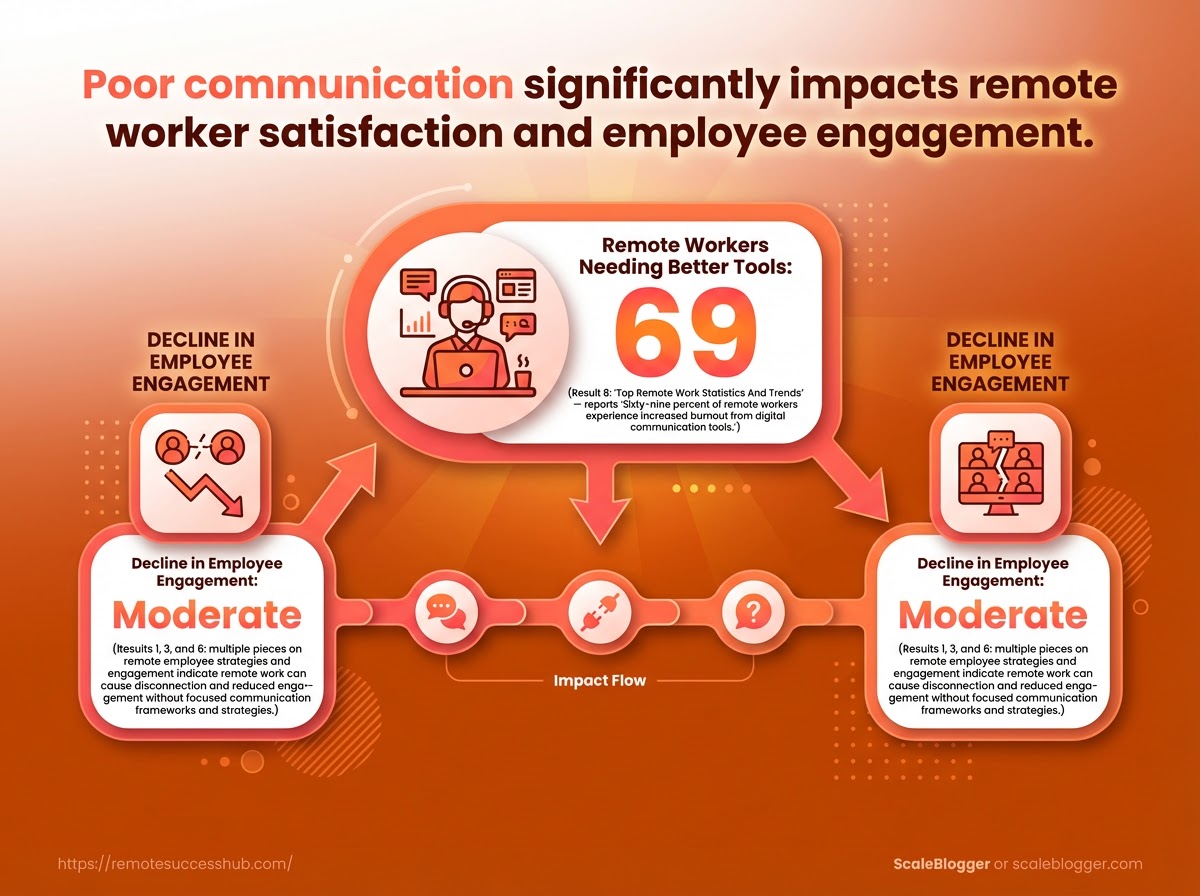
Remote teams still struggle: 74% of remote workers reported needing better communication tools in 2025, and Gallup found a 40% drop in engagement tied to weak communication that same year.
Regular, well-structured meetings are the simplest hedge against that decay.
A predictable meeting lifecycle—prep, focused agenda, captured decisions, and owned follow-up—turns time into momentum instead of noise.
This section gives templates, roles, and a hygiene checklist that make recurring meetings actually move work forward.
74% of remote workers reported needing better communication tools in 2025; Gallup also linked poor communication to a 40% decline in engagement that year.
Designing efficient syncs: agenda templates, time-boxing, and facilitation roles
A meeting that starts late, wanders, and ends without owners wastes more than time; it erodes trust.
Design every recurring sync with a clear lifecycle so outcomes are predictable and searchable.
The diagram above maps the meeting lifecycle: prep → agenda → decision capture → follow-up with owner and deadlines.
Use it to standardize handoffs and ensure meetings create traceable work.
Prep window: Share required reading and a 48-hour pre-meeting update in the thread so attendees arrive ready.
Focused agenda template: Start with (1–2 lines), then Decisions needed (explicit asks), then Blocked items and Quick wins.
Time-boxing: Assign exact minutes per agenda item and enforce a visible timer.
Facilitation roles: Rotate a facilitator, a timekeeper, and a scribe who captures decisions in the team board (like Trello).
Create one canonical agenda template and pin it to the meeting invite.
Publish meeting notes to your shared workspace after every sync.
Convert decisions into tasks with owners and due dates.
Meeting types that matter
One consistent weekly cadence covers most needs.
Use four meeting types and keep strict scopes. One-on-ones: A private sync for coaching, alignment, and career conversations.
Keep them 30–45 minutes and note at least one concrete outcome. Triage: Fast daily or twice-weekly checks to unblock urgent work and reassign capacity.
Keep it under 15 minutes. Planning: Longer sessions for sprint planning or roadmap review.
Use these to set priorities and capacity, not to debate every detail. Show-and-tell: Demo work in progress to build visibility and asynchronous feedback loops.
Make demos short and focused.
Meeting hygiene checklist for improved outcomes and visibility
Start with small, repeatable rules you can enforce.
Agenda posted: Always attach a structured agenda to the invite.
Prep required: Call out what to read or update before joining.
Decision capture: Scribe records the decision and the rationale.
Owner & deadline: Every action must have an owner and a due date.
Visibility: Notes live where work is tracked (e.g., Trello cards).
Time enforcement: End on time; if more time is needed, book a follow-up.
Rotate facilitator: Prevents one-person meeting fatigue.
For slide templates, agenda examples, and scribe checklists, consider platforms like https://remotesuccesshub.com/ as a central place to store reusable meeting assets.
Good rituals make remote work legible.
When meetings reliably produce owners, deadlines, and notes, the team spends more time doing and less time coordinating.
Async communication best practices
Async communication wins when messages are structured so recipients can act without chasing context.
Write subject lines that make outcomes searchable, open with a short TL;DR, and lead with the next action.
This minimizes follow-ups and keeps work visible across time zones.
Take an action-first approach: name the decision or request in the first sentence, add the context beneath, and finish with clear ownership and a deadline.
That pattern turns long threads into single-pass work and reduces the cognitive load of reconstructing prior conversations.
Human-readable signals matter.
Use bold for decisions, code-style tags for status (in-progress, blocked), and short bulleted lists for options.
Those small habits scale; they protect attention and cut the number of repeat clarifying messages.
Principles for effective async messages
Start every message with a single-line summary that answers: what needs to happen now? Follow with 1–3 short sentences of context and a clear who + when.
Keep attachments and links at the bottom so readers scan the action first.
Include a searchable subject line that includes the project and the verb, like: Payments — approve refund for invoice #1234.
That makes future retrieval easier in tools such as Slack or Trello and prevents work from disappearing into a feed.
Use TL;DR for longer updates, but keep it one sentence.
Prefer Decision: and Action: headings inside the body to mark outcomes.
This short screencast shows converting a chat thread into a tidy decision record and writing a single-pass async update.
Watch the example and pause at the shown template to copy phrasing.
Templates: status updates, decision records, escalation notes
Status update template (use weekly or sprint cadence):
Subject: Project — short verb + identifier
TL;DR: One-sentence status and next action.
Progress: 2–4 bullets with owner and percent complete.
Blockers: 1–2 bullets with required help and by whom.
Next steps / ETA: Owner + date.
Decision record template:
Subject: Decision — topic + date
Decision: Single declarative sentence (bold).
Options considered: 2–4 bullets with trade-offs.
Rationale: 1–3 sentences.
Owner / Implementation: Who does what and when.
Escalation note template:
Subject: Escalation — issue + severity
Impact: Who/what is affected and timeline.
Requested resolution: Specific ask and deadline.
Escalation path: Names and channels to contact.
These templates work across tools; mirror them in project boards (Trello) and in chat threads (Slack).
For a library of copy-ready templates, check platforms like https://remotesuccesshub.com/ for downloadable versions.
Managing notifications and boundaries to avoid context-switching burnout
Set predictable async-review windows: one block for deep work and two short checks for messages.
Protect a daily uninterrupted block for heads-down tasks.
Limit push notifications to high-priority channels only.
Mute low-value feeds and rely on summarized weekly digests where possible.
Use lightweight status signals: Auto-reply with ETA when out, Do-not-disturb on calendar events, and thread-only replies to keep channels tidy.
If escalation is needed, switch briefly to a targeted mention rather than an open channel blast.
A few disciplined habits eliminate most interruptions and preserve deep work time.
Small changes in how messages are written and routed create large gains in focus and follow-through.
Onboarding, documentation, and career visibility
New hires rarely fail for lack of skill.
They fail for lack of visibility and a clear path to contribute.
Remote teams must build onboarding that hands over both knowledge and the signals new people need to be noticed.
Start by treating onboarding as the first career-visibility project.
That means mapping tools, decisions, and early wins into a predictable sequence so a new hire can finish their first week with something demonstrable.
When onboarding is asynchronous and deliberate, it reduces churn and speeds up the time someone becomes a visible contributor.
Clarity matters more than completeness.
A short, well-structured onboarding flow will produce useful output faster than a long, messy doc that no one reads.
Asynchronous onboarding checklist: tools, knowledge transfers, and success milestones
Step | Owner | Outcome | Resources / Templates | Timeframe |
|---|---|---|---|---|
Account and access setup | IT / HR | New hire has SSO, email, Slack, Zoom, and repo access | IT access checklist; SSO guide; Slack channel list | Day 0–1 |
Team intro and role expectations | Hiring manager | Clear role priorities and 30/60/90 goals | Role expectation template; 1:1 schedule | Day 1 |
Workspace tour (where decisions live) | Documentation steward | New hire knows where to find policies, RFCs, and meeting notes | Documentation index (Notion/Confluence) | Day 1–3 |
First-week objectives | Team lead | Small, scoped tasks that produce visible output | First-week task board (Trello) | Week 1 |
Knowledge transfer sessions | Subject-matter experts | Recorded walkthroughs of key systems and architecture | Zoom recordings, annotated slides | Week 1–2 |
Documentation handoff | New hire + doc owner | Updated docs reflect what was learned; decisions noted | Doc update checklist; PR template | Week 2 |
Feedback loop and buddy check | Assigned buddy | Early blockers cleared; cultural fit assessed | Buddy checklist; Slack intro thread | Week 1–4 |
First 30-day showcase or demo | New hire + manager | Demonstrable project or improvement presented to team | 10-min demo template; recorded Zoom | Day 30 |
Career visibility log | New hire | Ongoing list of measurable accomplishments and impact | Achievement template (context → action → outcome) | Ongoing |
Review and promotion checkpoint | Manager | Alignment on skills, goals, and next projects | 30/60/90 review template; promotion rubric | Day 60–90 |
This checklist turns onboarding into a series of visible milestones rather than a pile of unread docs.
Aim to automate reminders for each step and store templates where the team already looks for decisions.
How to surface your work: documenting accomplishments, demo routines, and async showcases Make small demos routine.
Record a 5–10 minute Zoom walkthrough for each finished task and post it to the team channel with a 2-line summary and link to the PR or doc.
That creates searchable evidence and saves time on synchronous demos.
Use a simple accomplishment format and keep it next to your role goals. Context: What problem or goal you addressed. Action: What you did, briefly. Outcome: Measurable results or link to evidence.
Use Trello cards or a personal “career visibility” doc to collect these and update them weekly.
With 74% of remote workers reporting needs for better communication tools in 2025, these explicit artifacts substitute for hallway visibility.
Mentorship and peer-review loops that accelerate skill signals Mentorship needs structure to scale.
Pair each new hire with a buddy for day-to-day questions and a mentor for career goals.
Schedule a formal peer-review at weeks 2 and 6 focused on skills, not personality.
Establish a monthly peer-review rhythm with a short rubric and recorded feedback.
Require documented responses to feedback and one small follow-up project.
Use public praise channels in Slack for specific wins to amplify signals.
A consistent loop of mentoring, peer review, and public demos turns hidden work into trackable career momentum.
Tools such as Trello, Zoom, and Slack make these loops lightweight and repeatable, and templates on platforms like https://remotesuccesshub.com/ can speed setup. Visible wins early create longer careers.
Keep the process short, repeatable, and focused on evidence.
Measuring communication effectiveness
How do you know remote communication actually moves work forward? Measure outcomes, not message counts.
Focus on the signals that predict decisions, clarity, and career visibility: how fast teams resolve issues, how often decisions are recorded, and whether documentation actually answers future questions.
This matters because poor measurement hides problems until engagement drops.
In 2025, 74% of remote workers reported needing better communication tools, and surveys linked insufficient communication to a 40% decline in engagement that same year.
Tracking a small set of disciplined KPIs turns vague complaints into concrete fixes that leadership can act on.
The right metrics also create stories people can use for promotion conversations.
When engineers, PMs, or designers can point to reduced decision latency and documented impact, those numbers become career currency.
Key metrics and signals: response times, decision latency, and documentation coverage
KPI | Definition | How to measure | Suggested target/benchmark | Tools or reports to use |
|---|---|---|---|---|
Average response time (async channels) | Mean time between message sent and a substantive reply in async channels | Aggregate message timestamps across Slack/Teams channels by thread or channel | Target: < 24 hours for general channels; < 4 hours for priority channels | Slack analytics, Microsoft Teams reports, channel export |
Decision latency | Time from an identified issue to a documented decision (with owner & next step) | Track issue creation to decision entry in project boards or decision logs | Target: < 48–72 hours for non-blocking items; < 24 hours for blockers | Trello/Asana board history, Notion decision log, issue trackers |
Documentation coverage | % of active projects with an up-to-date decision log or runbook | Audit project list vs. existence of decision/deployment docs | Target: ≥ 85% coverage across active projects | Internal docs audit, Notion/Confluence usage reports |
Meeting utilization | Average hours spent in meetings per person per week | Calendar export aggregated by role/team | Target: 5–7 hours/person/week | Google/Outlook calendar exports, org analytics |
Visibility events per quarter | Number of demos, cross-team updates, or showcases per team | Count scheduled showcases and demo entries in calendar/project trackers | Target: 4–6 visibility events per quarter | Calendar reports, Trello cards, Slack announcements |
Thread resolution rate | % of message threads resolved without reverting to synchronous follow-up | Track threads marked resolved or with final decision/comment | Target: ≥ 90% resolved within 7 days | Slack thread analytics, custom labels, channel moderation reports |
Cross-team blocked time | Avg days tasks stay blocked due to external dependencies | Measure time in “Blocked” status on tasks across tools | Target: < 3 days | Trello/Asana workflow reports, dependency tracking |
Message clarity score | Average rating from pulse surveys on whether messages had enough context | Weekly or monthly micro-surveys after major async posts | Target: ≥ 4.0 / 5.0 | Office pulse tools, Slack integrations, Google Forms |
Escalation frequency | Number of unplanned escalations per team per month | Count issues bumped to leadership or emergency meetings | Target: ≤ 1 per team per month | Incident logs, calendar notes, Slack escalation channels |
Onboarding communication score | New-hire rating of communication clarity by week 4 | New-hire survey at day 14 and day 30 | Target: ≥ 8 / 10 by week 4 | HR LMS, onboarding surveys, Notion onboarding dashboards |
The table shows which signals to prioritize and where to pull the data.
Most sources live in Slack, calendar exports, and project tools like Trello, so start by automating those exports.
How to run a quarterly communication audit and present findings to leadership
A clear audit turns noisy anecdotes into a repeatable process.
Run the audit quarterly and align findings to business impact.
Gather exports: Pull Slack/Teams analytics, calendar exports, Trello/project reports, and docs index for the quarter.
Compute KPIs: Calculate the table metrics and highlight trends versus the last quarter.
Spot qualitative themes: Compile recurring feedback from pulse surveys and onboarding notes.
Map to outcomes: Link changes (e.g., decision latency down) to delivery metrics like sprint throughput or bug backlog.
Prepare a one-page brief: Use visuals—trend lines, a few callouts, and three recommended actions.
Present with requests: Share required resources (time, tooling, training) and an ask (e.g., owner for documentation initiative).
Deliver the one-page brief to leadership alongside a short demo of the data pipeline.
That makes the problem tangible and the fixes fundable.
Linking communication metrics to career outcomes
Quantitative communication work converts to promotion evidence when it’s documented and visible.
Metrics like ownership of decision logs, number of visibility events led, and reductions in decision latency can be cited in performance reviews.
Ownership counts: Track who opened and closed decision entries; present this as contribution evidence in reviews.
Visibility events led: Log demos and cross-team updates as achievements in career narratives.
Impact narratives: Pair metric improvements (e.g., blocked time ↓ 40%) with business outcomes (faster releases) in written summaries.
Imagine a product manager who reduces decision latency from 72 to 24 hours, documents every decision, and leads two cross-team demos per quarter.
Those actions create a measurable story that clearly supports promotion conversations.
For templates, audit checklists, and example dashboards, consult platforms like https://remotesuccesshub.com/.
Good measurement makes communication a career asset, not just background noise.
Governance, norms, and escalation paths
Remote teams need clear governance so everyday choices don’t turn into coordination debt.
A lightweight charter, simple channel rules, and predictable escalation paths stop confusion and protect focus.
Good norms make work discoverable and accountable without policing.
When people know where decisions live and how to raise urgent issues, visibility and trust rise — and engagement follows.
In 2025, 74% of remote workers still reported needing better communication tools, which often reflects missing norms rather than tool shortages.
Practical governance is less about rules and more about durable defaults that everyone can follow.
Creating team communication norms: charters, channel rules, and naming conventions
Start by writing a one-paragraph charter that answers three questions: why this team exists, how it decides, and how to escalate.
Keep it visible in the team wiki and link it in channel descriptions.
Set channel-level rules that match intent.
If a Slack channel is for async decisions, mark it as such and require a #decision thread before a change.
If Zoom is for paired design reviews, reserve pre-read links in the calendar invite.
Simple naming conventions reduce search friction.
Use these short examples for clarity: Charter: A two-sentence statement of purpose, decision authority, and review cadence. Channel rule: Channel intent plus response SLA (e.g., 48h async, urgent: @oncall). Naming convention: Project prefix + functional tag + item id (example: proj-payments/bug-4125).
Charter location: Store in the team wiki and pin the link in the team Slack channel.
Channel intent tag: Add intent to channel topic text.
Message subject format: Start long-form posts with
Decision:orFor review:.
Escalation playbook: when to escalate, to whom, and how to document the outcome
Define three escalation tiers: informal, manager, and leadership.
Describe triggers for each tier in one line.
Informal: unresolved after 48 hours or blocking a delivery milestone; escalate to peer lead with context.
Manager: cross-team impact, budget/legal implications, or unresolved after manager SLA; notify manager and schedule a 30-minute sync.
Leadership: strategic risk, regulatory exposure, or sustained customer impact; escalate through manager to exec sponsor within 24 hours.
Document every escalation using a short template in the issue tracker or Trello card: What → Who → When → Impact → Decision/Next steps.
Use Decision: as a tag so searches find outcomes.
Maintaining norms as the team scales: review cadence and ownership
Assign a norms owner — a rotating role.
That person runs quarterly reviews of channel usage, naming drift, and escalation logs.
Adopt a light review cadence: monthly spot-checks and a quarterly retro for norms changes.
Watch metrics like missed SLAs and duplicate channels; they signal friction.
With clear ownership and simple documentation, norms remain useful instead of becoming bureaucracy.
For additional templates and checklists, platforms like https://remotesuccesshub.com/ offer ready-made charters and playbooks.
Clear governance keeps signals useful and decisions findable.
That small investment pays back in fewer interruptions and steadier momentum.
Common implementation challenges and practical fixes
Most remote teams trip over the same three potholes: people resist new habits, tools multiply, and time zones collide.
These problems compound quickly — teams introduce a rule or a new app, adoption stalls, and the intended gains vanish.
That invisibility matters.
A 2025 Gallup analysis linked poor communication with a 40% decline in employee engagement, and in 2025, 74% of remote workers said they needed better communication tools to do their jobs.
Those numbers show urgency without pointing to a single technical fix.
Solve these issues with low-friction habits, clear retirement plans for tools, and explicit overlap windows for async handoffs.
The advice below uses familiar tools — Slack for lightweight discussion, Zoom for synchronous connection, and Trello for task handoffs — and focuses on behavior change rather than policing.
74% of remote workers in 2025 reported a need for better communication tools.
40% engagement decline in remote teams was attributed to insufficient communication in 2025.
Resistance to change: rolling out new habits without over-policing
Start with permission, not mandates.
Announce a short pilot, name success metrics, and let teams volunteer first.
That reduces pushback and surfaces practical blockers.
Start small: Run a two-week pilot with a single team and measurable outcomes (e.g., reduced follow-ups on a Trello card).
Model the behavior: Leaders and project leads must use the new habit in public channels (e.g., create meeting notes in
#project-docs).Feedback loop: Schedule a 30-minute retro at the pilot’s end and adopt only the fixes that reduce friction.
Tool sprawl and consolidation: when to retire channels and migrate discussions
Treat consolidation like a product migration.
You need a plan, a migration window, and a rollback option.
Don’t archive tools until three migration criteria are met.
Audit usage: collect 30 days of metrics (active users, messages, integrations).
Define migration owner: a single person responsible for the move and documentation.
Create a migration map: which Slack threads become Trello cards; which topics move to
#announcements.Run a 2-week overlap where both tools are writable and collect migration issues.
Archive with an index: link old threads to new Trello cards so context remains searchable.
Retire signals: low daily active users, duplicate functionality, or broken integrations.
Communicate timelines: post step-by-step migration instructions in the tool being retired.
Time zone complexity: scheduling patterns and asynchronous overlap windows
Global teams need predictable windows and clear handoffs, not constant compromise.
Identify a daily “overlap window” where core collaborators can sync, and make the rest async.
Define overlap: pick 60–120 minute windows that rotate weekly for fairness, and label them in calendar invites using
UTCoffsets.Async handoffs: end every async update with a clear next-step and an owning Trello card.
Rotate meeting times: prevent permanent night meetings for any one region by rotating who takes the early or late slot.
Video still matters for connection; a 30% increase in daily active users on video conferencing platforms in 2025 shows teams still rely on occasional synchronous touchpoints.
These fixes are practical and repeatable: pilot changes, migrate tools with care, and make overlap windows explicit.
Small, measurable steps beat sweeping rules every time.
Conclusion
Make communication a tool, not a traffic jam
Unread Slack threads and back-to-back calls are easy to blame, but the lasting fix is intentional design: pick channels for purpose, set clear norms, and make async the default when it preserves context.
That single shift — designing how conversations happen instead of letting them happen to you — was the throughline of every section of this piece.
Consider the meeting and ritual examples earlier: a short async status template paired with one weekly focused sync turns fragmented updates into searchable, actionable history.
Onboarding and documentation then become the amplifiers, not afterthoughts, so new hires and managers can see contribution and career visibility without interrupting teammates.
Start with one small, high-impact change today: create a one-page communication playbook that lists channel rules, one async template, your meeting cadence, and a single metric to watch.
Share it with your team before the next sprint and iterate from feedback; tools like Remote Success Hub can speed that work with templates and community examples.
Can your team ship that playbook by Friday?