
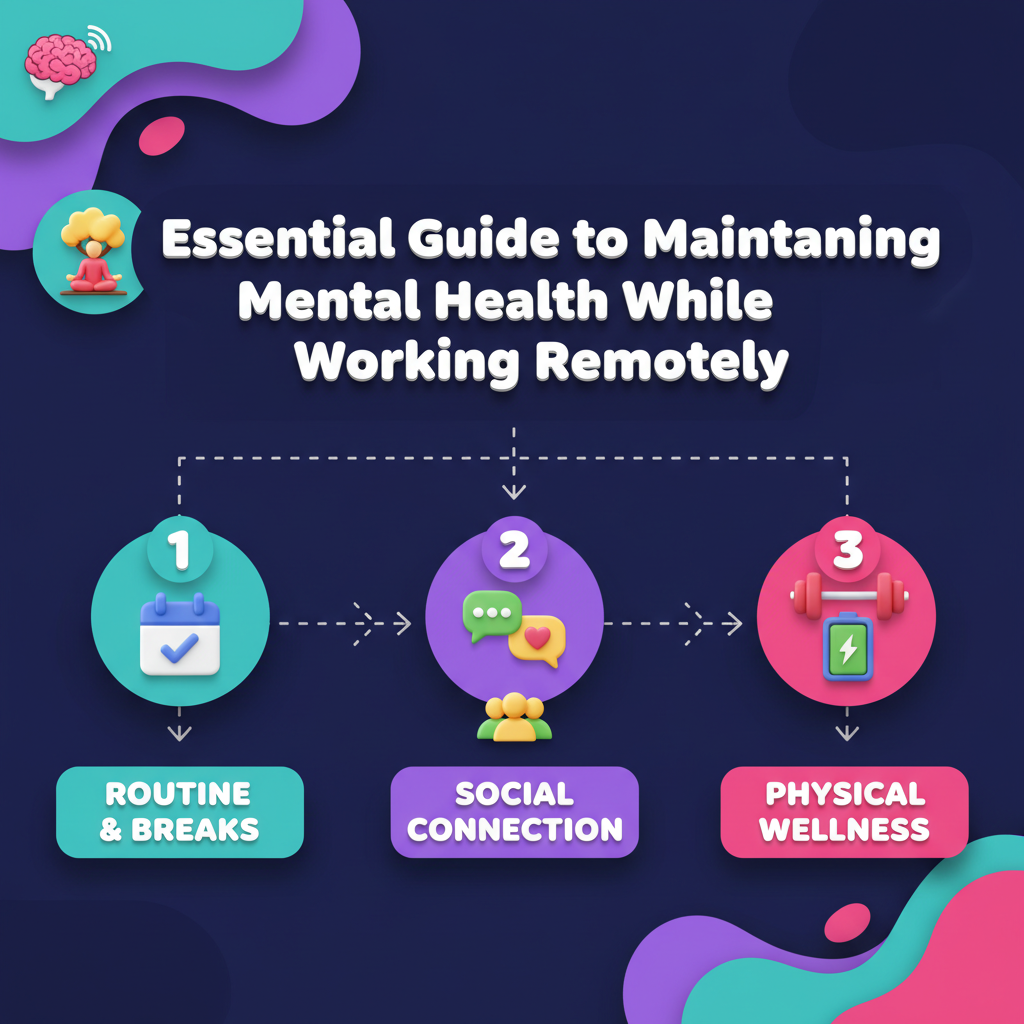
You close your laptop, wander into the kitchen, and answer one more message with a coffee in hand.
That tiny habit chips away at your boundaries and your mental health.
Remote work often looks like an inbox, not loneliness.
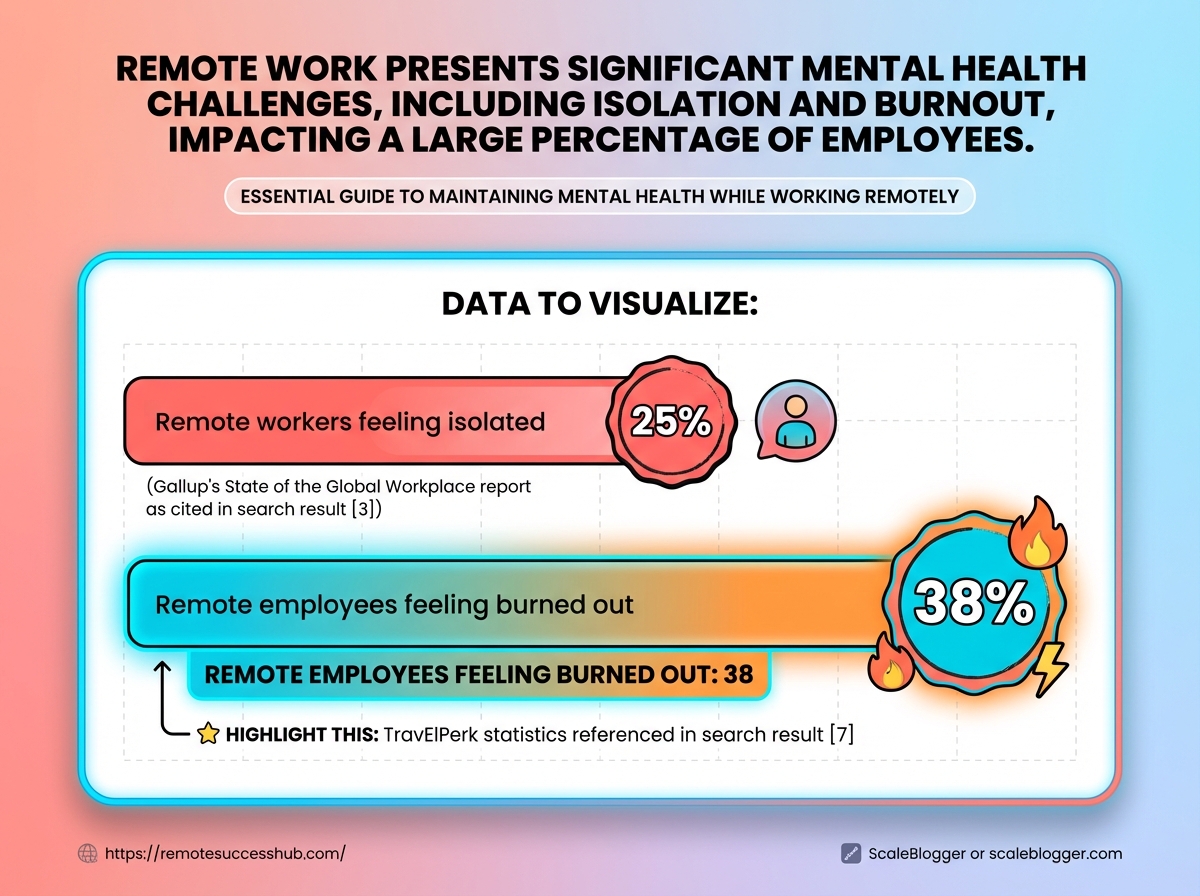
In a 2025 Buffer survey, 41% of remote workers reported feeling isolated, while a Gallup report noted that 67% report feeling burned out.
These pressures don’t require dramatic fixes.
Small changes to routines, clearer expectations, and better rituals around work time can repair your work-life balance.
Employers can help: companies offering flexible schedules report better mental health outcomes according to a 2026 PwC study.
Regular virtual socials…
The scope of the problem: why remote work impacts mental health
Sixty-seven percent of employees working remotely reported feeling burned out in a 2025 Gallup report.
That number is striking because burnout chips away at focus, creativity, and the small social moments that help careers move forward.
Remote work raises different pressures than the office.
The physical commute disappears, but boundaries blur.
Home distractions, back-to-back video meetings, and the need to signal availability create chronic low-level stress that accumulates over weeks and months.
Isolation is a separate problem.
A 2025 Buffer survey found 41% of remote workers feel isolated.
Isolation reduces informal feedback, shrinks sponsorship opportunities, and makes it easier for contributions to be overlooked.
A surprising statistic and what it means for your career
A single number can change how you plan your workweek.
When two-thirds of remote workers report burnout (Gallup, 2025), that suggests many high-performers are running on depleted reserves.
Burnout doesn’t just slow output; it lowers visibility.
People who are exhausted participate less in meetings, skip optional projects, and avoid networking.
The infographic visualizes the 67% burnout figure alongside three career-impact pathways: productivity, visibility, and promotion prospects.
It maps small daily behaviors to longer-term outcomes so readers can spot practical intervention points.
How remote-specific stressors differ from office stressors
Office stress often centers on commute, office politics, and face-to-face deadlines.
Remote stressors tend to be: fragmented attention from home life, relentless digital communication, and fewer spontaneous check-ins that surface problems early.
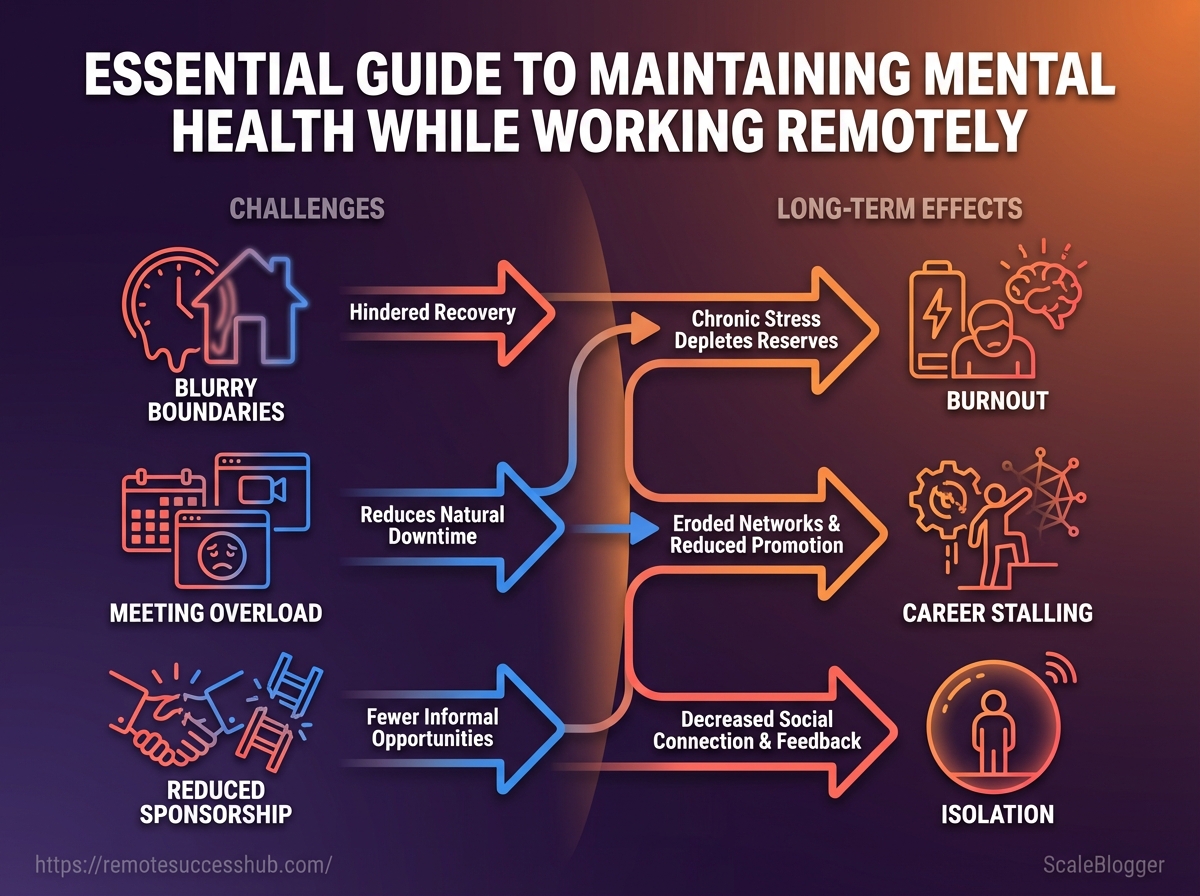
Blended boundaries: Work and home time overlap, making recovery harder.
Meeting overload: More meetings by video, with less natural downtime.
Reduced sponsorship: Casual hallway conversations that lead to promotions rarely happen.
Short-term vs long-term consequences for performance and advancement
Short-term effects are immediate: missed deadlines, muted participation, and strained team relationships.
Those problems are fixable with better routines or temporary workload changes.
Long-term effects are cumulative.
Chronic isolation or repeated burnout can stall career momentum, reduce promotion chances, and erode professional networks over years.
Organizations that offer mental-health support see better outcomes; tools like Headspace for stress management and Lyra Health for easier therapy access can help teams recover.
Microsoft found that regular virtual socials in 2025 reduced feelings of isolation for remote staff, and PwC’s 2026 work shows flexible schedules improve mental health outcomes. Takeaway: Remote work changes the risk profile for mental health.
Addressing it early preserves both day-to-day performance and long-term career progress.
Common mental health risks and how to recognize them early
Remote work makes some problems easier to miss because they show up slowly.
A 2025 survey by Buffer found 41% of remote workers felt isolated, and isolation often ripples into anxiety, sleep disruption, and mood changes before someone asks for help. Spotting risk early changes what comes next.
Small signs—skipping virtual socials, repeatedly missing deadlines, or snapping at a teammate—are signals, not personal failings.
Catching them early keeps situations from escalating into crises that need intensive treatment.
This section lists the conditions to watch for, offers a practical self-check table you can use right away, and shows how to bring those findings to a manager or HR contact without sounding alarmist.
Key conditions and common early symptoms
Isolation can look like fewer social messages, declining meeting camera use, or vanishing from informal channels.
Burnout often begins as persistent exhaustion, cynicism about work, and reduced accomplishment even when hours increase.
Anxiety shows as restlessness, racing thoughts, or sudden spikes of panic when presented with normal work tasks.
Depressive symptoms include low mood, loss of interest, slowed thinking, and changes in appetite or sleep. Cognitive fog appears as reduced concentration, missed details, and slower decision-making that harms productivity.
Other risks include increased substance use, physical complaints without clear medical cause, and boundary collapse where someone is always on-call. Organizations are already adding supports. Headspace has remote-focused stress programs, Lyra Health expands therapy access for distributed teams, and Zoom introduced casual ‘water cooler’ features to combat isolation.
Self-check indicators: quick screening questions to assess risk
Symptom/Sign | How it shows up in remote work | Immediate action (0–48 hrs) | When to seek professional help |
|---|---|---|---|
Social withdrawal | Stops joining team chats, declines non-essential calls | Reach out to one trusted colleague; schedule a brief check-in | If avoidance persists >2 weeks or worsens despite outreach |
Chronic fatigue or sleep changes | Napping during meetings, insomnia, daytime sleepiness | Pause non-critical tasks; log sleep patterns for 48 hrs | If sleep disruption affects daily functioning or PHQ/GAD screens positive |
Persistent low mood or loss of interest | No enthusiasm for projects previously enjoyed | Take short mental-health break; try a grounding exercise | If mood is low most days for 2+ weeks or PHQ-9 ≥10 |
Increased irritability or conflict | More terse messages, rising complaints from teammates | Flag the behavior privately; suggest a cooling-off period | If conflicts recur or escalate, refer to EAP or counselor |
Decreased productivity with cognitive fog | Missed deadlines, unclear writing, forgetfulness | Reduce meeting load; use task lists and time-blocks | If concentration doesn’t improve after basic interventions |
Panic attacks / acute anxiety | Sudden shortness of breath, inability to continue work | Move to a quieter space; use breathing techniques | If panic episodes recur or GAD-7 ≥10 |
Increased substance use | Reports of drinking to cope; smell or late starts | Have a nonjudgmental check-in; suggest employee support options | If use increases or impairs work safety |
Suicidal ideation / self-harm thoughts | Direct statements, alarming messages, drastic life changes | Ask directly about safety; stay with them via call and remove means | Immediate emergency services or urgent referral to mental health crisis team |
Physical symptoms (headaches, GI) | Frequent unexplained pain, frequent sick days | Encourage medical check; note stress correlation | If symptoms are chronic or linked with mood/functional decline |
Boundary collapse / always-on behavior | Late-night messages, no PTO use, rapid context-switch | Encourage time-off and | If sleep, relationships, or health suffer long-term |
The table maps common remote-work signs to immediate, practical steps.
Use it as a living checklist: check weekly and escalate when items repeat or combine.
For safety concerns—suicidal thoughts or imminent danger—activate emergency protocols immediately.
Quick self-check questions
Answer these honestly for a fast risk readout.
Sleep and energy: Have your sleep patterns or energy levels shifted significantly in the last two weeks?
Interest and mood: Have you stopped enjoying work or activities you used to like?
Concentration: Are you finding it hard to focus or make decisions at work?
Social contact: Have you intentionally avoided virtual social interactions or team chats?
Coping behaviors: Are you relying more on alcohol, medication, or substances to manage stress?
Safety: Have you had thoughts about harming yourself or not wanting to be alive?
How to use the checklist with managers or HR
Start conversations from observable facts, not judgments.
Prepare evidence: Share specific examples (dates, missed meetings, behavioral changes) and the checklist items that match them.
Frame needs: State what support would help—temporary workload reduction, EAP referral, or a flexible schedule.
Request follow-up: Ask for a scheduled check-in within 48–72 hours and agree on confidentiality boundaries.
Escalate when needed: If immediate safety concerns exist, ask HR to activate crisis support or EAP resources like Lyra Health.
Using the checklist keeps the focus on actions and safety rather than labels.
It makes conversations constructive and opens pathways to support for both the employee and the team.
Daily routines and habits that protect mental health and boost output
Ever finish a day that felt long but oddly unproductive? That happens when energy drains get ignored and focus is treated like an endless resource instead of something to steward.
A recovery-focused day treats attention and replenishment as part of the job.
Blocked deep work, predictable micro-breaks, and a morning ritual that signals the brain it’s time to turn on or off will stop stress from bleeding into every hour.
Combine those schedule choices with techniques that match natural physiology and simple sleep, movement, and food habits, and resilience rises while impulsive multitasking falls away.
Below are concrete, actionable steps and templates that make a predictable, humane day possible — plus quick tools to layer in (think Headspace for short meditations, employer programs like Lyra Health when therapy is needed, and Zoom for brief social check-ins).
Designing a recovery-focused daily schedule
Build the day around energy cycles, not calendar slots.
Start with a short morning ritual, move into long, protected focus blocks with micro-breaks, and end with a distinct shutdown routine that creates separation.
The visual shows a time-blocked sample: morning ritual, two 90-minute deep-work blocks, mid-day movement, an afternoon social check-in, and an evening shutdown routine.
Use it as a baseline and shift times to match personal chronotype.
How to use the template: try it for a week, note two hours when focus felt natural, then lock those as deep-work windows.
Swap the social check-in for a quick Zoom water-cooler if the team prefers informal connection.
Morning ritual: 10–20 minutes: light movement,
5–10minutes breathing or Headspace micro-meditation, and a brief priority list.First deep block: 90 minutes of single-task work with phone off and notifications muted.
Mid-morning micro-break: 10 minutes of walking or posture reset.
Midday recovery: 30–45 minutes for lunch and movement; avoid screens.
Second deep block: 60–90 minutes focused on a secondary priority.
Afternoon social check-in: 15 minutes on Zoom or async messages for connection.
Shutdown routine: 10 minutes to close tabs, set tomorrow’s top 3, and log off.
Productivity techniques aligned with wellbeing
Match methods to energy rather than forcing a single system.
The 25/5 Pomodoro works well for tasks needing frequent resets.
Longer, 90-minute ultradian blocks suit deep creative work.
Implement
25/5Pomodoro: set a timer for 25 minutes, then take 5; after four rounds take 20–30 minutes.Respect ultradian rhythm: schedule one or two
90-minutedeep sessions during peak energy; follow each with a substantive break.Single-tasking setup: close unrelated tabs, use site blockers, and write a single-intent headline for each work block.
Sleep, movement, and nutrition habits that support resilience
Quality sleep anchors mental health.
Aim for consistent sleep schedules and a wind-down routine without screens.
Consistent sleep window: go to bed and wake within the same
60-minute window daily.Movement pauses: short walks or mobility every 60–90 minutes to reset attention and lower tension.
Balanced mini-meals: pair protein with fiber at meals to avoid afternoon energy crashes.
Micro-recovery tools: use Headspace short sessions between blocks; leverage employer benefits like Lyra Health when persistent symptoms appear.
Small daily architecture beats heroic willpower.
Build rhythms that honor how the brain works and productivity becomes less about overdrive and more about sustainable focus.
Workspace ergonomics, boundaries and rituals
Good boundaries and deliberate rituals turn a noisy home into a predictable work environment.
Small, repeatable actions at the start and end of day reduce decision fatigue and protect mental energy for focused work.
Combine those rituals with an ergonomic setup and communication norms, and remote work stops feeling like a blur.
Physical comfort and predictable signals work together.
When your body is supported and your team knows your availability, attention becomes a renewable resource instead of a constant firefight.
The practical steps below show exactly what to change, when, and how to ask your manager to formalize them.
Start and end rituals and communication norms Begin the workday with a clear, short routine that signals “on” for your brain.
Close the door or put on a dedicated headset, update your status, and pick the single task to tackle first.
End the day by reversing that ritual: update status, record quick notes on progress, and store work items out of sight.
This physical separation helps the brain shift gears.
This clip demonstrates simple start/end rituals and provides status-message templates you can copy into Slack, Teams, or Zoom profiles.
Use the templates to make availability explicit without long explanations.
Practical start/end templates
Morning status:
Available — deep work until 10:30Midday update:
Back at 13:00 — reachable for quick syncsEnd-of-day:
Offline — tomorrow’s priorities posted in [doc]Do-not-disturb rule:
DND for focused work; urgent = callMeeting buffer:
No back-to-back meetings — 10-minute gap between calls
Ergonomic checklist for mental comfort and sustained focus
Item | Why it matters for mental health | Easy implementation (low-cost) | When to upgrade |
|---|---|---|---|
Chair and posture support | Reduces chronic pain that drains mood and concentration | Add lumbar pillow or rolled towel; adjust seat height | Replace when padding compresses or back support fails |
Monitor height and lighting | Prevents neck strain and eye fatigue, lowering irritability | Use books or a riser; position light to avoid glare | Upgrade to adjustable monitor arm and bias lighting |
Dedicated workspace vs multipurpose spaces | Clear physical cues improve boundary formation and reduce rumination | Use a corner, room divider, or even a dedicated chair | Move to a separate room when possible |
Headset for calls | Better audio reduces stress and cognitive load during meetings | Use wired earbuds with mic or a budget headset | Upgrade to noise-cancelling headset for heavy call loads |
Phone/notification management | Fewer interruptions protect deep work and emotional bandwidth | Use | Use a secondary work phone or unified notification tooling |
Desk height and keyboard position | Ergonomic reach limits fatigue and prevents wrist pain | Use a stack of books or a keyboard tray for angle | Invest in adjustable desk or ergonomic keyboard |
Footrest and leg support | Improves circulation and reduces discomfort-related distraction | Use a small box or cushion as a footrest | Buy a purpose-built footrest if sitting long hours |
Plants and natural light | Lowers stress and improves mood and cognitive recovery | Place a small plant and sit near a window when possible | Add daylight-mimicking lamps for low-light spaces |
Break schedule and movement | Regular movement prevents mental fog and decision paralysis | Use a 50/10 or 90/20 timer and quick walks | Consider wearable reminders or desk bike for heavy sitters |
Cable management/clutter | Visual clutter increases cognitive load and stress | Use simple clips and clean desk routine at day end | Upgrade to docking station and cable tray |
Standing option | Alternating posture reduces fatigue and improves alertness | Place laptop on a box for short standing periods | Invest in a height-adjustable desk |
The checklist pairs easy, low-cost fixes with clear upgrade triggers.
Start with small changes and treat upgrades as tools for sustained capacity, not instant solutions.
Policies and norms to propose to your manager or team Start with a short, written proposal that focuses on team outcomes and mental health benefits.
Keep asks specific and measurable.
Propose
meeting-free core hours(e.g., 10:00–12:00) to protect deep work and reduce context switching.Suggest a
no back-to-back meetingspolicy with mandatory 10-minute buffers between calls.Ask for a modest ergonomics stipend or one-time budget for chairs/headsets, with a simple reimbursement process.
Recommend standard status templates and an agreed
urgentsignal (call or explicit tag) to cut down on ambiguity.
These small policies reduce friction and create shared norms that protect attention and well-being.
Taking physical setup seriously and agreeing on communication rules makes remote work sustainable.
Tools, apps and services to support mental health and productivity
Most people find one tool rarely solves both focus and mental health.
Choose one app for attention, one for regular mindfulness, and an access path for professional help. That mix covers day-to-day focus, stress management, and escalation when you need a therapist or coach. Practical choices favor integrations and employer coverage.
Pick focus tools that tie into your task system, mindfulness apps with short, guided sessions, and teletherapy platforms that accept employer benefits or EAPs.
Those three decisions save time and reduce friction when stress peaks.
Below, find a compact comparison, guidance for discussing services with your employer, and low-cost alternatives that actually move the needle.
Comparing apps: focus, mindfulness, and teletherapy options
Tool/Service | Primary function | Best for (use case) | Price tier | Key limitation |
|---|---|---|---|---|
Forest | Gamified focus timer that grows virtual trees while you work | Reducing phone distractions during single-task work | Paid mobile app; optional subscription for sync | Desktop features and cross-device sync behind paywall |
Pomodone | Pomodoro timer with integrations to Trello/Asana | Teams that want timer + task integration | Freemium; Pro for integrations | Limited built-in mindfulness content |
Headspace | Guided meditations and short courses for stress and focus | Structured mindfulness and sleep routines; remote-work content | Subscription; employer/EAP partnerships available | Requires consistent use to see benefits |
Calm | Meditation, sleep stories, breathing exercises | Sleep support and anxiety reduction | Subscription | Fewer team-focused programs |
BetterHelp | Text/video counseling with licensed therapists | Flexible therapy without referral, asynchronous messaging | Subscription-based (weekly billing); often reimbursable via benefits | Therapist match can vary by region |
Cerebral | Integrated therapy and medication management | Combined therapy + prescriber access when appropriate | Subscription; employer/benefit pathways exist | Availability differs by location; intake timing varies |
Slack (features) | Team channels, huddles, custom statuses | Building social norms and async boundaries | Freemium; paid tiers for retention/apps | Can amplify noise if norms aren’t set |
Donut (Slack app) | Automates intros and recurring informal meetups | Regular virtual social connections | Freemium | Relies on team participation |
RescueTime | Passive productivity and wellbeing analytics | Personal attention data and limit-setting | Freemium; Premium subscription | Passive tracking raises privacy questions |
Toggl Track | Manual time tracking with focus reporting | Accountability and measuring deep-work sessions | Freemium; team plans paid | Requires discipline to start/stop timers |
RescueTime and Toggl are best when you want objective focus data.
Headspace and Calm suit daily habit-building.
BetterHelp and Cerebral work when flexibility and employer coverage matter.
Slack + Donut are practical for social connection at scale.
How to evaluate services with your employer
Start conversations with specific needs and benefits, not product names.
Ask HR how mental health services integrate with existing EAPs or benefits. Check coverage: Confirm whether teletherapy or subscriptions are reimbursable and if preauthorization is required. Ask about privacy: Verify whether usage is anonymized and what data the employer can see. Request pilot options: Propose a limited trial or stipend before company-wide rollouts. Clarify continuity: Ensure providers support your region and time zone. Leverage vendor partnerships: Mention Lyra Health as an example of an employer-centered mental health provider that companies often contract with. EAP: Employee Assistance Programs often include counseling, coaching, and referral services at no cost.
Low-cost and no-cost alternatives that still move the needle
Small, consistent habits beat expensive subscriptions when budget is tight.
Use built-in focus modes on phones, schedule 10-minute guided breathing breaks, and create a shared “water cooler” channel for brief social check-ins.
Free app tiers: Use free versions of Pomodone, RescueTime, or Headspace basics for routine practice.
Peer support: Rotate short peer-coaching sessions inside Slack or Zoom huddles.
Micro-routines: Short walking meetings and 5–10 minute mindfulness breaks restore energy fast.
Community resources: Explore platforms like https://remotesuccesshub.com/ for curated guides and tools for remote professionals.
Small choices add up — pick simple tools that integrate with your workflow and cover focus, calm, and access to care.
📥 Download: Download Template (PDF)
Building community, accountability, and access to help
Isolation in remote work is fixable with deliberate social design.
Small, predictable groups and clear escalation options replace accidental loneliness with dependable human contact.
That matters because regular, low-stakes connection prevents small problems from growing into crises.
Focus on creating micro-communities, peer-led accountability, and clear paths to professional support.
Micro-communities are interest- or role-based groups of 4–12 people that meet often and casually.
Accountability pods pair two to four people around specific goals and short check-ins.
Mentorship 1:1s combine career guidance with emotional support when mentors are trained to ask about workload and wellbeing.
Practical formats and escalation plans make these systems durable.
The advice below shows how to build each format, lead a mental-health-focused peer group, and create an escalation path to HR, EAPs, or clinical care without stigma.
This short video demonstrates three group templates: standing coffee chats, 20-minute accountability pods, and mentorship 1:1s.
Use the clips to mirror meeting lengths, prompts, and simple facilitation cues.
Practical formats that reduce isolation
Micro-community: Small interest or role-based clusters that meet biweekly for 30–45 minutes to share wins and pain points.
Accountability pod: Two-to-four people who set one-week goals and do three-minute check-ins three times a week.
Mentorship rotation: A structured 1:1 program where mentors commit to monthly conversations and topic prompts.
Virtual coworking: Scheduled coworking blocks with optional cameras on for 45–90 minutes to simulate office presence.
Peer coaching circle: Four peers trained in active listening rotate being the focus person for 20 minutes.
How to create and lead a mental-health-focused peer group
Choose a clear charter: define purpose, meeting cadence, confidentiality norms, and max size (6–10 people).
Recruit intentionally: invite a mix of roles and time zones, and limit membership to keep trust high.
Start with structure: use a 5–10 minute check-in, a 20-minute focus topic, and a 10-minute wrap with action items.
Facilitate with care: rotate facilitators, keep prompts non-clinical, and enforce the group’s confidentiality agreement.
Add simple training: 60–90 minute onboarding on active listening and sign-posting to resources.
Review quarterly: collect feedback, refresh norms, and close or spin off members who need different support.
Peer group: A recurring, employee-led gathering for mutual support and practical problem-solving. Micro-community: A small network bonded by role, project, or interest that meets regularly to reduce isolation.
Escalation paths: when and how to approach HR, EAPs, or professional care
Start with these red flags: escalating absenteeism, physical symptoms tied to work stress, sustained decline in quality, or clear talk of hopelessness.
Document dates, examples, and impact before escalating.
When approaching HR or an EAP, bring a concise note: observed behaviors, dates, attempted peer supports, and the employee’s stated needs (if consented).
Emphasize confidentiality and request next steps and timelines.
If your organization uses vendors like Lyra Health or Headspace for therapy or coaching, refer people directly and explain access steps.
For urgent risk (suicidal ideation, self-harm), follow local emergency protocols immediately and notify HR per policy.
Building reliable, low‑effort social structures and clear escalation channels turns remote work from a lonely grind into a supported practice.
Keep groups small, predictable, and practical — that continuity is what keeps people connected and safe.
Conclusion
Protect the tiny habit that protects your mental health
That one extra message in the kitchen isn’t just a bad habit — it’s the kind of small, repeated choice that slowly erodes focus and rest.
Routines, clear boundaries, and community accountability are the interventions that actually shift how remote work feels day to day.
From ergonomics and a reliable shutdown ritual to the peer check-ins described earlier, the most valuable change is consistency: tiny actions repeated until they become non-negotiable.
One concrete example from the guide: the “close-laptop” ritual paired with silent notifications reduced evening rumination and made sleep come easier for the case study participants.
Adding one person — a coworker, friend, or accountability buddy — amplified that effect faster than any app alone.
If curated routines or a supportive community would help, tools like Remote Success Hub can point you to practical templates and groups that fit your schedule.
Pick one micro-boundary to protect this week and treat it like a meeting on your calendar.
Tonight, set a 15-minute shutdown alarm and follow it: close your laptop, mute notifications, and move to another room — do that for seven nights and notice the difference.