

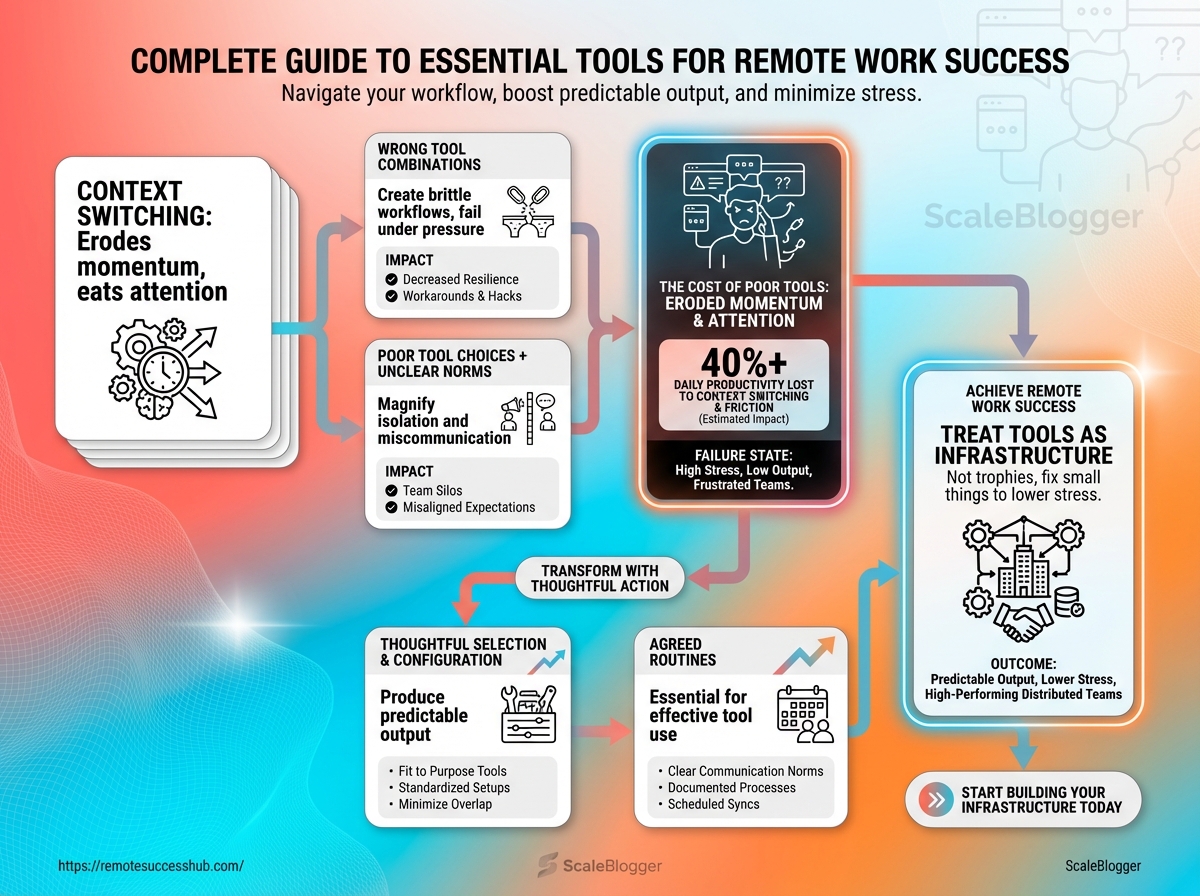
Two meetings, three message threads, and five tabs open: a morning like that erodes momentum.
That’s the real harm of context switching—it eats attention more than it eats calendar slots.
The right set of remote work tools can stop the leak.
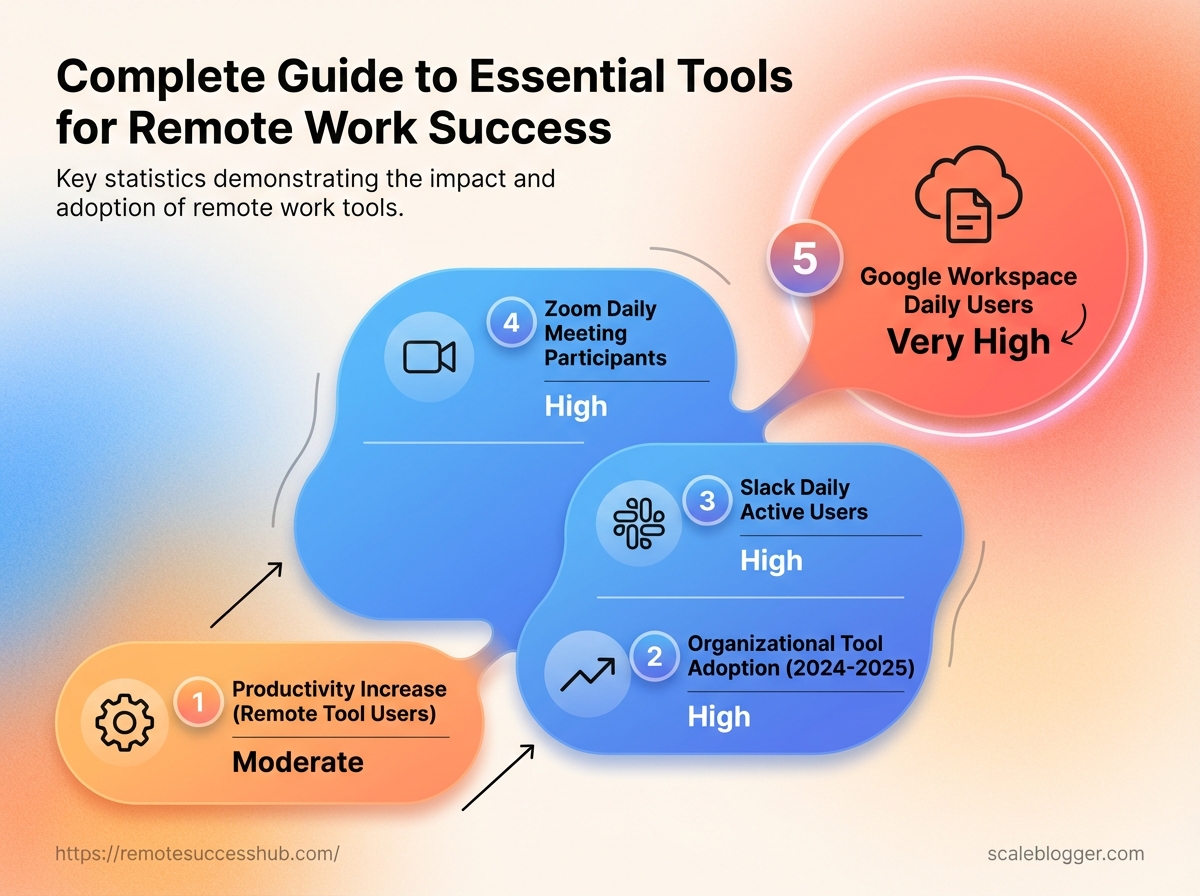
Forty-two percent of workers using remote work tools reported higher productivity in 2025.
Adoption is rapid: 58% of organizations adopted remote work tools between 2024 and 2025.
Most people assume more tools equal better workflows.
Reality shows the opposite; thoughtful selection, correct configuration, and agreed routines produce predictable output.
Worse, the wrong combinations create brittle workflows that fail under pressure.
Isolation and miscommunication are seldom technology problems alone.
They are habit problems magnified by poor tool choices and unclear norms.
Start by treating tools as infrastructure, not trophies.
Fixing small things frees hours and lowers stress.
Table of Contents
Core Categories: The Essential Toolset Every Remote Professional Needs
Top Recommended Tools by Category (Practical Picks and Why They Work)
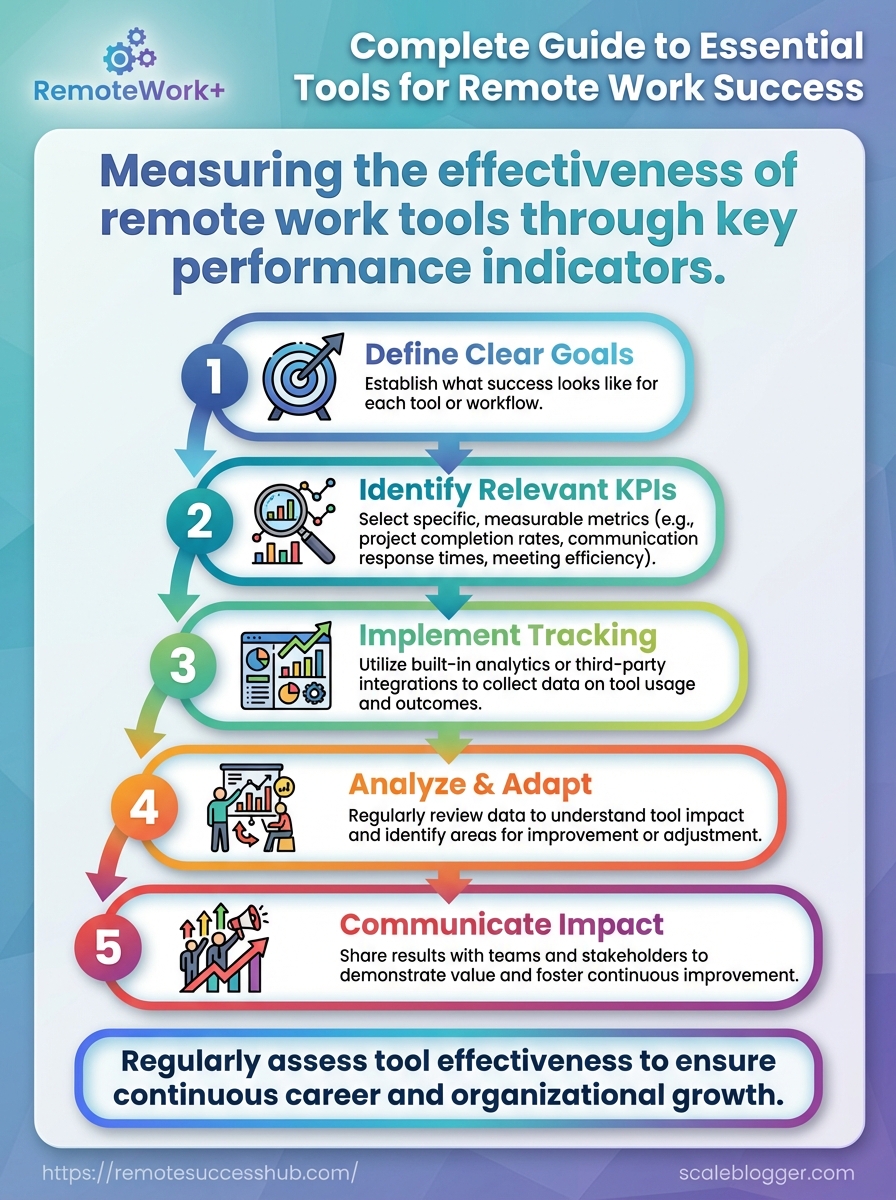
Measuring Effectiveness: KPIs and Signals That Tools Are Helping Your Career
Why the Right Tools Matter for Remote Career Growth
42% of remote workers who use dedicated remote-work tools report higher productivity (2025).
That number changes how managers measure impact and how colleagues notice contributions.
Tools shape the signal you send about reliability, output, and collaboration.
Adoption moved fast: 58% of organizations adopted remote work tools between 2024 and 2025.
With platforms like Slack (channels and integrations), Zoom for live collaboration, and Google Workspace for real-time document work, the baseline skills expected from remote employees now include tool fluency.
Slack had over 18 million daily active users in 2025, Zoom reported more than 300 million daily meeting participants in 2025, and Google Workspace surpassed 6 billion daily users across its apps in 2025.
Mastering these systems changes career trajectories because visibility becomes measurable.
Using boards in Trello or tasks in Asana creates a traceable history of impact.
Time-tracking and productivity tools like Toggl and Clockify let contributors translate work into metrics that influence raises and promotions.
Data-driven case for investing in remote tools
Organizations that invest in the right stack see faster alignment and clearer performance signals.
That makes promotions and cross-team opportunities less about hallway impressions and more about measurable outcomes.
The infographic links adoption and productivity stats to career outcomes.
It highlights tool user counts (Slack, Zoom, Google Workspace) and workforce metrics (42% productivity boost; 58% adoption 2024–2025).
Look for the section showing how tool-driven visibility maps to promotion likelihood.
Common remote-work pain points tools must solve
Communication: Frequent, clear updates across time zones to avoid context loss. Context switching: Centralized documentation so work doesn’t vanish in chat threads. Accountability: Traceable task ownership and status for fair performance reviews. Time tracking: Simple, non-invasive measures of focused work and output. Onboarding friction: Standardized templates and integrations to make new contributors productive fast.
How tools influence visibility, collaboration, and promotion opportunities
Tools make work visible.
When tasks and deliverables live in shared systems, managers can quantify contribution and cross-check claims.
Measurable outputs: Platforms like Asana and Trello turn tasks into audit trails that factor into reviews.
Async reputation: Clear messages in
channels(Slack) and documented decisions increase perceived reliability.Cross-team exposure: Using shared docs in Google Workspace or meetings on Zoom increases stakeholder visibility.
Time-quality signals: Toggl and Clockify provide evidence of focus and project effort.
Curated stacks: Platforms like https://remotesuccesshub.com/ help workers adopt balanced tool sets that highlight their strengths.
Investing a bit of time in the right tools pays off in clearer impact, fewer misunderstandings, and faster career moves.
Mastery of the toolstack is now part of professional signaling in remote work.
Core Categories: The Essential Toolset Every Remote Professional Needs
Remote work runs on a tight set of tool categories that replace the old office scaffolding.
Pick tools from each category that integrate smoothly with one another, and daily friction drops dramatically.
The right mix keeps communication clear, projects visible, documents synced, time tracked, and devices secure.
This section lists the core categories every remote professional should have in their toolkit and explains what each delivers in practice.
Examples use real, widely adopted products so you can map needs to concrete options.
Expect short guidance on purpose, common choices, and how to combine them.
Start here, then adapt.
Different teams will favor different brands, but the categories themselves are non-negotiable for sustained remote performance.
The diagram above maps how working documents, a centralized knowledge base, and project tools exchange information.
It shows read/write flows, notification triggers, and where approvals or handoffs typically occur.
Use that map to decide where single sources of truth must exist and where live links (not copies) should flow.
Communication & video conferencing: Slack-style channels and reliable video for async and live talk.
Project & task management: Boards, lists, and timelines to track ownership and progress.
Document collaboration & knowledge management: Shared docs, versioning, and a searchable wiki.
Time tracking, focus & productivity: Lightweight timers, distraction blockers, and planning tools.
Security, password management & device hygiene: Encryption, password vaults, and update policies.
Communication and video conferencing
Channels and synchronous meetings serve different rhythms of work.
Use channel-based chat for quick decisions and short status updates, and reserve video for planning, onboarding, and complex problem-solving.
Slack remains central for many teams (Slack reported over 18 million daily active users in 2025), while Zoom still handles high-volume meeting traffic (300 million daily meeting participants in 2025).
Project and task management
Projects fail without visible ownership. Tools like Trello saw a 50% rise in usage since 2024, reflecting how simple boards still solve messy handoffs.
Choose one system for assignment and timelines, and link tasks back to documents and calendar events.
Document collaboration and knowledge management
Centralizing knowledge reduces repeated questions.
Google Workspace surpassed 6 billion daily users across its apps in 2025, showing scalability for shared editing and storage.
Keep short operational docs in a wiki and living deliverables in shared docs.
Sync links rather than copying files.
Time tracking, focus, and productivity tools
Time tools turn vague work into measurable blocks.
Toggl grew subscriptions by 30% in 2025 as teams tracked billable and focus time.
Combine passive trackers for billing with active focus apps to protect deep work.
Security, password management, and device hygiene
Passwords and device updates are hygiene, not optional extras.
Use a password manager and enforce OS/app patching on every endpoint. Password manager: Use a vault to generate, store, and share credentials securely. Device hygiene: Keep automatic updates enabled and require disk encryption where possible.
These categories form the practical spine of any remote setup; fill them with tools that talk to each other and enforce consistent habits.
How to Choose Tools: Frameworks and Decision Criteria
Picking a tool starts with trade-offs, not features.
The tightest-fit tools solve the biggest pain points for the actual people using them — not the idealized org chart.
Good decisions come from a repeatable framework and a simple scoring practice teams can trust.
That keeps tool choices defensible when budgets tighten or workflows change.
This section gives a five-point framework you can apply quickly, a ready-to-use decision matrix, and clear guidance on when to standardize tools versus let people choose.
Use the matrix in meetings, vendor trials, or when you must replace a legacy app.
Five-point selection framework
Start with a short pilot that scores each candidate on these five dimensions.
Use the same rubric across tools so comparisons are apples-to-apples. Cost: Total cost of ownership* — include license fees, admin time, and training. Integrations: How well it links to your stack* — native connectors, Zapier, and open APIs matter. Scalability: Can it grow with you?* — multi-team support, workspace limits, and enterprise plans. UX: Adoption depends on ease-of-use* — onboarding time, mobile experience, and discoverability. Security: Compliance and controls* — SSO, 2FA, data residency, and audit logs.
Use 1–5 numeric scores per dimension and weight them by importance.
For example, give Security a higher weight for finance teams and UX more weight for heavy-collaboration teams.
Decision matrix template for team vs. individual needs
The table below is a checklist you can duplicate into a spreadsheet and customize weights or columns.
Decision matrix template
Tool Name | Cost Tier | Key Integrations | Ease of Use (1-5) | Security Rating | Best For (Individual/Team) | Notes |
|---|---|---|---|---|---|---|
Slack | Freemium / Paid | Google Workspace, Zoom, Zapier | 5 | High (SSO, EMM) | Team | Channels, strong third-party ecosystem; 18M DAU (2025) |
Notion | Freemium / Paid | Slack, Google Drive, Figma | 4 | Medium | Individual/Team | Flexible docs + databases; works for personal and team wikis |
Asana | Freemium / Paid | Slack, Google Workspace, Jira | 4 | High | Team | Workflow-focused PM; reported 40% growth (2025) |
1Password | Paid | SSO providers, Browser extensions | 5 | High (Zero-knowledge) | Individual/Team | Password vault with team admin controls |
Loom | Freemium / Paid | Slack, Google Workspace | 5 | Medium | Individual | Fast async video; helpful for onboarding and demos |
Trello | Freemium / Paid | Slack, Google Drive, Zapier | 5 | Medium | Individual/Team | Card-based PM; usage rose 50% since 2024 |
Zoom | Freemium / Paid | Google Calendar, Slack | 4 | Medium-High | Team | Ubiquitous meetings; 300M daily participants (2025) |
Google Workspace | Paid | Native suite integrations | 5 | High | Team | Docs, Drive, Calendar; broad platform adoption (2025) |
Toggl | Freemium / Paid | Asana, Trello, Slack | 4 | Medium | Individual/Team | Time tracking; subscription growth in 2025 |
Clockify | Freemium / Paid | Asana, Trello, Slack | 4 | Medium | Team | Widely used time tracker; strong free tier |
Microsoft Teams | Freemium / Paid | Microsoft 365, Zoom interop | 4 | High | Team | Deep Microsoft 365 integration; large enterprise footprint |
Miro | Freemium / Paid | Slack, Jira, Google Drive | 4 | Medium-High | Team | Visual collaboration and workshops |
The matrix above balances immediate usability with long-term operability.
Customize the Ease/Security scores after a 7–14 day pilot and average user feedback with admin reviews.
How to use the matrix (quick steps)
Assign weights for each of the five criteria based on team priorities.
Score each tool 1–5 per criterion after a pilot.
Multiply scores by weights and sum to get a comparative rank.
Validate the top choice with a 30-day rollout and measure adoption metrics.
When to standardize vs. allow personal choice
Standardize when you need predictability, security, or tight integrations across multiple teams. Central procurement reduces duplicative costs and simplifies compliance.
Allow personal choice when work is exploratory, teams have distinct workflows, or tool-fit is highly subjective.
Individual freedom speeds innovation and increases satisfaction.
Mix approaches by creating an approved baseline set of core tools and allowing a curated palette of optional apps.
That preserves control while respecting autonomy.
The simplest discipline: score decisions transparently and re-evaluate annually.
This keeps tool sprawl under control and gives people room to pick what actually helps them do better work.
Top Recommended Tools by Category (Practical Picks and Why They Work)
Forty-two percent of remote workers who use dedicated remote-work tools report higher productivity in 2025.
That single number explains why choosing a small set of reliable tools matters more than chasing every new app. This section names battle-tested picks across communication, project management, docs, time & focus, security, and visibility.
Each choice prioritizes low friction, strong integrations, and clear value for remote workflows.
Communication tools shine when they reduce meeting time and make async work easy.
Slack: Robust channel-based chat, rich integrations, and searchable history.
Pros: real-time and async balance; strong app ecosystem.
Cons: can become noisy without rules.
Zoom: High-quality video and webinar features that scale from 1:1s to large meetings.
Pros: reliable video with good recording tools.
Cons: meeting fatigue; requires discipline.
Microsoft Teams: Deep Microsoft 365 integration and enterprise controls (over 280 million MAUs in 2025).
Pros: best for orgs already on Microsoft stack.
Cons: heavier UI for small teams. Project management choices differ for solo contributors versus small teams.
Trello: Visual boards that are quick to adopt and flexible for solo workflows (usage rose 50% since 2024).
Pros: low friction, great for kanban-style tasks.
Cons: limited advanced reporting.
Asana: Structured workflows and timelines, useful for coordinating small teams (user base grew ~40% in 2025).
Pros: stronger task dependencies and tracking.
Cons: steeper setup than Trello.
Notion: Hybrid workspace that combines docs, simple databases, and lightweight PM.
Pros: highly customizable knowledge + tasks.
Cons: requires templates to scale.
Document collaboration and knowledge bases must scale with team knowledge.
Google Workspace: Real-time docs, sheets, and Drive collaboration (surpassed 6 billion daily users in 2025).
Pros: instant collaboration, strong search. Cons: permissions can get messy at scale.
Confluence: Structured knowledge base for documented processes and playbooks.
Pros: built for team documentation. Cons: less flexible than free-form tools.
Notion: Great for living docs and internal templates that link to tasks.
Pros: single source for notes + lightweight KB.
Cons: search and export limitations.
Time management and focus apps help protect deep work time.
Compare top options below.
Best time management & focus apps
App | Free Tier | Price (monthly) | Key Feature | Platform (Web/Mobile/Desktop) | Best For |
|---|---|---|---|---|---|
RescueTime | Yes | Freemium, paid plans available | Automatic activity tracking and distraction reports | Web/Mac/Windows/Android | Users who want passive analytics |
WakaTime | Yes | Freemium, paid plans available | Developer-focused coding activity metrics | Web/Plugins/Desktop | Developers tracking coding time |
Forest | Yes | Paid app, one-time or subscription options | Gamified focus with tree-growing mechanic | iOS/Android/Chrome | People who benefit from visual rewards |
Focus@Will | No | Subscription-based | Scientifically curated focus music channels | Web/iOS/Android | Users who focus better with music |
Toggl Track | Yes | Freemium, paid plans available | Manual + automatic time tracking with reports | Web/Mobile/Desktop | Freelancers and consultants |
Clockify | Yes | Freemium, paid plans available | Unlimited time tracking for teams | Web/Mobile/Desktop | Teams needing free multi-user tracking |
Strict Workflow | Yes | Free (Chrome extension) | Pomodoro timer + site blocker | Chrome extension | Users wanting a simple Pomodoro blocker |
Pomodone | Yes | Freemium | Integrates Pomodoro with task apps | Web/Desktop/Mobile | Users combining tasks and Pomodoro |
Be Focused | Yes | Paid upgrades | Simple Pomodoro timer for macOS/iOS | macOS/iOS | Apple users preferring native apps |
Freedom | Yes | Paid subscription | Cross-device site and app blocking | Web/Mac/Windows/iOS/Android | Users blocking distracting sites across devices |
The table groups passive trackers (RescueTime, WakaTime), gamified focus tools (Forest), and strict blockers (Freedom, Strict Workflow).
Choose one passive tracker plus one active blocker or Pomodoro app for balanced coverage.
Security and password management deserve a simple, central approach.
Bitwarden: Open-source, affordable team vaults with cross-device sync.
Pros: transparent security model; strong value.
Cons: UI is functional but not flashy.
1Password: Polished UX, great team controls, strong filling integrations.
Pros: excellent UX and enterprise features. Cons: paid-only for most teams.
LastPass: Familiar for many teams; options vary by plan.
Pros: wide adoption.
Cons: past security incidents require careful policy use.
Tools for professional visibility include portfolios, async video, and personal analytics.
The visual maps tools by external visibility (portfolios) versus internal influence (analytics, async updates).
Use portfolios to show outcome work and async video to amplify reach within and outside teams. Pick a small, interoperable stack.
Use the time & focus table to match your rhythm, then lock down security with a single password manager.
Workflows and Templates: Putting Tools into Practice
Zoom recorded over 300 million daily meeting participants in 2025, which makes meeting hygiene and repeatable workflows more than convenience — they prevent chaos.
Routines and templates turn tools into reliable muscle memory so teams stop reinventing coordination on every task.
Design workflows that map tools to outcomes, not the other way around.
That means a daily checklist for focused work, a weekly sync for alignment, and templates that remove ambiguity from handoffs.
Daily and weekly routines keep momentum.
Morning sync (daily): Quick status posts in
#daily-standupon Slack; update today’s Trello cards; track deep work inClockify.Afternoon wrap (daily): Block 30 minutes for email and async replies in Google Workspace; log time in
TogglorClockify.Weekly planning (weekly): Use Asana or Trello for sprint planning; 30-minute team triage on Zoom for blockers.
Review and retrospective (weekly): Rotate a written retro in Google Docs and a 45-minute Zoom to align decisions.
Onboarding template for new remote teammates
Onboarding Step | Responsible | Tool | Estimated Time | Outcome / Checkpoint |
|---|---|---|---|---|
Welcome email + paperwork | HR | Google Workspace (Gmail, Docs) | 30 min | Signed forms; welcome pack delivered |
Account setup (company email) | IT Admin | Google Workspace | 45 min | Email active; access to Drive |
Communication accounts | IT Admin / Hiring Manager | Slack | 20 min | Slack account in team channels |
Project board access | Team Lead | Trello / Asana | 30 min | Assigned to initial boards/cards |
Device provisioning | IT Admin | Company MDM / Zoom | 2 hours | Laptop configured; Zoom installed |
Access permissions | IT Admin | SSO / Google Admin | 30 min | Permissions validated for apps |
Knowledge base tour | Knowledge Manager | Google Drive / Confluence | 45 min | Bookmark key docs; first doc edited |
Tools training session | Trainer | Slack, Trello, Zoom, Google Docs | 90 min | Completed hands-on tasks |
Security & 2FA setup | Security Officer | Authenticator app / Google Workspace | 20 min | 2FA enabled; security checklist passed |
First-week goals & buddy intro | Hiring Manager | Trello / Slack | 60 min | 3 measurable goals; buddy assigned |
30-day check-in | Hiring Manager | Zoom | 30 min | Progress review; plan adjustments |
Onboarding that maps steps to owners and outcomes prevents slow starts.
Each item above expects a tangible checkpoint so new hires and managers know when to move forward.
Treat the table as a living checklist and attach it to the new hire’s Trello card.
Async collaboration playbook (messaging, handoffs, review cycles)
Start short: prefer a 2-line headline, 1-2 context sentences, and an explicit ask or decision deadline.
Message format: Bold headline, one-sentence context, bullet of action,
@assigneeand deadline.Handoffs: Create a Trello card with current state, blockers, and attachments in Google Drive.
Review cycles: Use Loom or Google Drive comments for demos; reviewers leave timestamped notes within 48 hours.
Escalation rule: If unresolved after 72 hours, schedule a 15-minute Zoom with relevant stakeholders.
Archival: Move completed cards to a
Donelist and tag the release notes in Google Docs.
Status update: Daily one-paragraph post in #status — What I did; What I’m doing; Blockers (if any).
Include links to Trello cards. Meeting agenda: Title, objective, timebox, 3 topics with owners, pre-reads linked, desired outcome for each item. Async demo script: Start with 30-second TL;DR, list features shown with timestamps, link to recording (Loom/Drive), and specific feedback questions with a 72-hour review deadline.
Repeatable habits make tools earn their keep. Templates and clear owners save hours and reduce friction across distributed teams.
Measuring Effectiveness: KPIs and Signals That Tools Are Helping Your Career
If tools are working, your career metrics should change in predictable ways.
Look for improvements in output, fewer friction points in daily work, and clearer signals from stakeholders that your impact is rising.
Measure both hard numbers and soft signals.
Quantitative KPIs show the operational lift tools provide.
Qualitative signals show whether that lift is translating into visibility, influence, and promotion-readiness.
What to track: KPIs for individual remote professionals
Start with metrics you control and can report reliably.
These KPIs map directly to career conversations and performance reviews.
Output quality: Number of completed projects or deliverables with stakeholder ratings.
Cycle time: Average time from task start to completion.
Focus hours: Weekly uninterrupted deep-work hours (tracked with
time-blocktools).Meeting ROI: Percentage of meetings with clear decisions or next actions.
Stakeholder response time: Average time to receive feedback on deliverables.
Skill-up velocity: Certifications, courses, or new responsibilities accepted per quarter.
Qualitative signals that matter
Visibility and feedback often predict promotions more reliably than raw output.
Read these signals as early indicators of career momentum. Visibility: Presence in cross-team projects, invitations to speak, or being asked for advice. Stakeholder feedback: Direct praise in 1:1s, written recognition, or recurring requests from managers. Promotion-readiness: Assigned stretch goals, roadmap input, or ownership of high-visibility outcomes.
How to run a quarterly tool audit
Treat this like a small business review of your personal stack.
A tidy audit frees budget, reduces cognitive load, and surfaces new automation opportunities.
Inventory every app and subscription you used in the quarter.
Note cost, monthly active use, and last-used date.
Map each tool to a specific outcome (e.g.,
calendar→ focus hours).Remove duplicates.
Measure usage against KPIs: did this tool reduce cycle time or increase visibility?
Ask three stakeholders for one-sentence feedback on tools that affect them.
Record responses.
Consolidate, cancel, or negotiate subscriptions; replace low-value tools with integrations or automations.
Set a follow-up action list and recheck in 90 days.
This short walkthrough shows a live audit workflow and subscription pruning tips.
Watch it before your next quarterly review to speed up the process.
A few minutes each quarter spent measuring and pruning tools pays off in clearer results and stronger career conversations.
Tools should shrink your overhead, not add to it.
📥 Download: Download Template (PDF)
Cost Optimization and Vendor Management
Vendor sprawl is the silent budget leak for remote teams. Subscriptions pile up—many unused, some redundant—and the cost compounds faster than people notice.
Start by treating your toolset like a portfolio.
Rationalize based on active seats, overlap, and measurable outcomes rather than feature checklists.
That mindset turns vague cost-cutting into targeted decisions that keep productivity intact.
Negotiation is not just about price.
It’s about payment cadence, support SLAs, seat flexibility, and exit terms. Those contract elements often determine true total cost of ownership more than sticker price.
Consolidation and negotiating team pricing
Consolidation begins with an audit that maps who uses what and why.
Run a 30–60 day usage review to find inactive seats, duplicate capabilities, and shadow IT.
Audit first: Collect seat counts, renewal dates, and integration maps for each vendor.
Rightsize seats: Convert rarely used seats to floating licenses or lower tiers.
Bundle leverage: Combine multiple teams into a single contract to unlock tiered discounts.
Annual vs monthly: Ask for annual pricing with a mid-year headcount adjustment clause.
Negotiation levers: Trade promotional placement, case studies, or longer commitments for lower rates or added seats.
Open-source and low-cost alternatives that scale
Open-source options remove licensing overhead but require ops and support planning.
Self-hosting shifts cost from recurring fees to predictable infrastructure and maintenance.
Self-hosted chat: Mattermost or Element for teams needing channel-based chat and data control.
Project boards: Focalboard or self-hosted Kanban for Trello-like workflows without per-seat costs.
Video options: Jitsi for low-cost meetings; pair with a managed recording service if compliance matters.
Time tracking:
ClockifyandToggloffer low-cost tiers and can scale before moving to enterprise plans.
When choosing an alternative, quantify support burden: allow 20–40% of the SaaS savings for ops during the first year.
58% of organizations adopted remote work tools between 2024 and 2025, which makes vendor rationalization a near-term priority for many teams (2025).
Security and compliance cost considerations for contractors and freelancers
Start contracts with minimum security clauses and clear data handling rules.
Contractors should follow the same least-privilege and encryption rules as full-time staff.
Include data classification and permitted tools in the SOW.
Require
MFAand device hygiene checks before granting access.Use scoped, time-limited credentials and audit logs for third-party access.
Budget for periodic compliance reviews or SOC2 readiness if handling sensitive data.
Offer a small stipend for secure tooling (VPN, password manager) instead of forcing expensive vendor tools.
Keeping contractors compliant often costs less than the exposure from a single breach. Vendor consolidation and smart alternative selection reduce headline spend; enforcing security for all users protects that saving and preserves reputation.
Community, Support, and Continuous Learning Resources
58% of organizations adopted remote-work tools between 2024 and 2025, and that rapid shift created more active communities, peer mentorship, and structured learning paths for remote professionals.
Those networks are where opportunities, referrals, and informal training often appear first.
Join a few high-signal communities and combine them with credentialed learning to keep skills current.
Pair that with a small accountability circle and the tools covered earlier, and the daily grind becomes a deliberate career engine rather than a reactive sprint.
Where to find remote-work communities and mentorship
Start by finding communities that match your role and rhythm.
Look for active discussion, regular events, and visible member success stories rather than sheer size.
Niche Slack/Discord communities: search role- or industry-specific workspaces for focused help and job leads.
LinkedIn groups and creator circles: use strategic commenting and targeted followings to surface mentors.
Professional associations: many offer mentorship programs and portfolio reviews for members.
Peer mentorship platforms: look for structured one-to-one mentoring with short commitments.
Platforms like https://remotesuccesshub.com/: community-led groups that combine job resources with practical tips from remote workers.
Continuing education: courses, certifications, and micro-credentials
Map learning to specific outcomes: better portfolio, a promotion, or a new role.
Choose short, verifiable credentials that show measurable competency rather than long, generic certificates.
The visual above plots three lanes: community platforms (where you network), learning providers (where you gain credentials), and networking groups (where you find mentors).
Use it to decide which lane needs your next investment. Micro-credential: A short, skills-focused certificate tied to demonstrable work or assessments. Stackable certification: Several micro-credentials that combine into a recognized certification. CPD-style course: Continuous Professional Development courses aimed at steady skill maintenance.
How to build an accountability circle using the tools in this guide
Start small and instrument your progress with tools you already use.
Keep meetings brief, outcome-focused, and tied to measurable signals.
Invite 3–5 peers: pick people at adjacent career levels who can both give and take feedback.
Set a cadence: weekly 30-minute check-ins with one clear agenda item each.
Use shared boards: create a
Trelloor shared doc for commitments and proof-of-work.Measure signals: track one metric per member (deliverable shipped, interview done, course completed).
Rotate accountability roles: rotate facilitator and reviewer to keep energy and fairness high.
Building a community and continuous learning habit is a career multiplier.
Small, consistent inputs—mentorship, targeted credentials, and a tight accountability circle—compound faster than intermittent bursts of effort.
Conclusion
Protect Your Attention, Not Your App Count
Tools only matter when they preserve attention, not when they add noise.
Remember the morning with two meetings, three message threads, and five tabs — that’s not busyness, it’s fragmentation, and it’s the single biggest drain on career momentum.
Choosing fewer, better-integrated tools changes daily output more than adding another app to the pile.
Practical workflows, templates, and measurable KPIs convert tool choices into visible career progress.
Tracking one simple metric—weekly deep-focus hours or time-to-complete-priority—shows whether a change is helping or just creating overhead; tools like Remote Success Hub can supply templates and community feedback to get started.
Community input and vendor pruning, plus routine cost-and-usage reviews, keep the stack lean and aligned with goals.
Do a quick experiment right now: spend 15 minutes on a tool triage — list every open app or tab, then keep, merge, or remove each.
Run that setup for a week while measuring your chosen KPI and compare the difference in uninterrupted focus.
Which single habit will you disrupt today to reclaim your best work?